
CMCS solutions for PMWEB
Solutions we have built to extend what PMWEB can do.
Beyond configuration, CMCS has developed solutions on PMWEB for specific client needs, from extended e-procurement to land sales and stage-gate management, and moves owners from Oracle Aconex and Oracle Unifier to PMWEB. Our new offerings are askAIRO, which brings AI answers from PMWEB and your ERP to the PMWEB you already run, and Labo, a browser-based BIM viewer whose comments and markups become PMWEB records. Each was built for one client and can be delivered to others, extending the use of the PMIS across more of the business.
Every solution runs on, or connects directly to, PMWEB, so its data stays in the system of record and under the same security, workflows and audit trail. Each is configured to the new client's processes rather than rebuilt.

New New CMCS offering · Data talks, insights follow
askAIRO for PMWEB: AI answers from the PMWEB and ERP you already run.
askAIRO gives your leaders and project teams an AI assistant that answers business questions from PMWEB and your ERP, in plain language and in seconds. It works with PMWEB hosted on your own servers or in the cloud, on the PMWEB version you run today, and nothing inside PMWEB is changed.
On your servers
Works with PMWEB hosted on-premises by the client, fully inside your network, or in the cloud if you prefer.
PMWEB + ERP
One answer across project and finance data.
Read-only
Never changes data. Users see only what they are allowed to see.
Any LLM, or no LLM costs
Use the language model of your choice, or your own GPU server and pay no LLM costs, ever.
Plain-language questions
Questions on live PMWEB data, answered with the source records cited.
Key terms, obligations and dates
From contracts, RFIs and correspondence held in PMWEB.
Tables and summaries on request
With scheduled delivery as an option.
Early sight of overruns and delays
Overruns, ageing change orders, overdue RFIs and unpaid invoices.
One reconciled answer
Budgets, commitments, invoices and payments from PMWEB and the ERP in one answer.
What is pending, and with whom
Open workflow steps, who holds them and for how long.
- What have we paid against Terminal B versus budget?
- Which projects are forecasting over budget this quarter?
- List open change orders above AED 500,000 and who they wait on.
- What does the contract say about liquidated damages?
- Which RFIs are older than 14 days with no response?
- Compare committed cost with invoices posted in the ERP.
- Ask. A user types a question in plain language.
- Retrieve. Read-only connectors fetch the data from PMWEB and the ERP, as that user.
- Answer. A clear answer in seconds, with the source records cited.
Built on the Model Context Protocol (MCP), the open standard that connects AI models to business systems, much as an API does. The connectors use PMWEB's API and web services, or a read-only reporting view where needed. Nothing inside PMWEB is changed.
Works with any ERP
askAIRO · security and deployment
Built for IT and security teams.
askAIRO runs on your servers or in the cloud. Every AI solution runs on a large language model (LLM), and most bring token costs that grow with every question asked. askAIRO lets you choose: connect any LLM you already trust, or buy your own GPU server, where we deploy askAIRO with an open model and you are free of LLM costs for good.
Inside your network
The on-premises model keeps the application, the connectors and the AI model inside your network.
Your directory
Users sign in with Active Directory or SAML.
PMWEB and ERP roles apply
Every answer respects the user's PMWEB and ERP roles.
No changes to records
No tool can create, change or delete records.
Every question logged
Questions and answers logged, and exportable to your security monitoring system.
Controlled access
Tool access by role, row limits and masking of sensitive fields.
Any LLM, or no LLM costs at all
Connect the provider you already trust
- No GPU hardware to buy
- Fastest start; switch providers at any time
- Enterprise endpoints in your preferred region
- Pay per use, billed directly by the provider
An open model on your own GPU server
- No data ever leaves your network
- Works in restricted or air-gapped sites
- Predictable cost, unlimited questions
- No LLM token costs, ever: a one-time hardware purchase
From kick-off to live in 8–10 weeks · first answers on your data in 3–4 weeks
- 01
Discover
PMWEB version and hosting, access, and the priority questions.
- 02
Prepare
The askAIRO server and the AI model option.
- 03
Connect
The PMWEB and ERP connectors.
- 04
Secure
Single sign-on, roles, audit and guardrails.
- 05
Pilot
Five to ten pilot users tune the answers.
- 06
Go live
Training and hypercare. Fixed fees, independent of the number of users.
New New CMCS offering · BIM model review
Labo: review BIM models and drawings in the browser, with every comment a PMWEB record.
Labo is a cloud 3D BIM viewer for redlining and marking up BIM models and drawings, integrated with PMWEB or used on its own. Users launch it from within PMWEB, review federated 3D models and 2D drawings in the browser, add redlines and markups, and raise comments that become PMWEB records. Answers come back to the same viewpoint in the model, so coordination never becomes a parallel record. It follows the same concept as the Bluebeam integration CMCS has delivered for PDF markup, applied to BIM models.
Review
Federated 3D models and 2D drawings in the browser. Nothing to install for reviewers.
Coordinate
Comments, redlines, markups and saved viewpoints on the model and the drawing sheets.
Launch from PMWEB
Open the model or drawing from a PMWEB record, redline it, and the issue comes back to PMWEB with status kept in step.
Integration your way
The PMWEB integration is fully customised to each client: which records, which processes, which workflows.
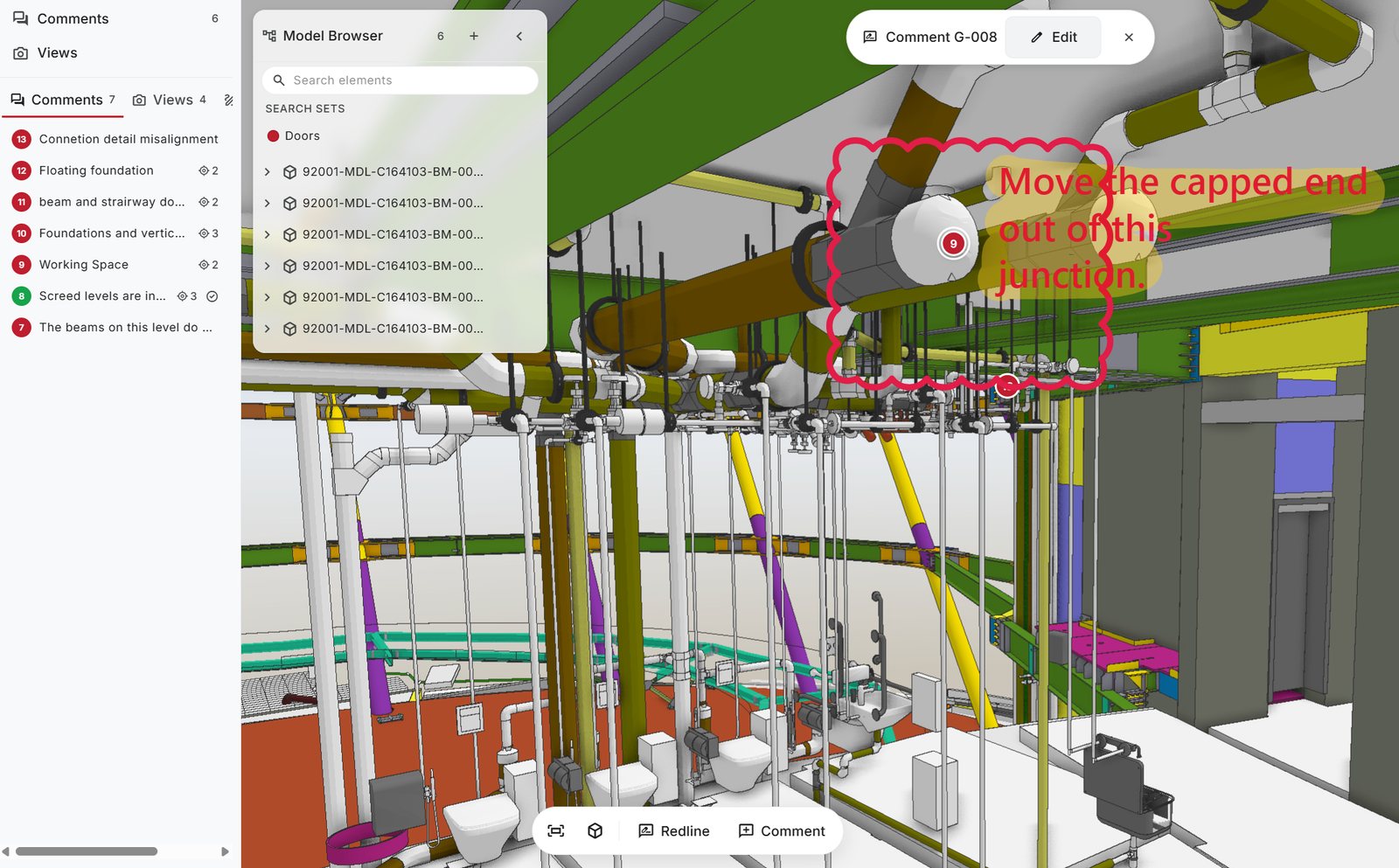
3D review: a comment with redlines on the federated model, with the comment list and model browser.
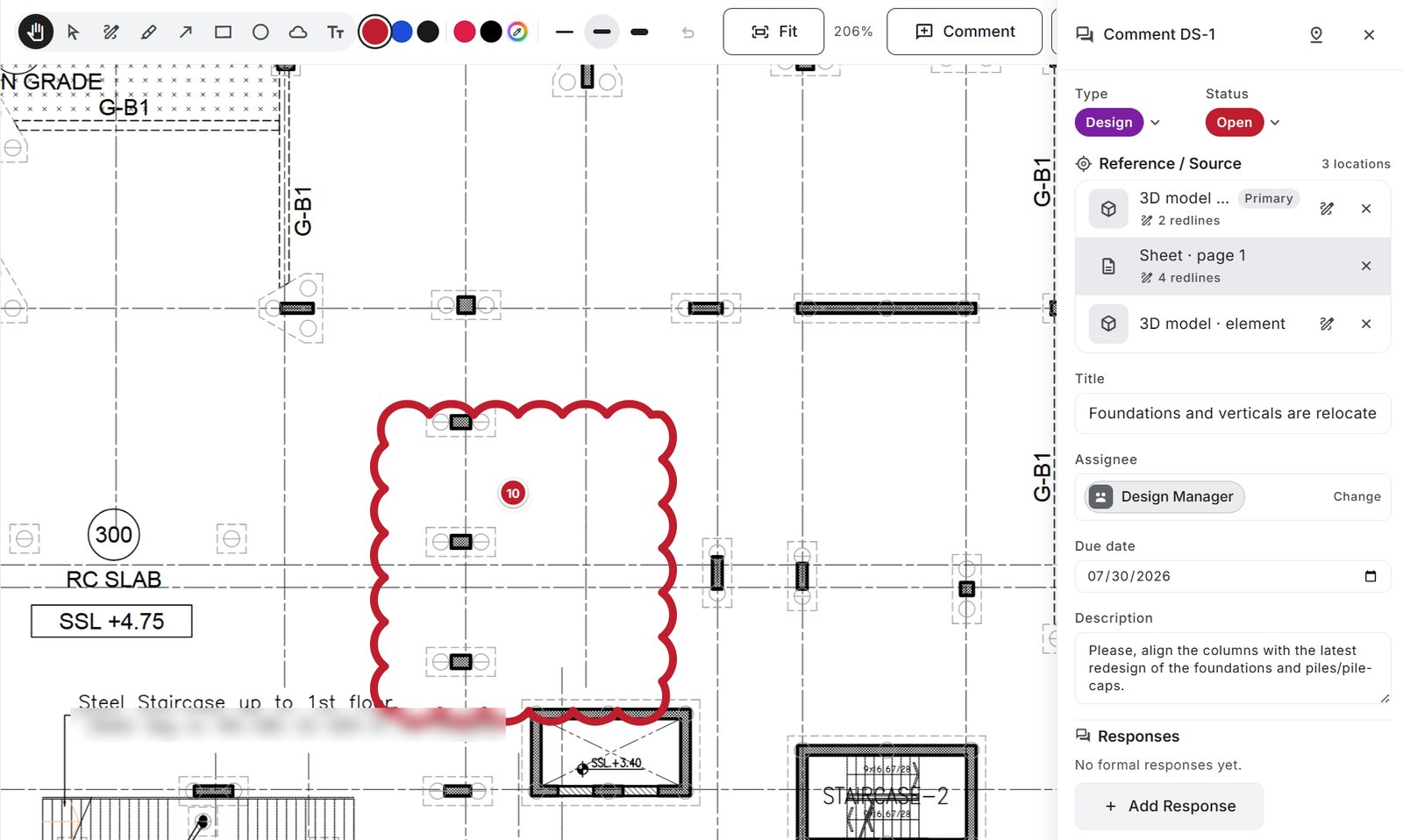
2D review: one comment carrying redlines on the 3D model and on a drawing sheet, with type, status, assignee and due date.
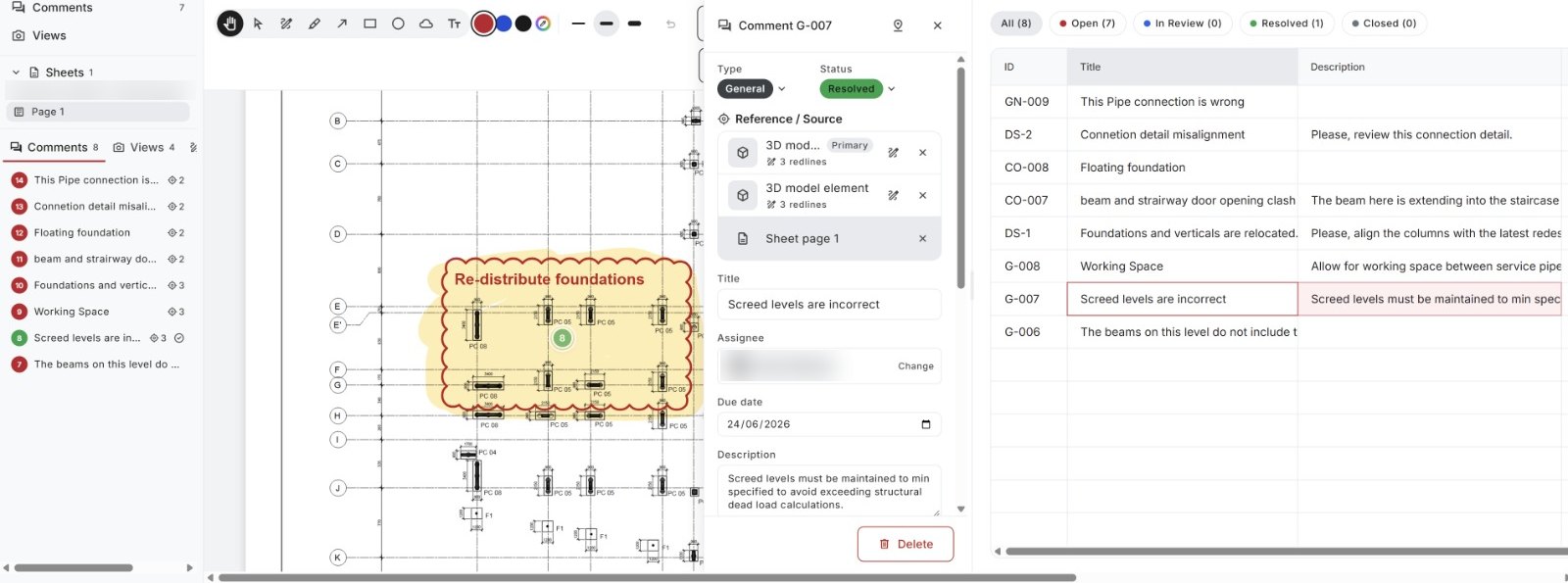
The comment tracker: a markup on the drawing, its comment with references to the 3D model, and every issue with its status.
From a comment in the model to a PMWEB record
- 01
Launch and comment
Open the model from PMWEB. A clash or query is spotted during review, and the elements concerned are selected.
- 02
Pin and mark up
Pin the comment in 3D and on drawing sheets, mark up the viewpoint, and assign an owner and a due date.
- 03
Raise in PMWEB
The issue becomes a PMWEB record, such as an RFI, submittal or change order, with the viewpoint image attached.
- 04
Respond and track
Status and responses come back to the same issue in the viewer, with every comment tracked online.
- Orbit and walk, select elements, view properties, isolate, section and measure
- Drawing sheets beside the 3D scene, with shared selection
- Comments pinned to elements, with threaded replies and mentions
- Cloud, arrow, text and freehand markup
- A saved viewpoint and attachments on every comment
- Status, priority and assignee, and an issue list filtered by any field
One coordination issue, one record
No re-keying between the model and the controls process. CMCS tailors the integration to each client's records, processes and workflows. Issues are held in BCF, the open buildingSMART standard, so a comment carries the camera position, the selected elements and the markup: anyone opening it sees exactly what the reviewer saw. Models are read as IFC.
Hosted where you choose
- Any region you choose, including your own cloud account
- Isolated tenant, encrypted in transit and at rest
- Single sign-on, and a private VPN link to PMWEB
- A fast start, with no servers to provision
Inside your network
- The same product installed on two servers inside your network
- For organisations whose policy rules out hosted services
- Deployment changes where the servers sit, not what reviewers can do
Architecture
Labo is supplied, integrated with PMWEB and supported by CMCS, as part of your PMWEB delivery. For a demonstration, a proposal or support, contact CMCS.
Featured solution
Extended e-procurement and tendering.
PMWEB's procurement extended with a bidder-facing tendering tool, covering the full cycle from purchase request to purchase order in 13 stages. Bidders register, ask questions and submit priced BoQs and proposals online; evaluators score in parallel; reports generate themselves.
- 01Procurement request
- 02Expression of interest
- 03Shortlisting
- 04Proposal forms
- 05Bill of quantities
- 06Tender release
- 07Tender queries
- 08Bid submission
- 09Evaluation
- 10Manage & reissue bids
- 11Post-tender clarifications
- 12Evaluation reports
- 13Contract award & PO
Bidder portal
Registration, expressions of interest, queries and submissions in one place.
BoQ import & validation
BoQs pasted or imported from Excel, validated, then priced by bidders online.
Multi-evaluator scoring
Technical and commercial scoring by several evaluators against templates.
Automatic reports
Priced BoQ comparison and evaluation reports, then award and PO in PMWEB.
New Featured service
Move from Oracle Aconex and Oracle Unifier to PMWEB.
For owners who want correspondence, documents, cost and contracts in one PMIS instead of two or three platforms. CMCS plans and delivers the move, so your history comes with you and your teams keep working while it happens.
Correspondence and documents as structured records
- Mail and correspondence registers to PMWEB correspondence, RFIs and instructions
- Document registers, revisions and transmittals to PMWEB document control
- Review and approval history kept with each record
- RFIs linked to the schedule, change and claims in PMWEB
- Aconex-style adaptive forms, with the same fields, terms and numbering
Business processes and cost into PMWEB modules
- Business processes mapped to PMWEB forms and workflows
- Cost sheets, budgets and commitments to the PMWEB cost structure
- Change, payment applications and invoices with their history
- Project, programme and portfolio structures rebuilt in PMWEB
- 01
Assess the source
How the data is held, its structure, volume and consistency across projects, before any migration scope is committed.
- 02
Map to PMWEB
Every source register, process and field mapped to PMWEB modules and confirmed in the BRD.
- 03
Start new work in PMWEB
PMWEB is programme-scoped, so new programmes can go live straight away while legacy projects move in stages.
- 04
Migrate and reconcile
Data extracted, transformed and loaded, with AI assistance where it helps, then reconciled against the source.
- 05
Retire the source
Users trained, the source platform switched to read-only or archived, and licences released.
Featured solution
Power BI dashboards integrated with PMWEB.
A modern reporting layer built on PMWEB data: one semantic model, consistent KPIs, and interactive dashboards from board level down to the individual contract, refreshed automatically and secured by the same roles as PMWEB.
Unified semantic model
Standard fact and dimension tables, optimized SQL views and one set of KPI definitions, with role-based security aligned to PMWEB permissions.
Feature-rich dashboards
Drill-down from portfolio to project, cross-report filtering, exception alerts, variance and forecast views, maps and KPI scorecards.
Existing reports rebuilt
Legacy SSRS and website reports rebuilt in Power BI or optimized, with consistent templates and better filtering.
Optimized data pipelines
Rewritten SQL logic, incremental refresh for large datasets and scheduled refresh cycles.
Reporting portal
One front end with categorized reports, quick filters and integrated document search and viewer.
Hundreds of dashboards delivered
For government agencies, infrastructure megaprojects, real estate developers and aviation clients.
Sample dashboards
Power BI dashboards CMCS has built for PMWEB.
Each dashboard is embedded in PMWEB and reads PMWEB records directly, so every figure traces back to its source. The samples below use demonstration data.
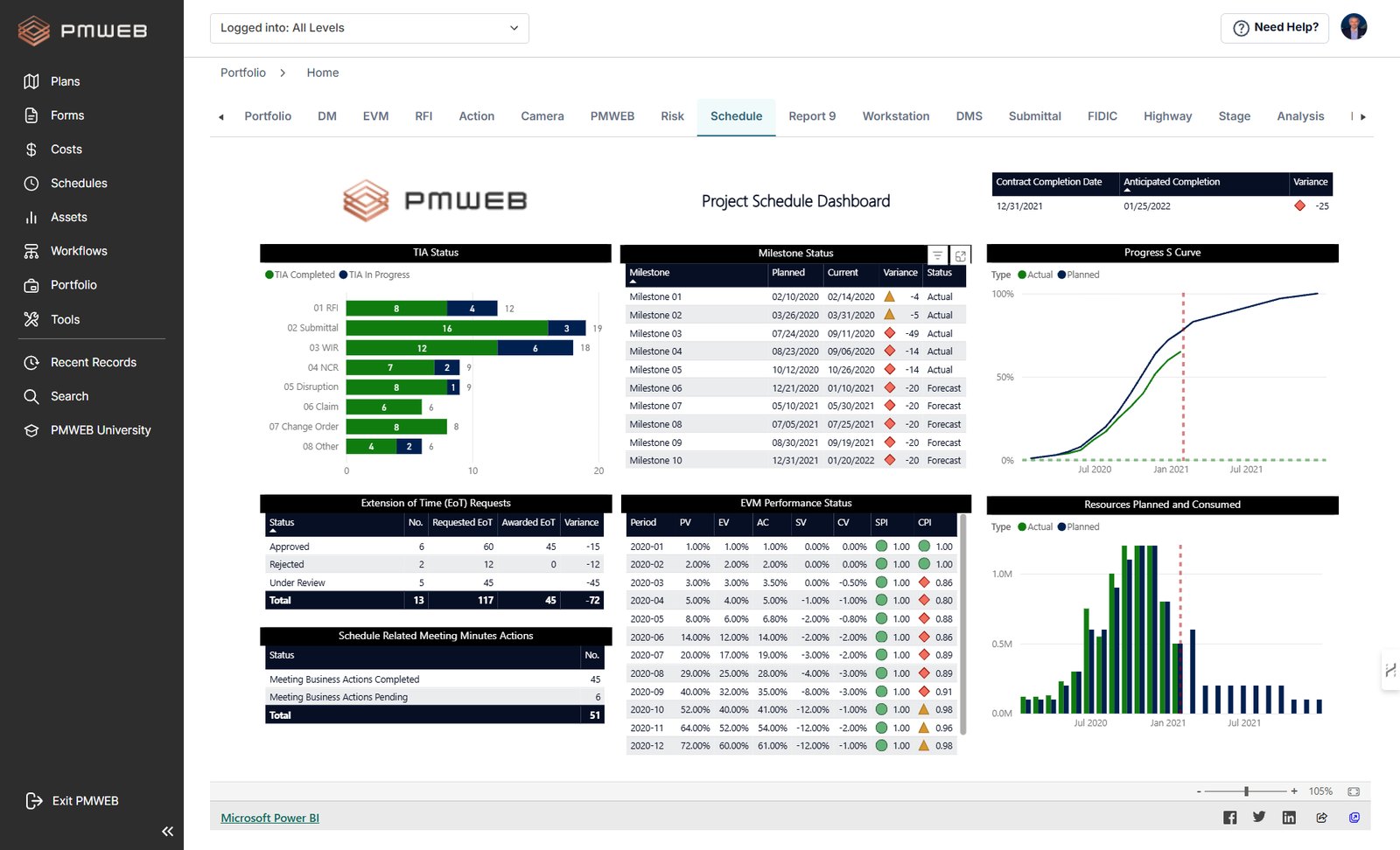
Project schedule: milestone variance, time impact analysis status, extension of time requests, earned value and the progress S-curve.
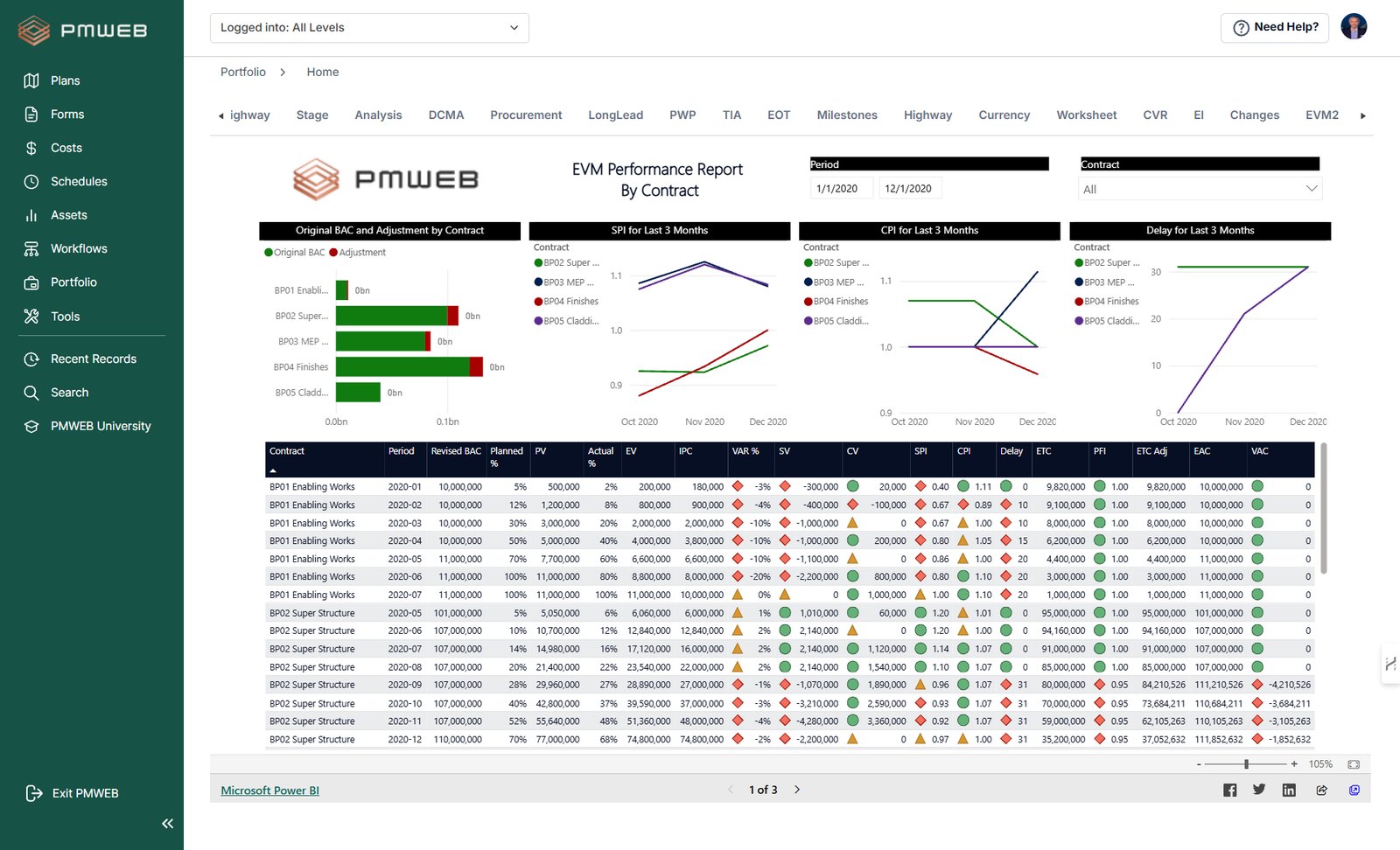
Earned value by contract: budget at completion and adjustments, SPI, CPI and delay trends for the last three months, period by period.
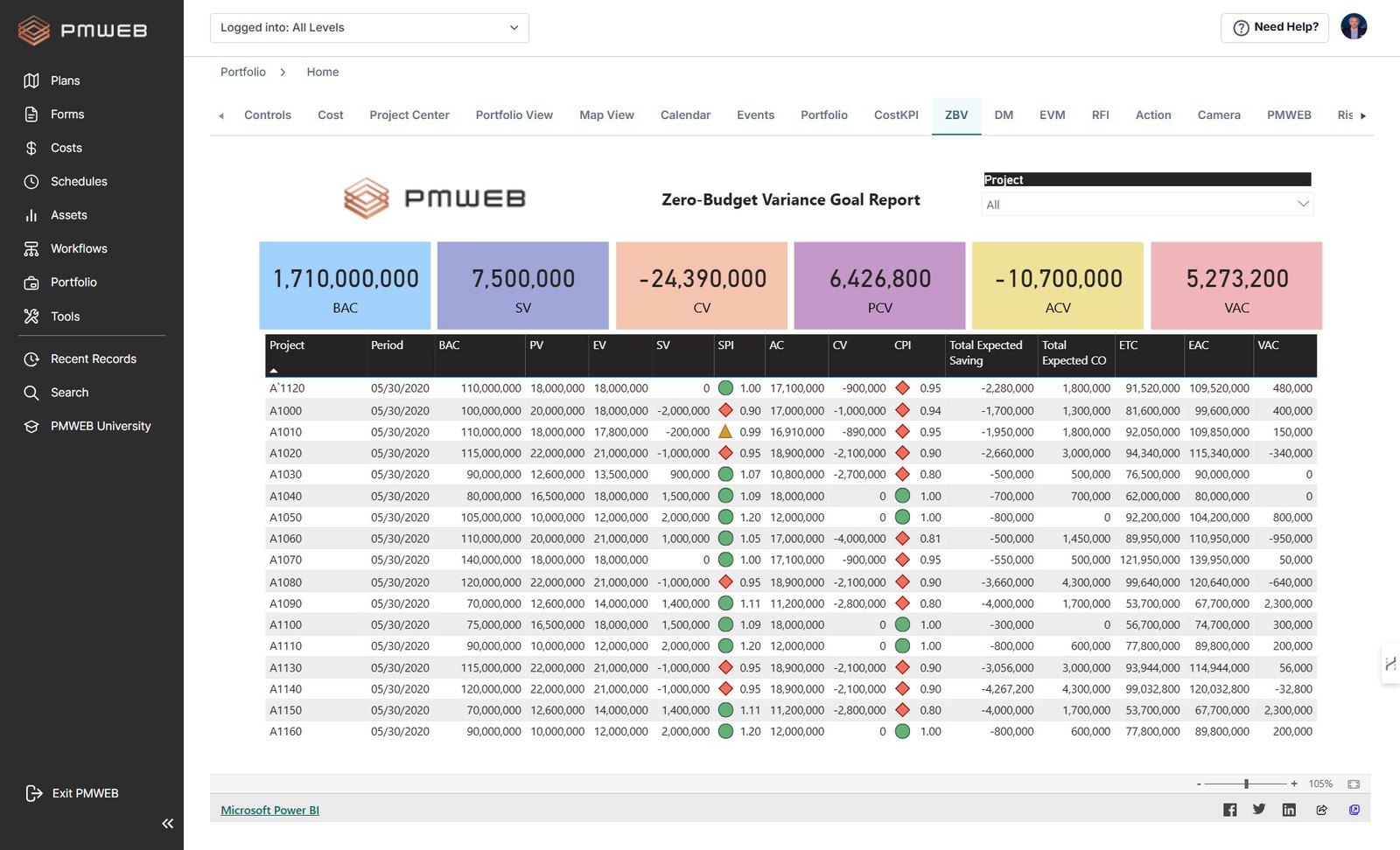
Zero-budget variance goal: BAC, schedule, cost and at-completion variances for every project, with SPI and CPI flags.
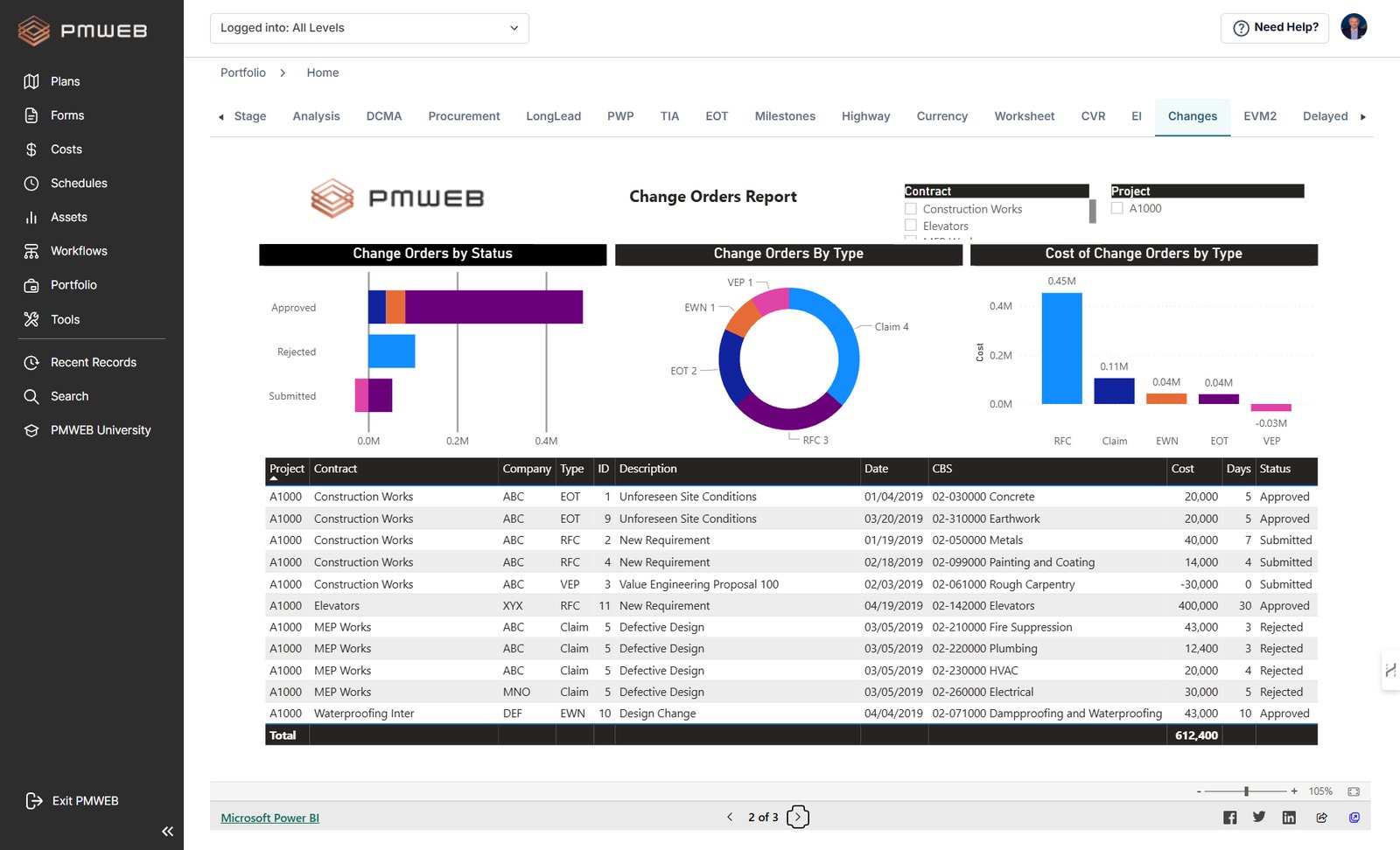
Change orders by status and type, with their cost, contract, CBS code and days of time impact.
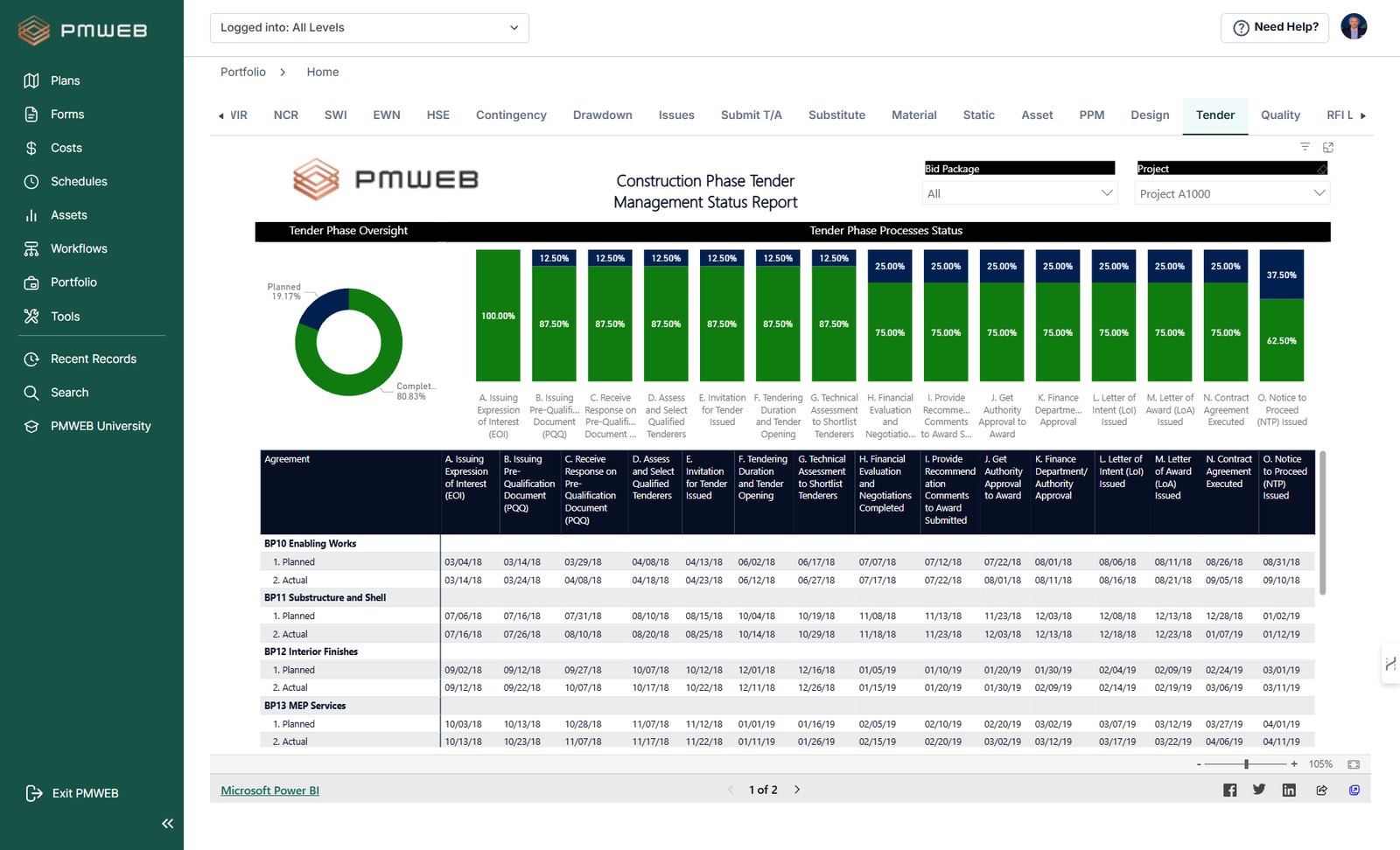
Tender management: every step from expression of interest to notice to proceed, planned against actual, by bid package.
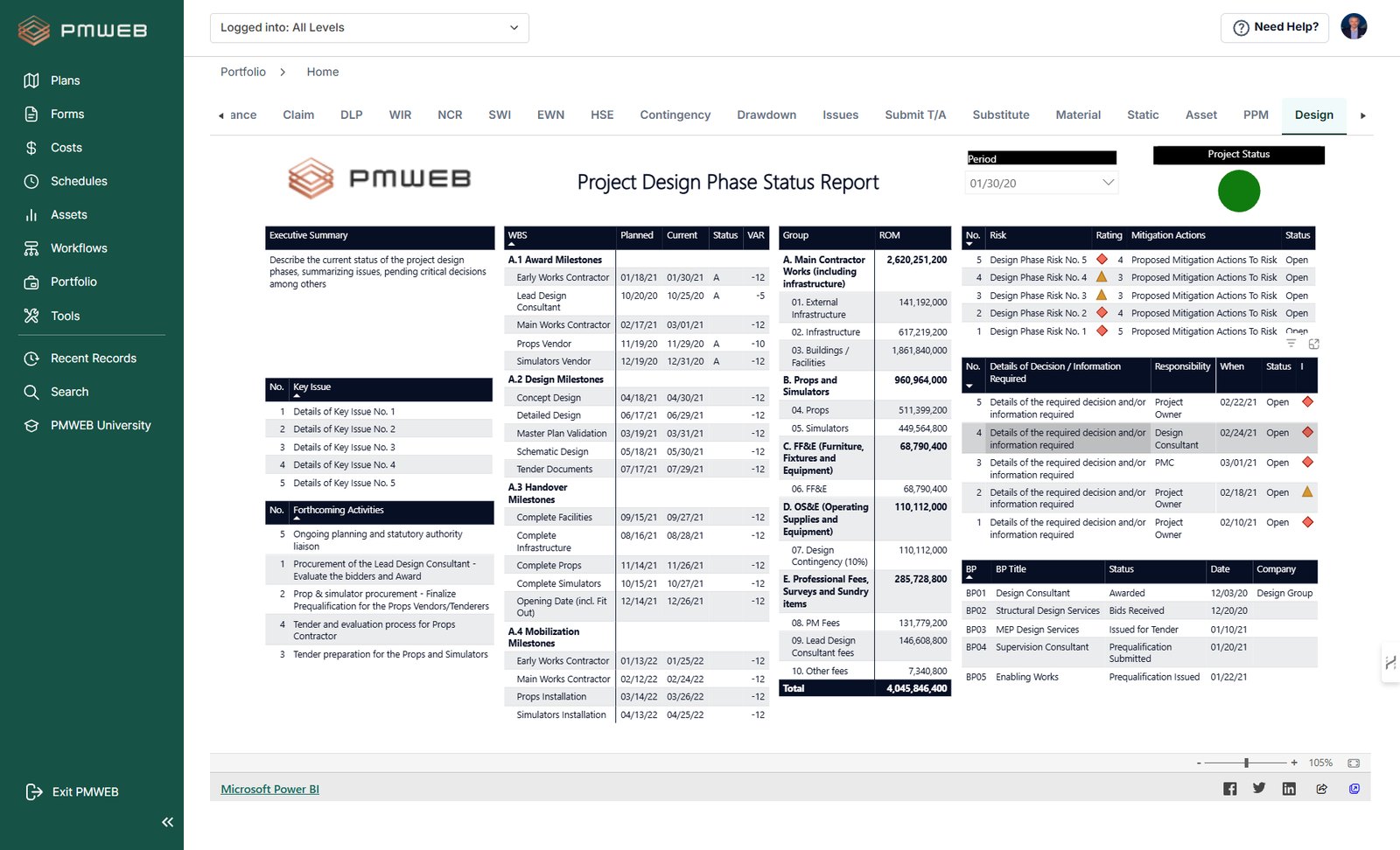
Design phase status: milestones, rough order of magnitude cost, key issues, decisions required, risks and bid packages.
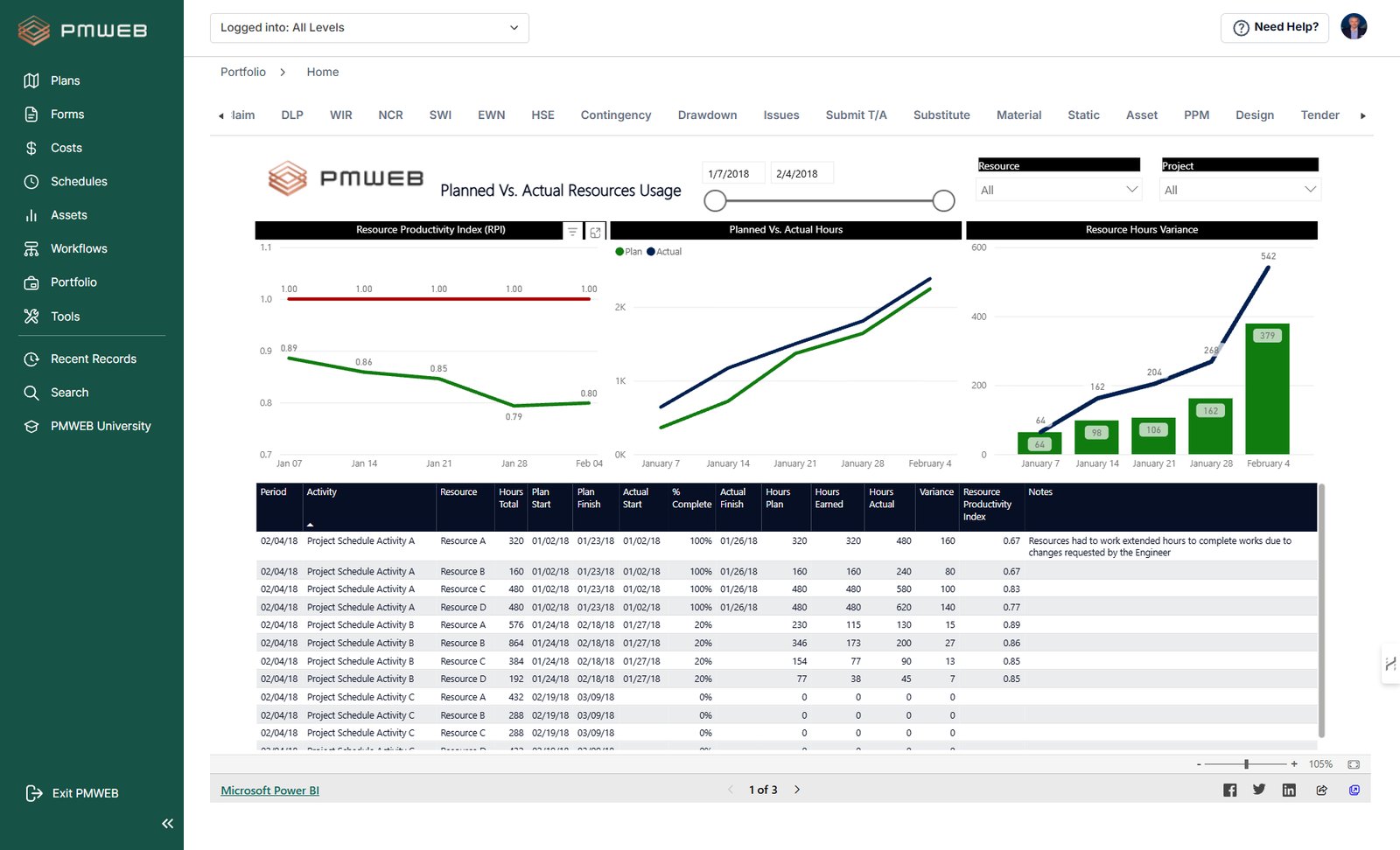
Resources: planned against actual hours, resource productivity index and hours variance by activity.
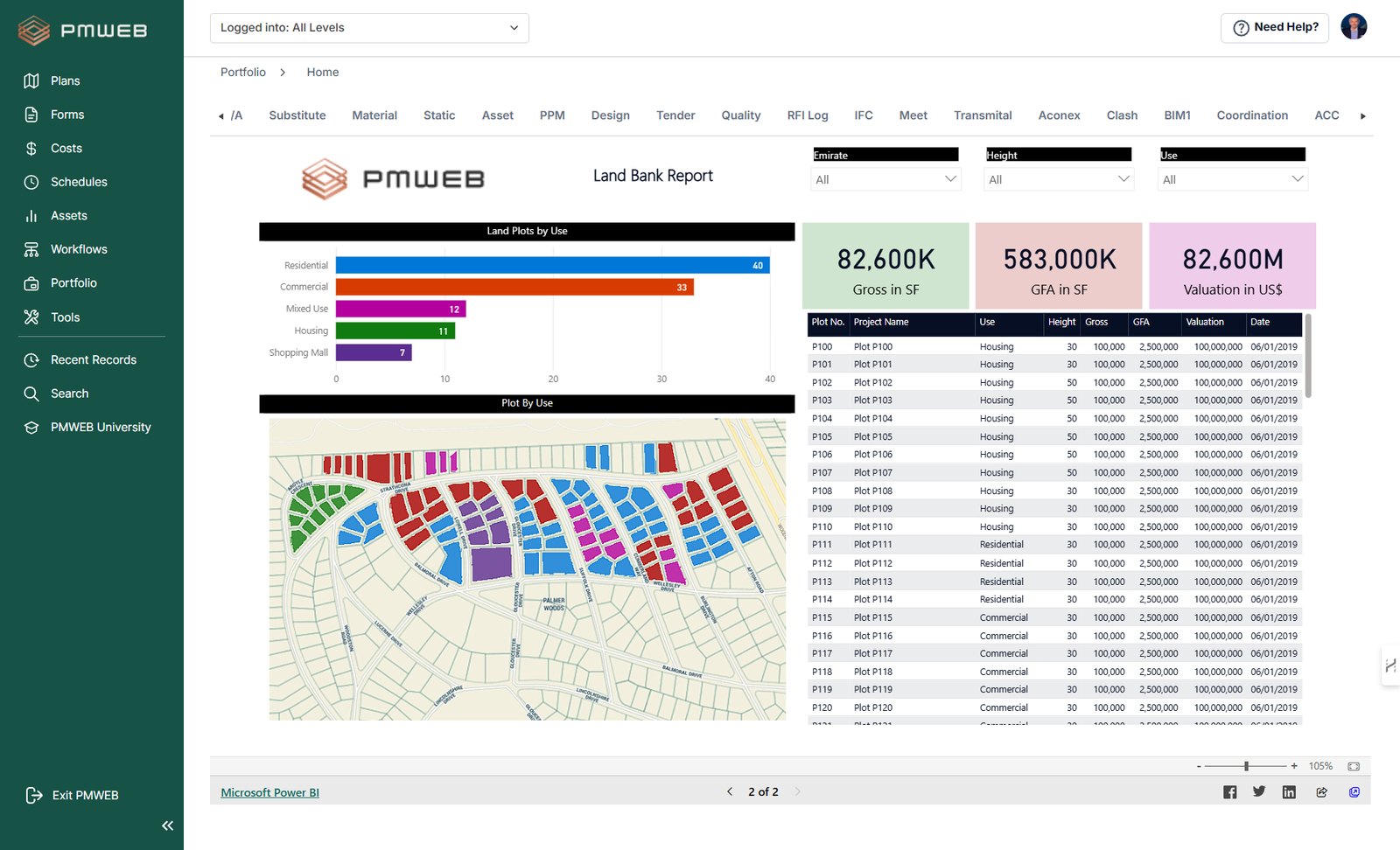
Land bank: plots by use, gross area, GFA and valuation, a map of plots coloured by use, and the plot register.
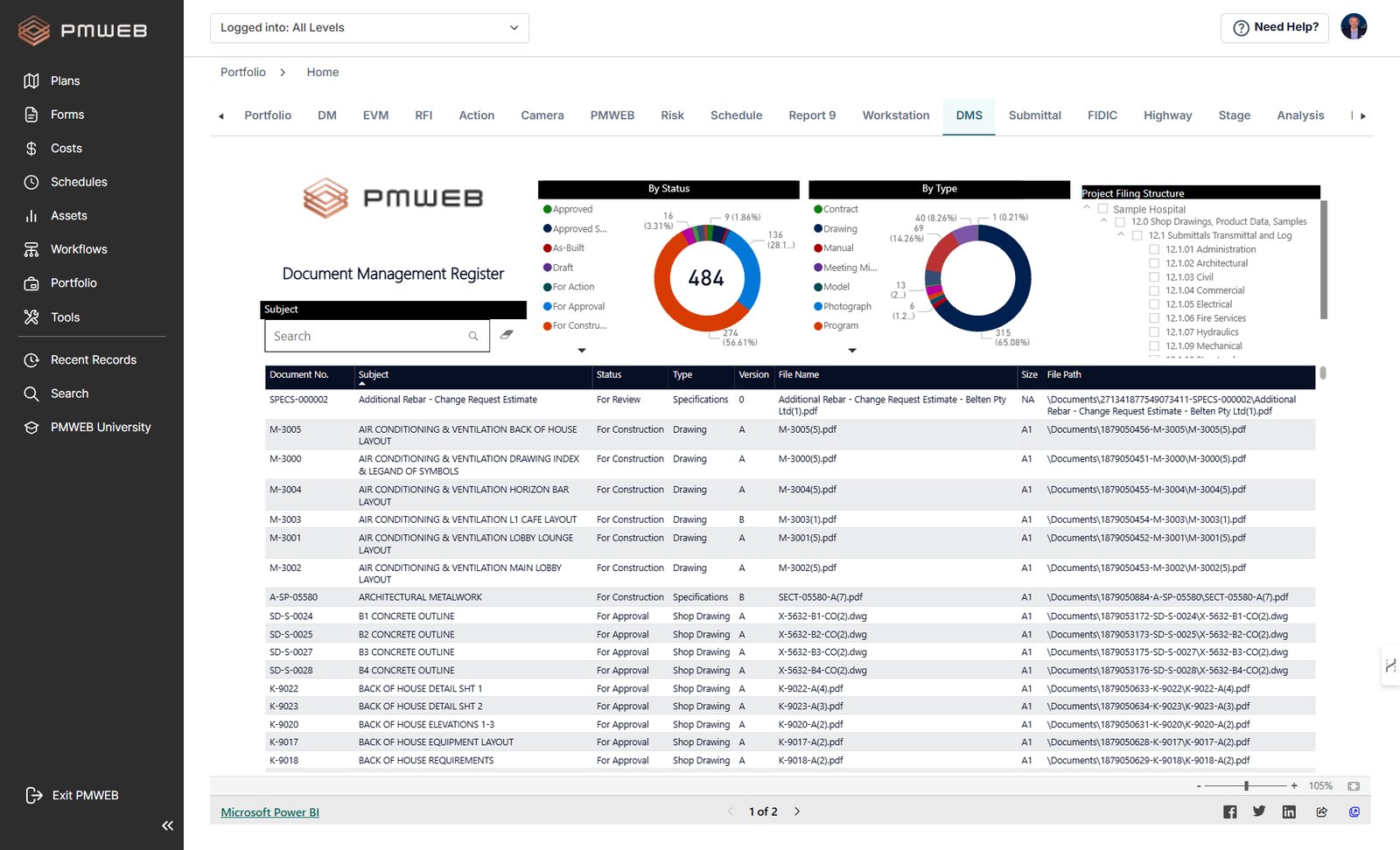
Document register: documents by status and type, the project filing structure and every file with its version.
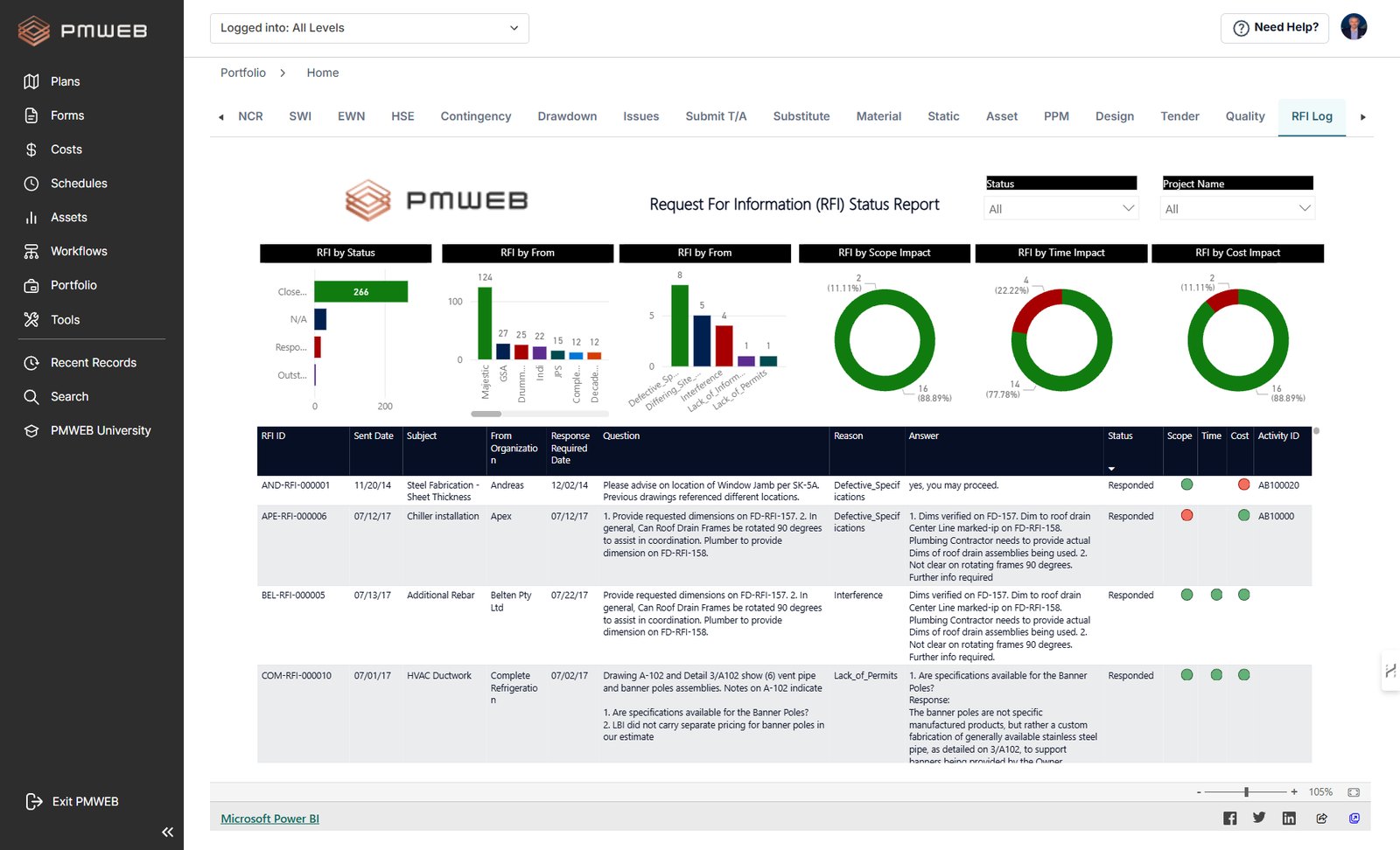
RFIs by status, originator, reason and impact on scope, time and cost, with each question and answer.
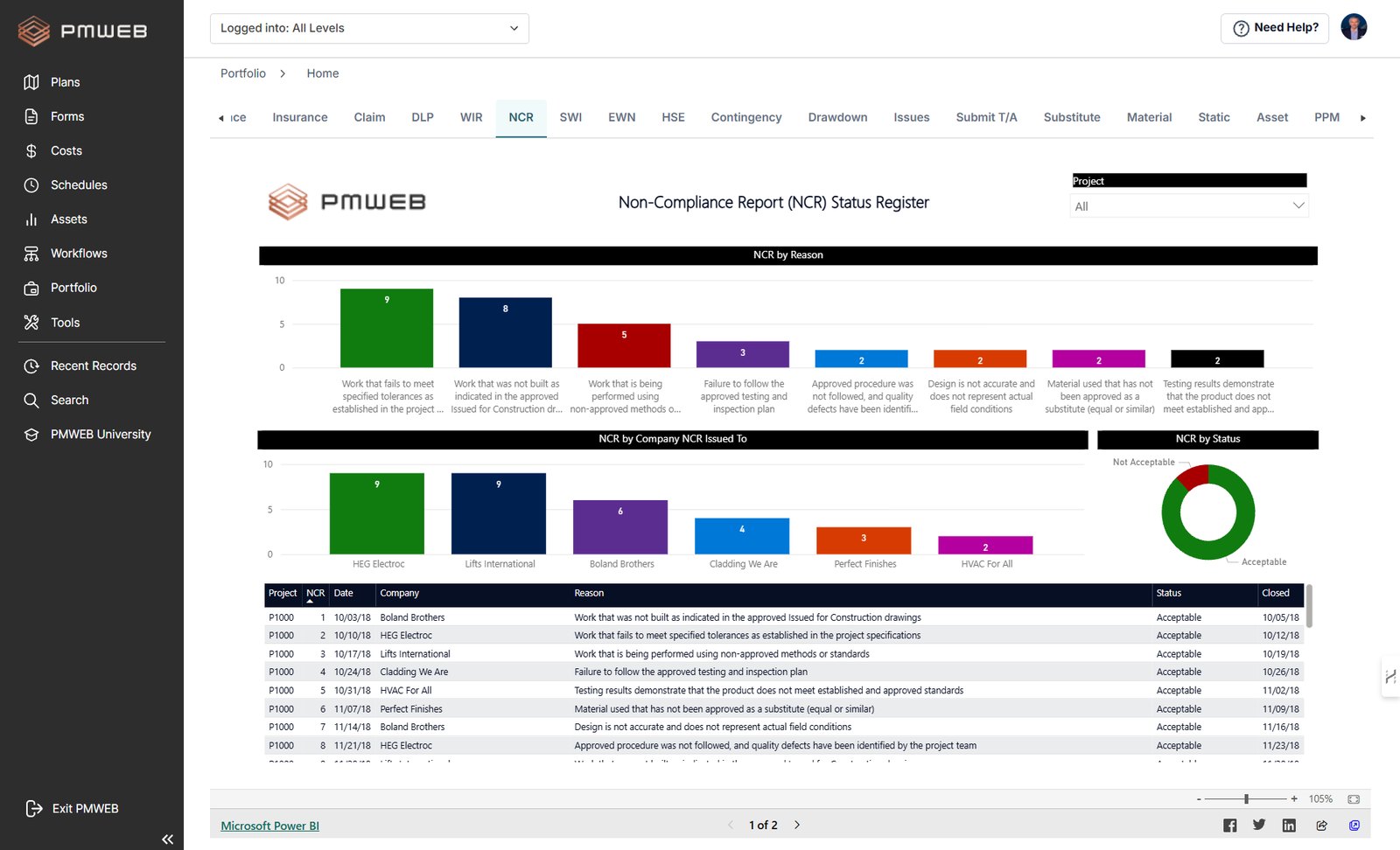
Non-compliance reports by reason, by company issued to and by status, with the corrective action log.
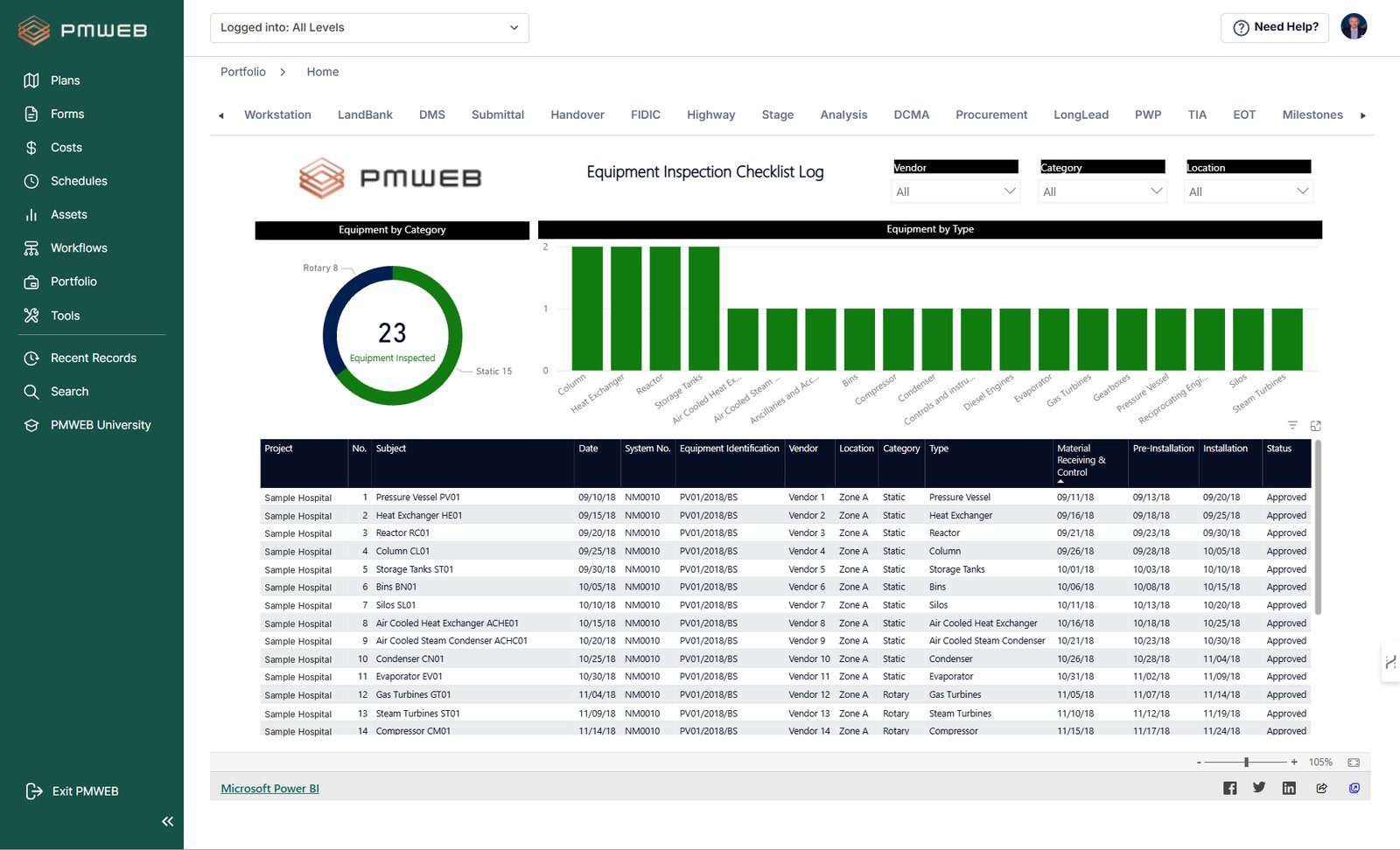
Equipment inspections: equipment by category and type, with receiving, pre-installation and installation inspection dates.
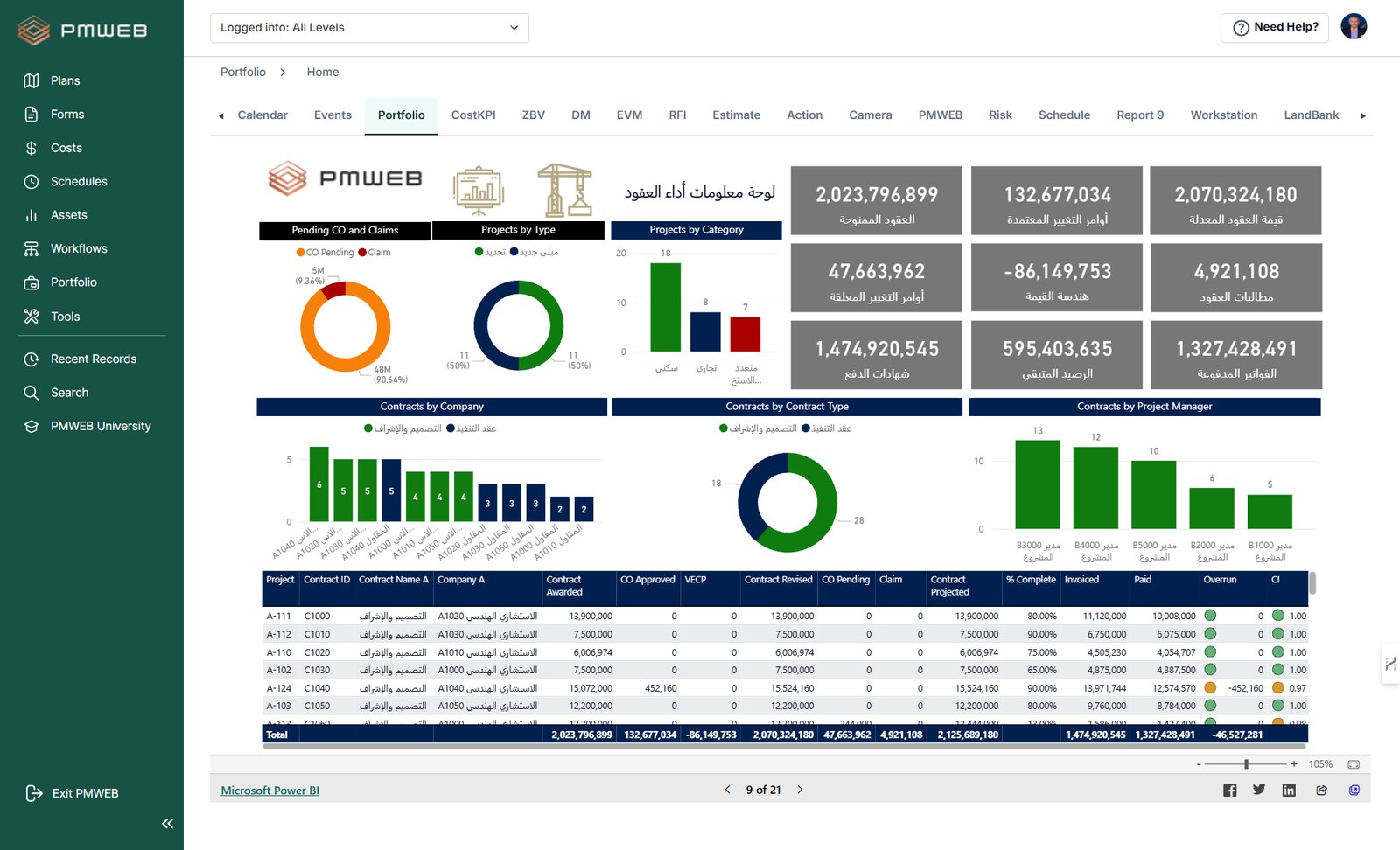
Bilingual reporting: a contracts performance dashboard in Arabic, with awarded, changed, invoiced and paid values.
Reporting domains
How it is delivered
- 01
Discovery
Existing reports, datasets and performance baselines reviewed; KPI catalogue and scope confirmed.
- 02
Architecture & design
Semantic model, SQL views, dashboard wireframes and portal design, overlapping with development.
- 03
Development
Datasets, domain dashboards, interactive features and the reporting portal built.
- 04
Testing & refinement
Functional and performance testing, and every figure validated against PMWEB.
- 05
Deployment & hypercare
Go-live, user training, stabilization support and handover documentation.
New Custom integration · Real estate developers
Robotic process automation (RPA): software robots that keep PMWEB up to date.
RPA uses software robots that perform the same steps a person would in a website or application: open the page, read the values and enter them in another system. CMCS has built RPA for a major real estate developer, taking repetitive data entry off its teams and keeping the data accurate.
Dubai RERA progress, recorded automatically
The robot reads the construction progress rates for thousands of units from the Dubai RERA website and records them in PMWEB, with no retyping.
From BOQ to payment certificate
Hundreds of BOQ line items carried into the payment certificates every month, without manual entry.
Accurate data, same controls
The robot writes into PMWEB records, so the data falls under the same workflows, permissions and audit trail as everything else.
In Dubai, and in other markets where the government holds off-plan sale proceeds in escrow, funds are released to the developer against construction progress. Escrow protects buyers, and developers need full transparency on when each payment falls due under the payment plans agreed with buyers. With progress recorded in PMWEB automatically, the developer sees escrow releases and buyer instalments against the same, current progress data.
New Standards compliance
RICS, CMAA, NPMO and FIDIC practice, mapped to PMWEB.
See, process by process, how PMWEB helps organisations comply with internationally recognised project and contract management practice, and where each process is shown in our articles. Working to another standard? Ask us to map it.
More solutions
Proven on client projects. Available to every PMWEB client.
Stage-gate management
Configurable stage gates with RACI-based task assignments, linked to the master development programme. A stage-gate workstation, automated approvals, forecast dates with in-activity updates, and management dashboards of gate status.
Land sales to sub-developers
A one-stop process for selling land plots to sub-developers: expressions of interest, proposal submission, automatic and manual scoring against pre-set criteria, and decision reports. First delivered for a Saudi master developer, reducing manual processing by about 80%.
Workflow task & performance dashboard
Every due and delayed workflow task across all projects in one view, with performance by role and process, so bottlenecks are visible before they become delays.
Government ERP integration with status tracking
Progress invoices pass from PMWEB to the government ERP on final workflow approval, with an integration status report and payment details written back to PMWEB.
Control tower: PMWEB, Primavera P6 and Esri GIS
Schedule, cost and record data from PMWEB and P6 shown by location on Esri maps, giving a portfolio view of where work stands on the ground.
Schedule risk with Safran
PMWEB risk registers and P6 schedules passed to Safran for schedule risk analysis, with results brought back to the PMIS.
Interface agreement management
Interfaces between projects modelled as linked schedule activities and an Interface Agreement form, with programme-level interface projects for country-wide programmes.
Next step
Have a process PMWEB doesn't cover yet?
Tell us what you need. We may already have built it for another client.