Aconex-Style Document Control in PMWEB — Adaptive Forms Built for Aconex Users
By Bassam Samman, PMP, PSP, EVP, GPM · CEO & Chairman, CMCS FZCO
Document controllers do not resist a new platform because it is new. They resist it because the fields, numbers and lists are not the ones they know. The adaptive forms in this solution were designed to remove that barrier: Aconex users open PMWEB and recognise what they see.
Part 1 of this series made the case for managing document submittals in the same platform as every other project function. This part shows how the developer in our use case did it in PMWEB: three adaptive forms that emulate Aconex, and four pieces of back-end logic that close the gaps document controllers care about most.
Based on real implementations
This series is based on real PMWEB implementations, not a concept: CMCS has migrated two clients from Aconex to PMWEB, including a major real estate developer in the Gulf region. Client names and client data are withheld; the form illustrations and dashboards use sample data.
Is this article for you?
Yes, if you need to know what Aconex users will see and do in PMWEB:
Document controllers: the screens, fields, numbering and lists you will work with every day.
PMIS managers: how the adaptive forms, workflow and back-end logic are configured and maintained.
Reviewers and technical leads: how review steps, due dates and comments sheets work.
Project and programme managers: how the review process is controlled and what confidential records mean for distribution.
Contractors and consultants: what submitting a document will look like.
PMWEB clients: whose document controllers resisted the built-in submittal forms.
The delivery risk this part addresses
When document controllers resist a new platform, documents drift back to email and spreadsheets, and the project loses control of which revision is approved. Forms that Aconex users recognise keep every submittal inside PMWEB, coded to its package, asset and contract, so cost, schedule, quality and HSSE work from the same approved record.
Rebuilding the Aconex Experience Inside PMWEB
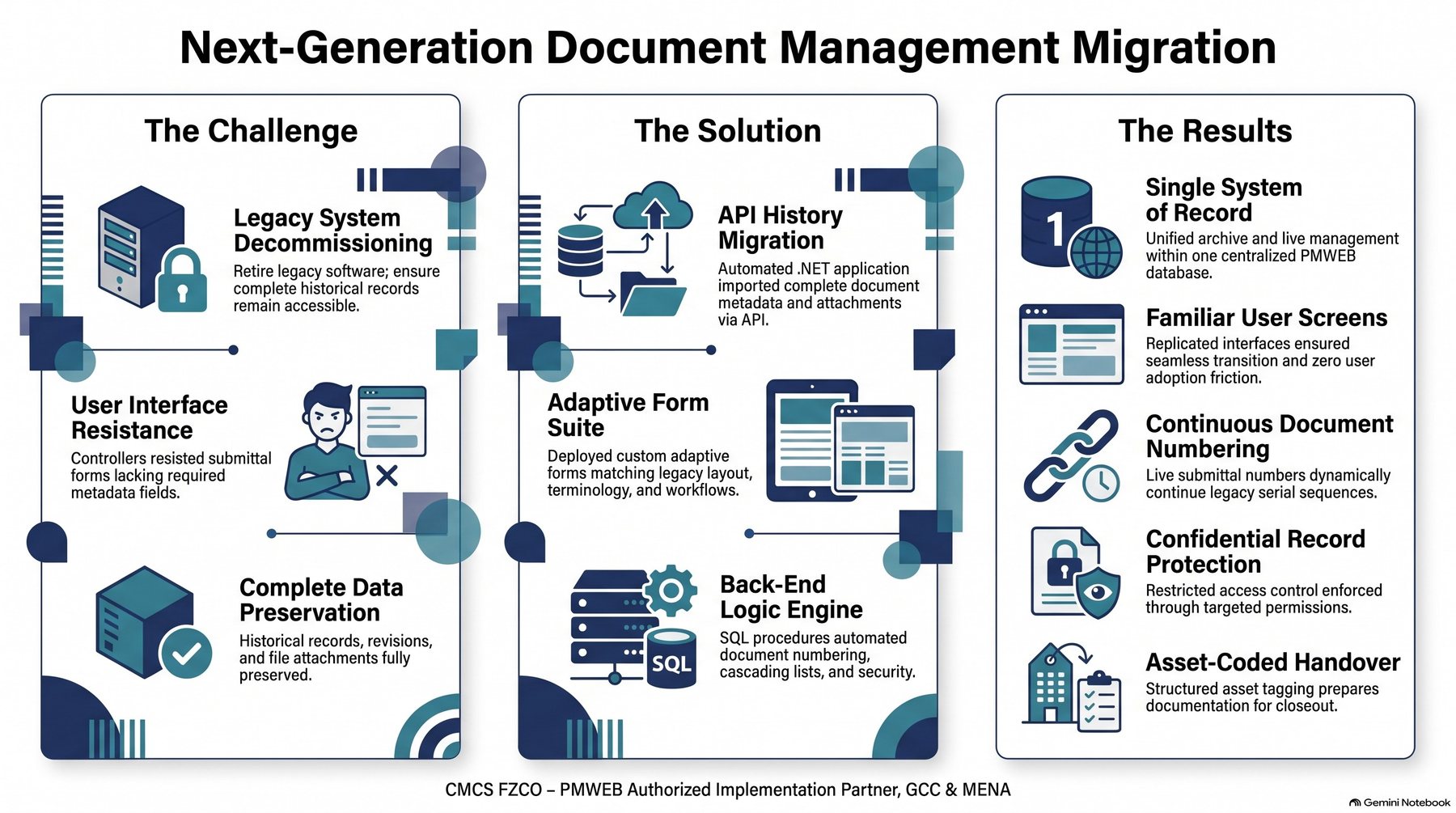
The developer's goal was one system of record without asking document controllers to give up the way they work in Aconex. That second condition shaped the whole design. PMWEB's built-in Document Submittal Sets and Submittal Items are capable, but the document controllers resisted them because the fields, numbering and picklists were not what they knew. So the team rebuilt the Aconex experience inside PMWEB instead of asking people to change habits.
Infographic 1 – The challenge, the solution and the results
The Solution at a Glance
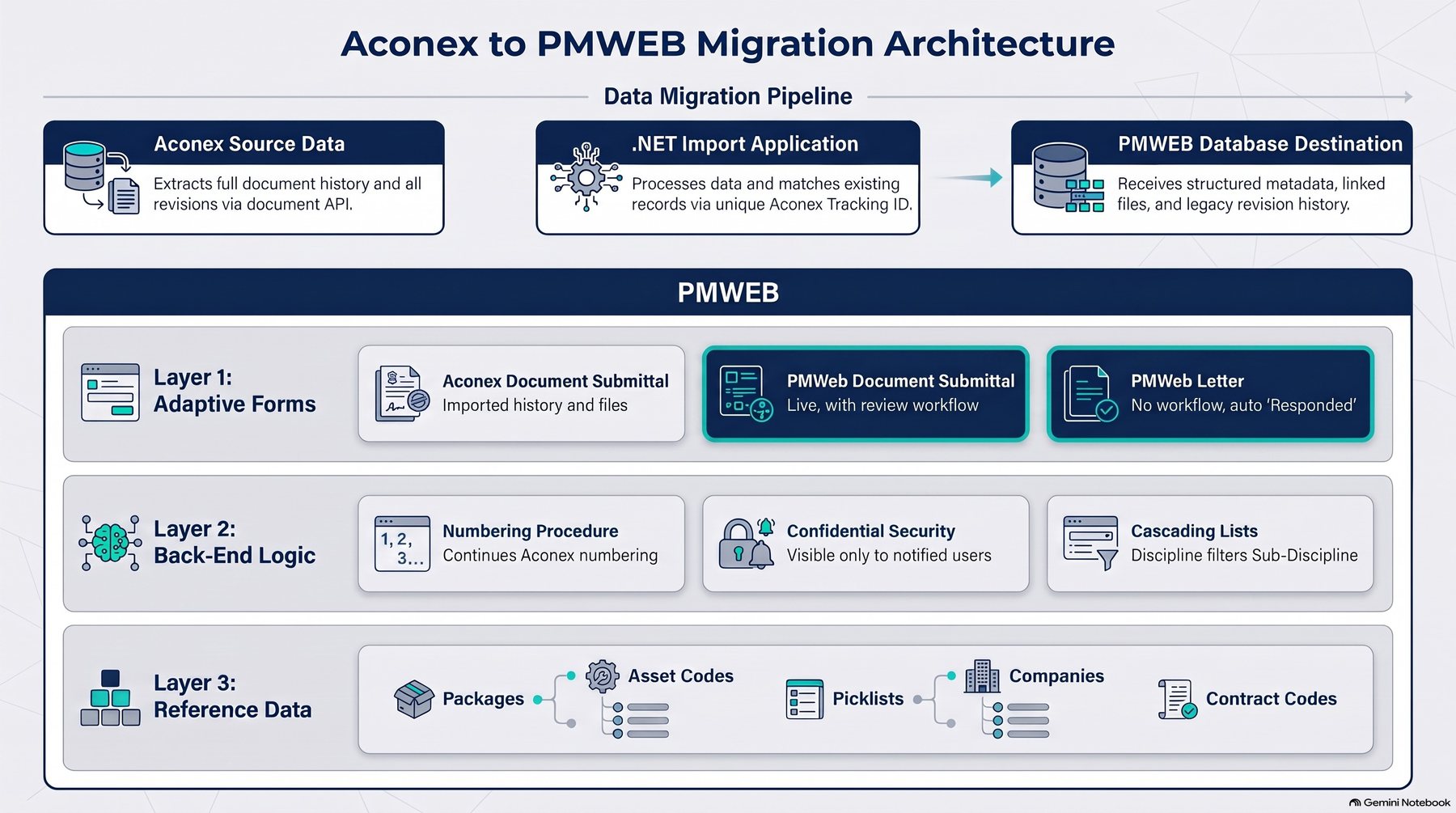
The solution has two parts. Three PMWEB adaptive forms, backed by a small amount of back-end logic, give document controllers Aconex's behaviour inside PMWEB. This is all a new project needs. For a project that has already started on Aconex, an optional one-way import also moves the Aconex history into PMWEB.
Infographic 2 – Solution architecture: the import pipeline and the three PMWEB layers
Component
Built as
What users get
Aconex history import (optional)
.NET application on the Aconex API
For projects already on Aconex: every Aconex document, revision and file in PMWEB
Aconex Document Submittal
Adaptive form
A searchable historical register
PMWEB Document Submittal
Adaptive form with review workflow
Live submittals with Aconex fields, terms and screens
PMWEB Letter
Adaptive form without workflow
Correspondence with automatic response tracking
Document numbering
SQL stored procedure
Aconex-style numbers that continue the legacy serials
Confidential records
Back-end security rule
Visibility limited to the parties and notified users
Cascading lists
External table and configuration link
Sub-disciplines filtered by the selected discipline
Submittal dashboards
PMWEB Power BI dashboards on the PMWEB database
Daily work queues and executive performance views
Three Adaptive Forms That Feel Like Aconex
The adaptive forms were designed with one purpose: a smooth move for Aconex users into PMWEB. Document controllers, contractors and reviewers should not face different screens, different field names or new terminology on the day they switch. So the forms emulate what Aconex users are used to seeing, in their data fields, their order and labels, their picklists and their numbering, and in the way documents are submitted, reviewed and distributed.
Designed for a smooth migration of Aconex users
Users open PMWEB and recognise what they see. The same metadata is asked for in the same order, the same list values appear, document numbers follow the same pattern, and confidential documents are distributed the way they were in Aconex. Training focuses on what is new, such as the dashboards and links to contracts and cost, rather than on relearning document control.
What Aconex users are used to
How the PMWEB adaptive forms emulate it
Aconex document metadata fields
The same fields, with the same names and order, on the PMWEB Document Submittal form
PMWEB lists with the same values, including discipline-dependent sub-discipline lists
Aconex document numbering
A stored procedure that builds the same number pattern and continues the existing serials
Review and approval of submittals
A review workflow with document control, technical and owner steps, and review codes
Confidential distribution and mail copies
A Confidential flag, with visibility limited to the parties and the users notified on the record
Correspondence with replies
PMWEB Letter, where a reply links to the original letter and marks it as responded
Searching the document register
Registers filtered by package, asset, title and, for imported records, the Aconex Tracking ID
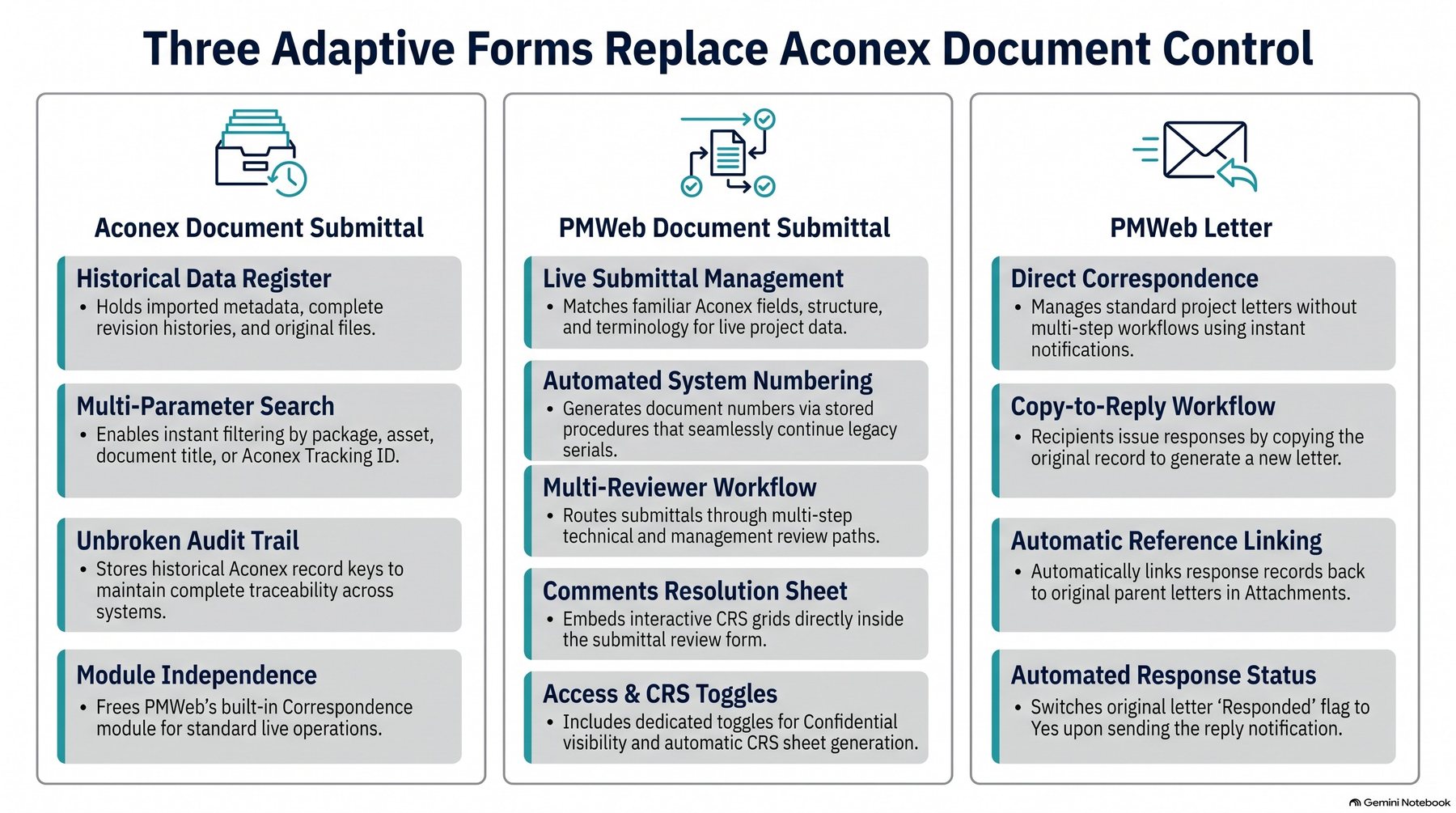
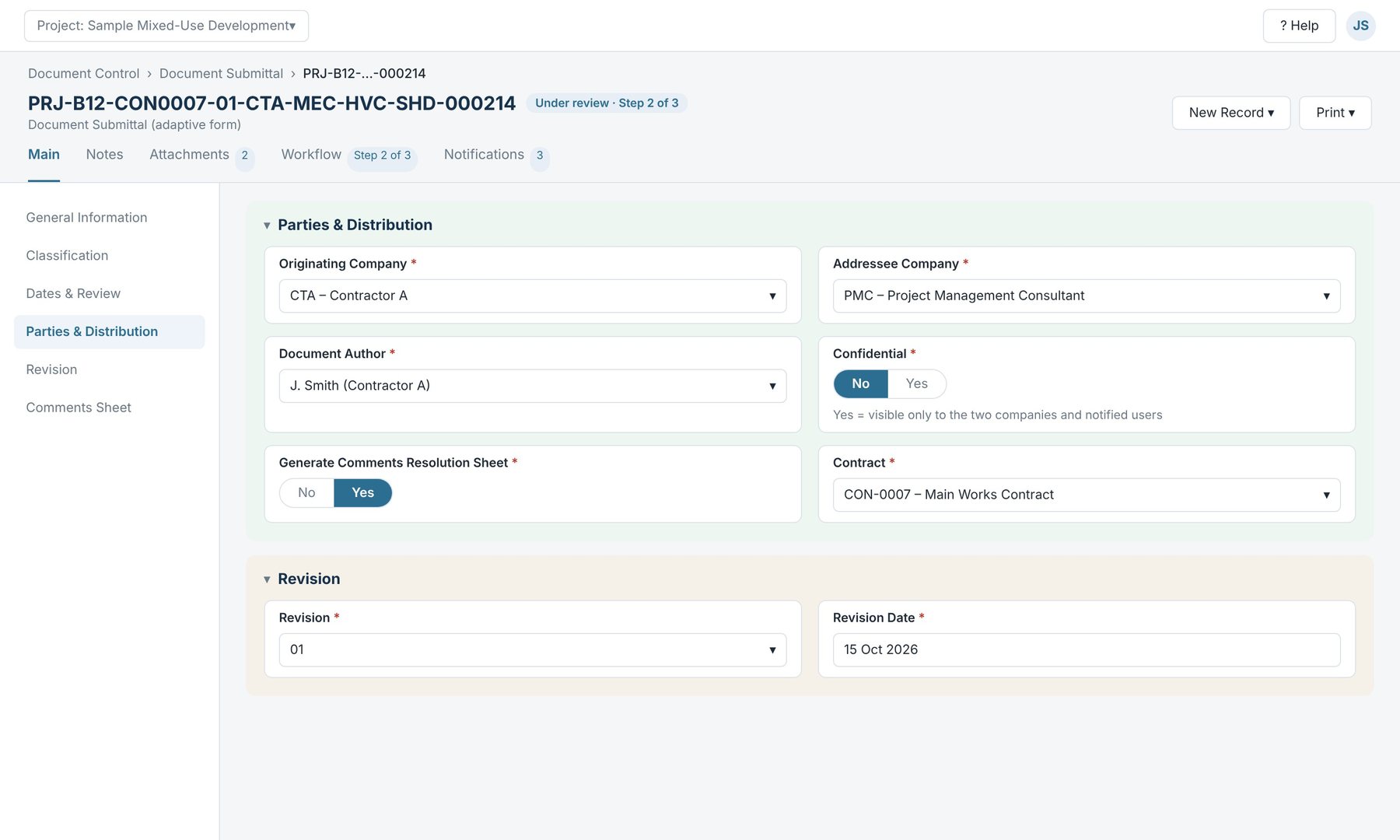
In practice the solution uses three PMWEB adaptive forms. Each uses the same fields, order and terms as the Aconex screens they replace, laid out in collapsible sections and coloured in the owner's brand.
Infographic 3 – The three adaptive forms that replace Aconex document control
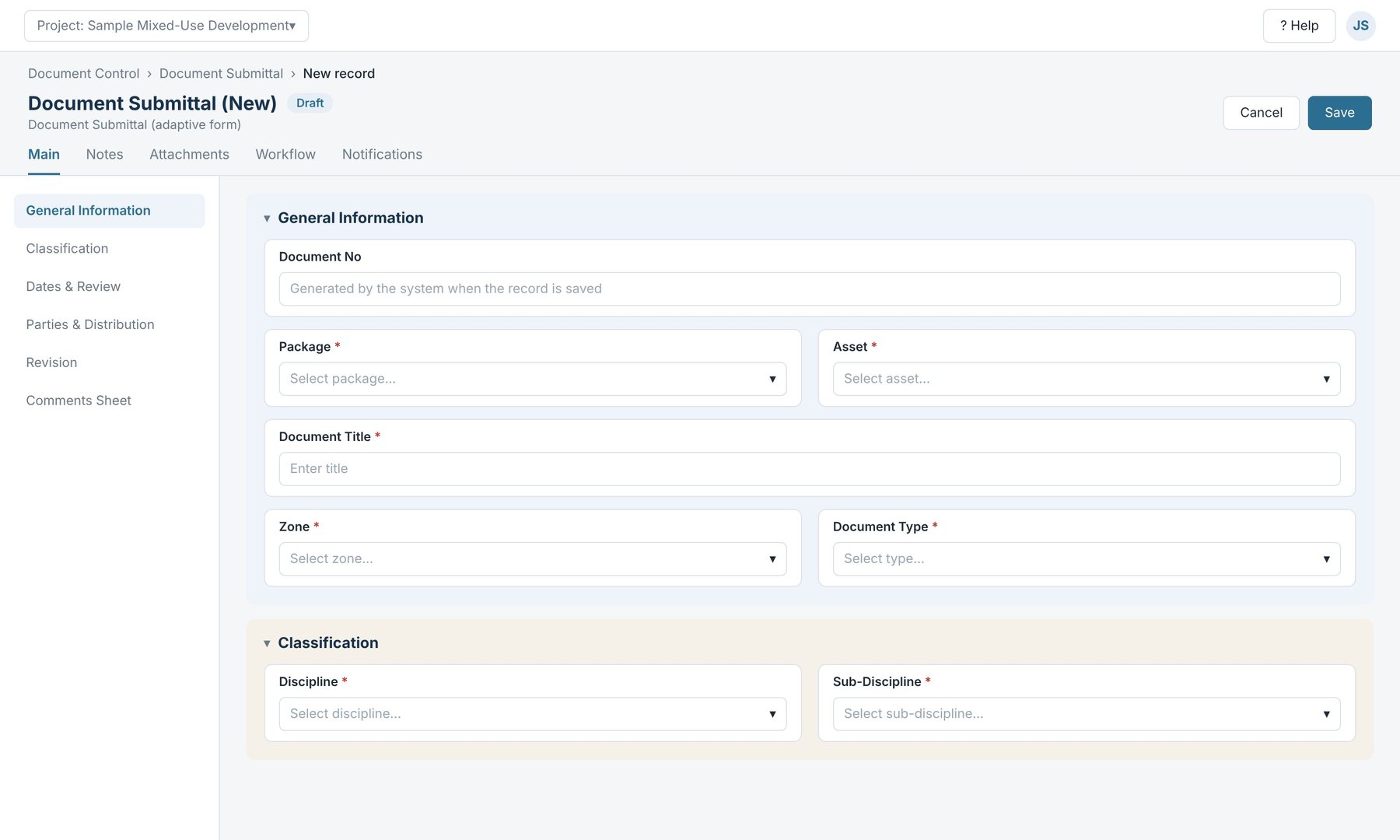
PMWEB Document Submittal: is the live form. A new record opens with the General Information section: the Document No is left blank because the system generates it, and Package and Asset come first because every document is coded to both.
Illustration (sample data): a new Document Submittal record, with the Document No generated by the system
Section
Typical fields
General Information
Document No (generated), package, asset, document title, zone, document type
Classification
Discipline, sub-discipline (filtered by discipline), stage, work order
Revision, revision date, record number (generated), workflow status
Comments Sheet
Comments sheet reference (generated) and a grid of comments by section, reviewer and response
Illustration (sample data): parties and distribution, with the Confidential and Comments Resolution Sheet switches
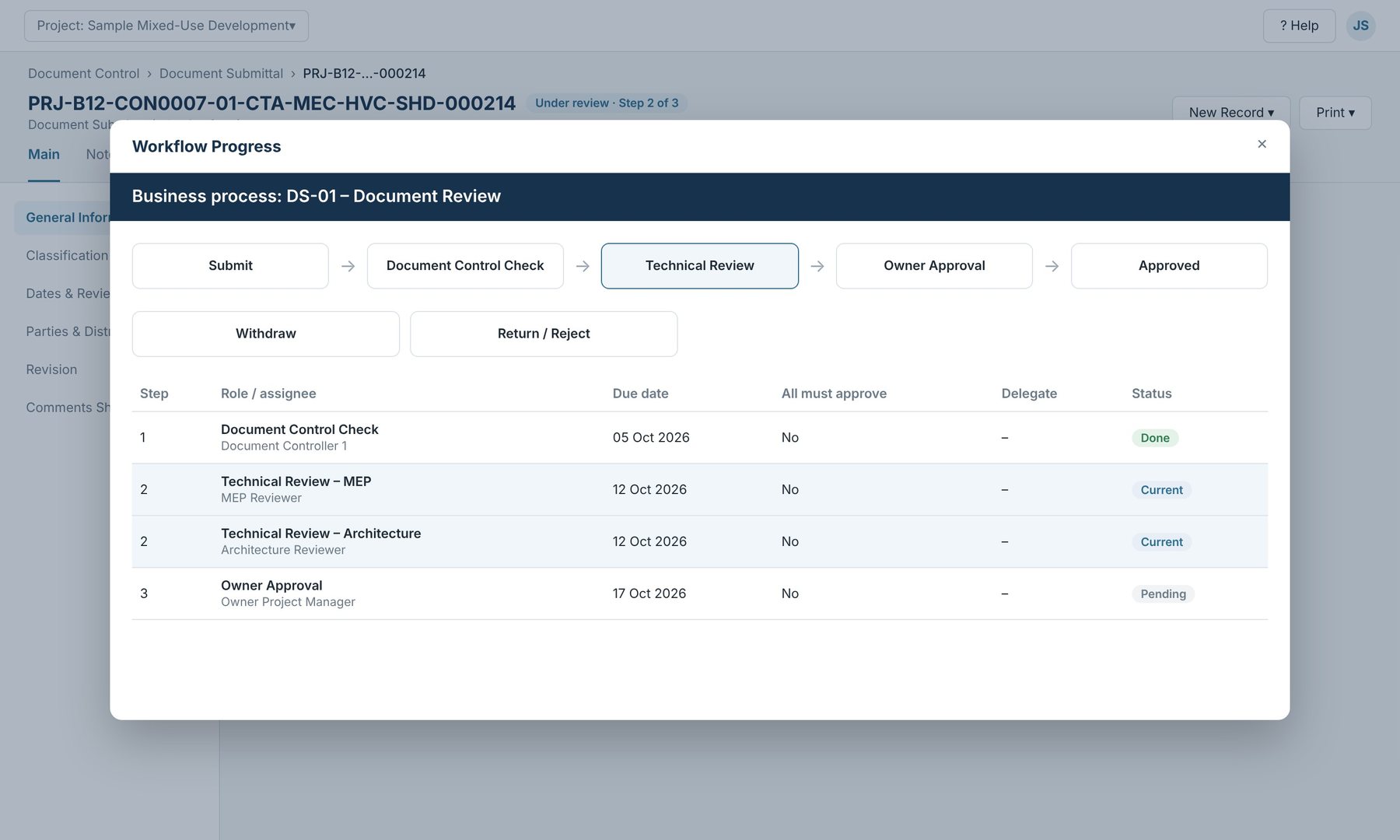
Each submittal runs through a review workflow. In a typical set-up, document controllers check the submission first, technical reviewers review it next, and the owner approves last. Each step can have several reviewers, with withdraw and reject paths and a due date on every step.
Illustration (sample data): workflow progress of a document review with three steps and parallel technical reviewers
Aconex Document Submittal: is needed only when history is migrated from Aconex. It holds the imported history, searchable by package, asset, title and Aconex Tracking ID. PMWEB Letter handles correspondence without a workflow: letters are distributed by notification, which is how most correspondence works in practice.
Closing the Gaps for Document Controllers
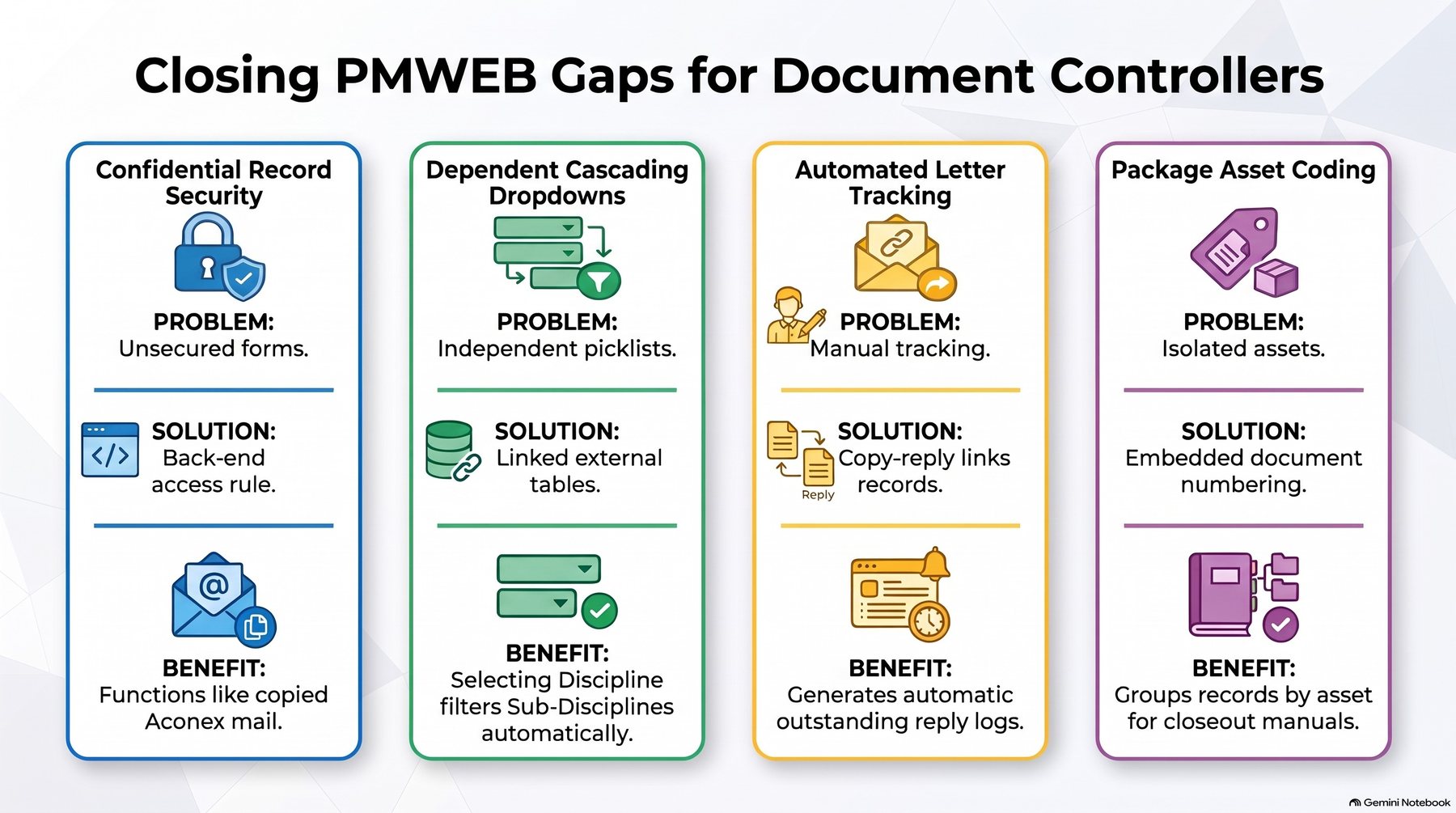
Adaptive forms cover most of what Aconex does. Four things needed extra work, and they are the reason document controllers accepted the change.
Infographic 4 – Closing PMWEB gaps for document controllers
Numbering that carries on from Aconex
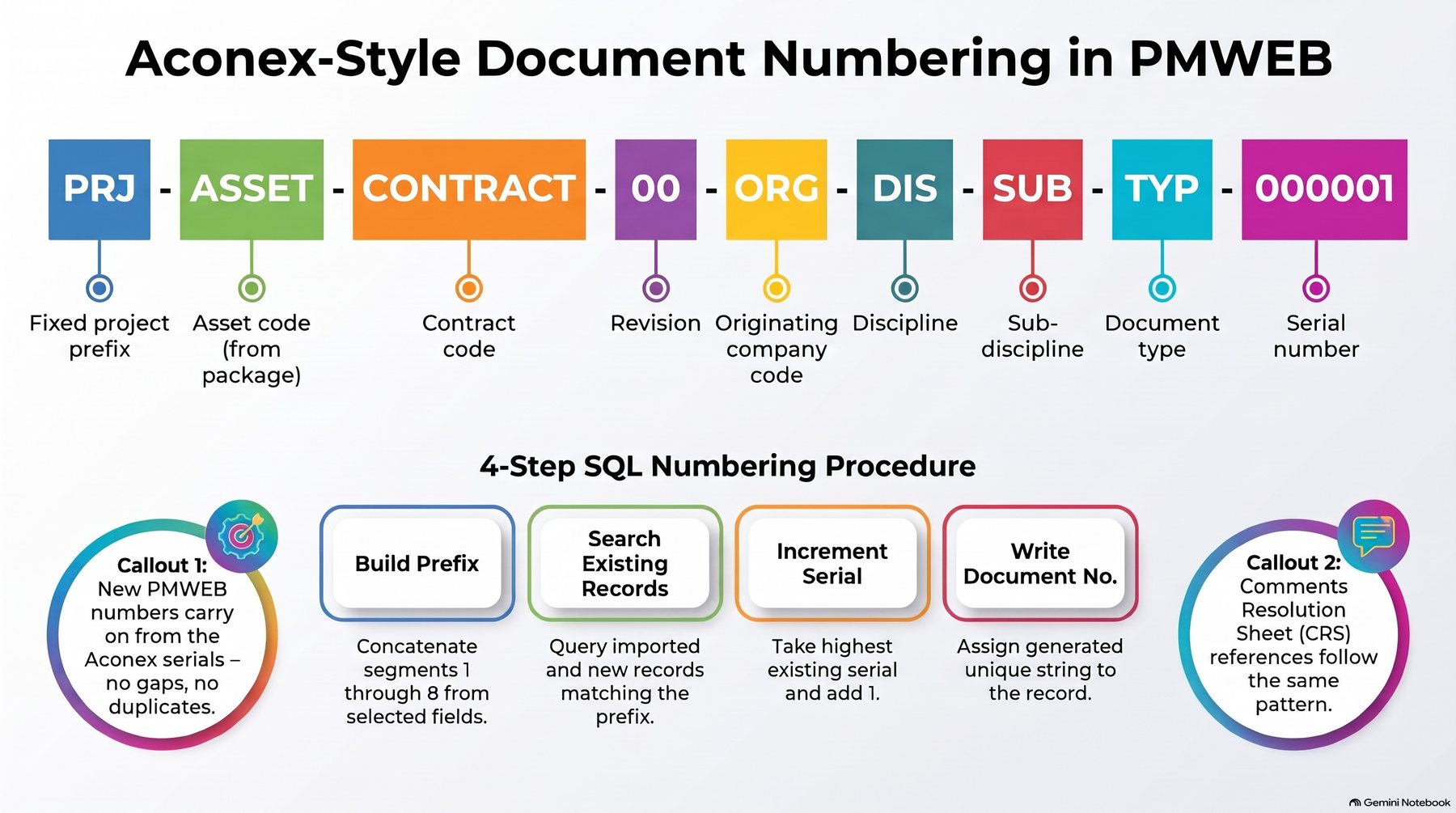
The Document No is built by a SQL stored procedure from nine segments: a fixed project prefix, the asset code, the contract code, the revision, the originating company, the discipline, the sub-discipline, the document type and a serial number. The procedure searches existing records, imported and new, for the same prefix, takes the highest serial and adds one. New PMWEB numbers therefore continue the Aconex sequence with no gaps and no duplicates. Comments Resolution Sheet references follow the same pattern.
Infographic 5 – Aconex-style document numbering and the stored-procedure logic
Confidential records
Adaptive forms have no record-level security, so the client added it in the back end. When a record is marked Confidential, only the two companies on the record and the people the document controller adds on its Notifications tab can see it. This is the PMWEB equivalent of copying someone on an Aconex mail, and it is a good candidate for a standard PMWEB feature.
Cascading discipline lists
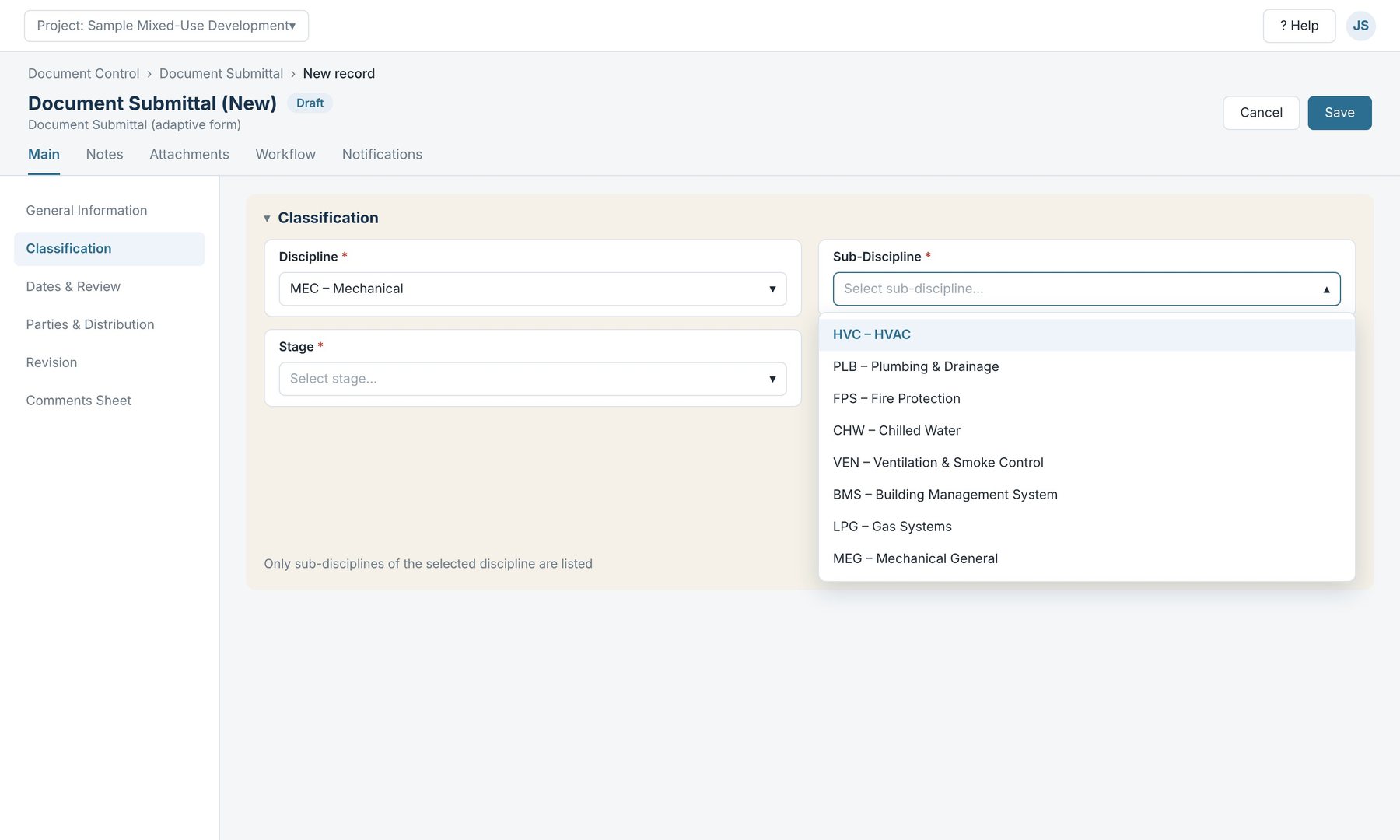
Built-in forms lack dependent picklists, a common complaint from document controllers. An external table holds each sub-discipline against its discipline, and a link registered in PMWEB's configuration table filters the list. Choosing MEC-Mechanical shows only the mechanical sub-disciplines.
Illustration (sample data): the Sub-Discipline list filtered by the selected discipline
Letters that track their own responses
In Aconex, document controllers tracked letter responses by hand. In PMWEB the sender sets the status to Response Required. The recipient replies by copying the letter, which generates a new number and links the original letter in the attachments. When the reply is sent, the original letter's Responded flag switches to Yes, so outstanding responses can be listed at any time.
What Changes, Role by Role
For each stakeholder, the change is small where it matters most and large where it adds value.
Stakeholder
What changes
Document controllers
Same fields, terms, picklists and numbering as Aconex. New: no manual response logs, fewer data-quality fixes, and documents coded to package and asset from the start.
Reviewers and technical leads
Review tasks with due dates arrive in PMWEB, and comments go into a structured comments sheet instead of marked-up PDFs and emails.
Contractors and consultants
One submission screen that looks like the Aconex upload they know, with the document number generated for them.
PMIS managers
Adaptive forms, lists and workflows configured in PMWEB, plus a small set of documented back-end functions (numbering, confidentiality, cascading lists) to own and test at upgrades.
Project managers
Control of who reviews what and when, and confidential records limited to the right parties.
Programme managers and PMO
The same forms and numbering rules applied consistently across every project in the programme.
Key takeaway
The adaptive forms emulate Aconex fields, terms and functions, so Aconex users move to PMWEB without facing unfamiliar screens.
Numbering that continues the Aconex serials, confidential records, cascading lists and self-tracking letters close the gaps document controllers care about.
PMWEB becomes the single system of record for documents as well as cost, contracts and schedules.
Next in the series: Part 3 covers the optional Aconex history import for projects already on Aconex, on-premise deployment and the rollout plan.
Bassam Samman, PMP, PSP, EVP, GPM, is CEO and Chairman of CMCS FZCO, the PMWEB Authorized Implementation Partner for the GCC and MENA and PMWEB Global Partner of the Year 2025. He has more than 40 years of capital project experience, is a co-founder of the PMI Arabian Gulf Chapter and the author of four books on digitalising project delivery.