Moving from Aconex Without Losing History — Migration, Hosting and Rollout
By Bassam Samman, PMP, PSP, EVP, GPM · CEO & Chairman, CMCS FZCO
A project that is already running on Aconex cannot afford to lose a single document, revision or comment when it moves. For those projects, the Aconex history can be imported into PMWEB in full. New projects need none of this and start directly in PMWEB.
Part 2 described the Aconex-style forms that document controllers now use in PMWEB. This part covers what happens around them: bringing the Aconex history across for projects that started on Aconex, choosing where PMWEB runs, and rolling the solution out on a new PMWEB instance.
Based on real implementations
This series is based on real PMWEB implementations, not a concept: CMCS has migrated two clients from Aconex to PMWEB, including a major real estate developer in the Gulf region. Client names and client data are withheld; the form illustrations and dashboards use sample data.
Is this article for you?
Yes, if you are planning, approving or taking part in the move:
PMIS managers and IT: the history import, the match key, server capacity and the hosting choice.
Document control managers: the parallel run, cut-over and checks that numbering continues correctly.
Project and programme managers: when to move a live project and how to avoid disruption to reviews in progress.
Executives and security officers: on-premise versus PMWEB-hosted, and what each means for data control and PMWEB AI.
Contractors and consultants: what changes for you on cut-over day.
The delivery risk this part addresses
Moving a live project between platforms can break the evidence chain: approvals, comments and dates that later support claims, audits and handover. Importing the full Aconex history, keyed on the Aconex Tracking ID, keeps that chain intact, and a planned cut-over avoids losing reviews in progress.
Option for Projects Already on Aconex: Bringing the History Across
When you need this step
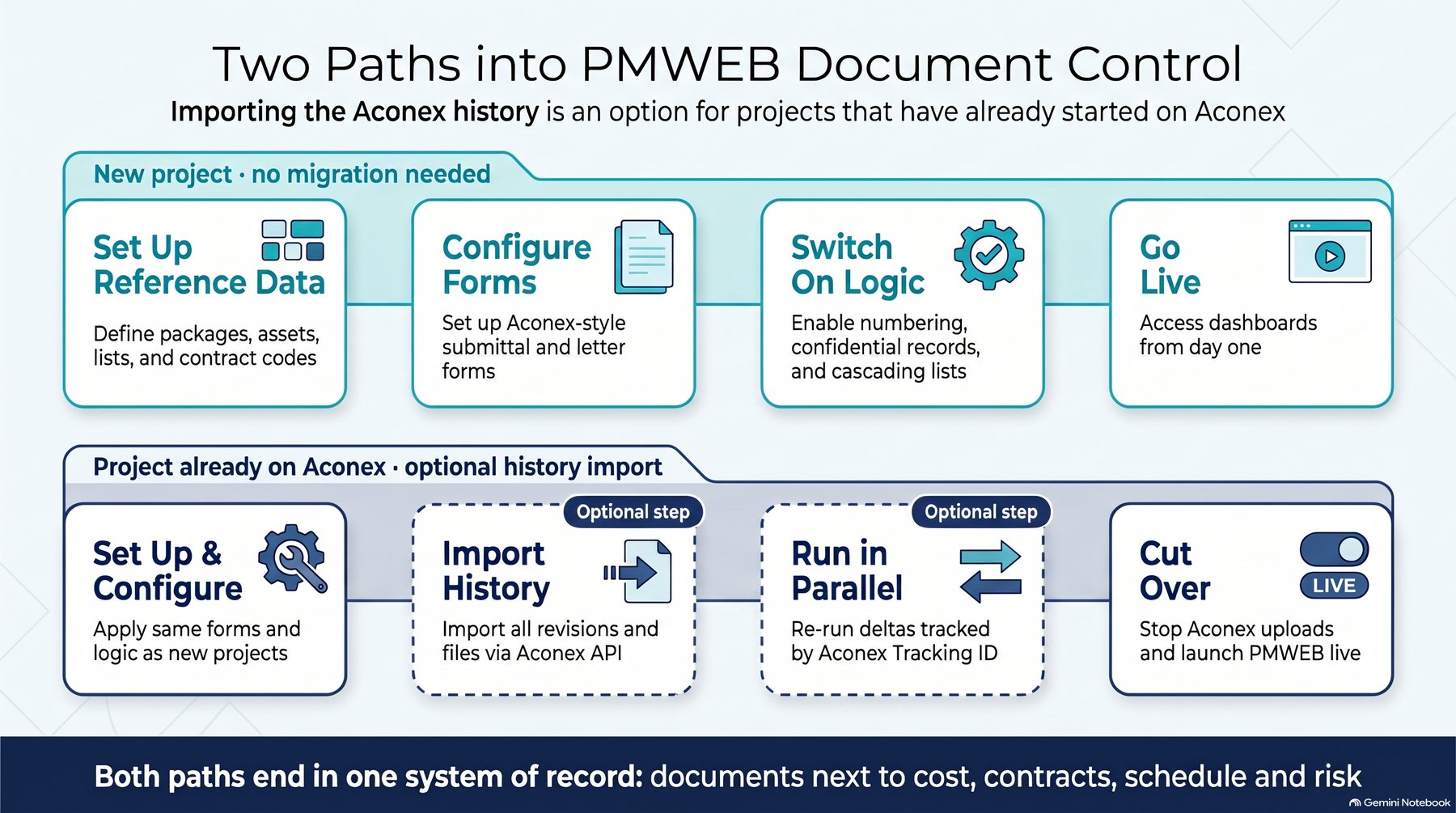
A new project can start directly in PMWEB with the Aconex-style forms described in Part 2; there is nothing to migrate. This step is for projects that have already started using Aconex and need to move to PMWEB mid-stream, for example when the owner standardises on one platform or an Aconex subscription ends. It ensures nothing recorded in Aconex is lost.
Infographic 1 – Two paths into PMWEB document control
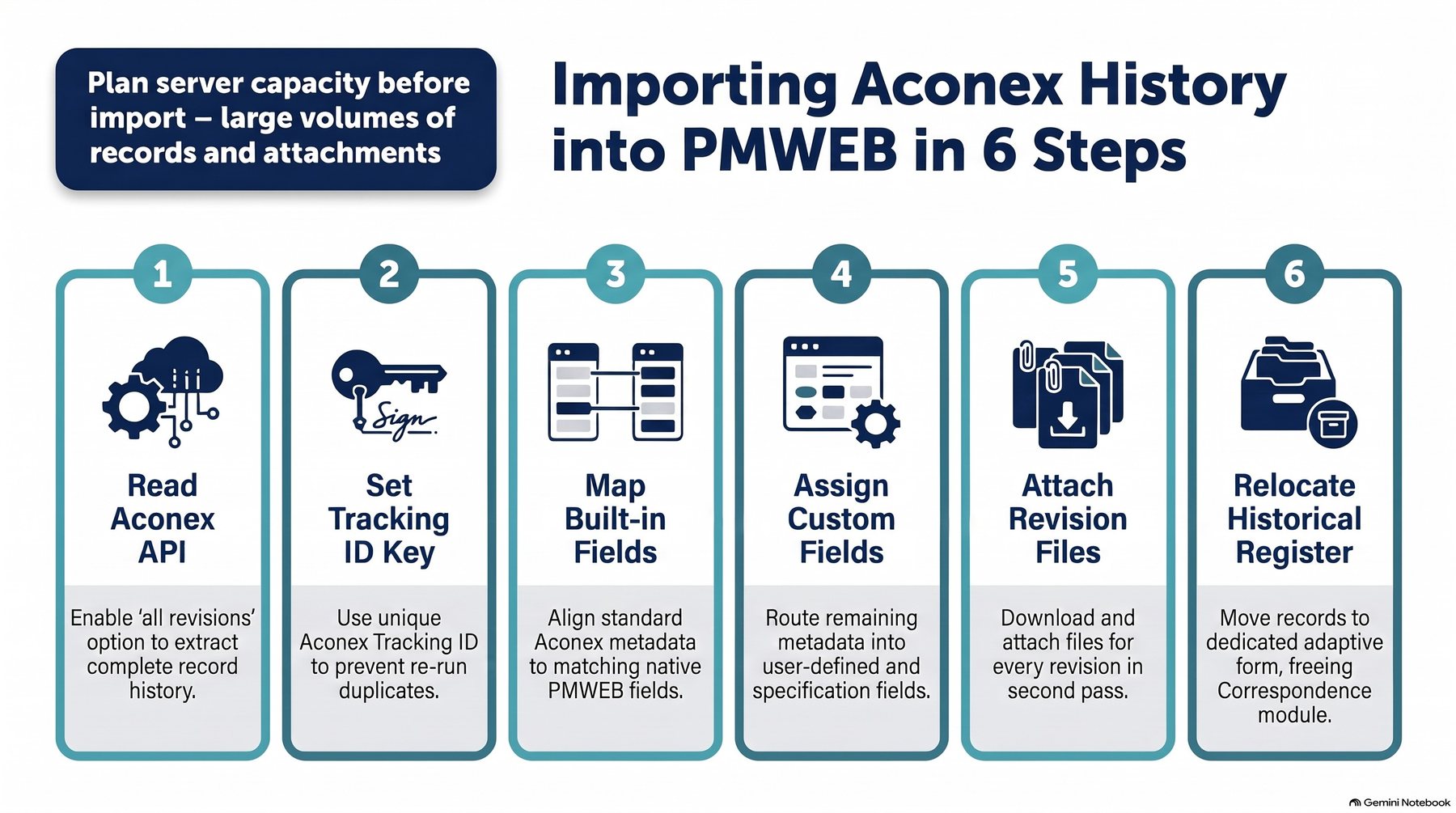
For those projects, a custom .NET application reads each project's documents through the Aconex API and writes them into PMWEB. Nothing is retyped and nothing is left behind.
Infographic 2 – Importing Aconex history into PMWEB in six steps
Three decisions made the import reliable:
All revisions, not just the latest. By default the Aconex API returns only the current revision of each document. Switching on the all-revisions option brings the complete history.
One match key. Every Aconex record has a unique ID, stored in PMWEB as the Aconex Tracking ID. The import can be re-run as often as needed without creating duplicates, which matters during the weeks when both systems are still live.
Built-in fields first, custom fields for the rest. Aconex metadata goes into PMWEB's standard fields wherever one fits. Discipline, sub-discipline, companies, confidentiality and the Aconex dates go into user-defined and specification fields.
Metadata was loaded first and the files in a second pass. The history was first loaded into PMWEB's Correspondence module and then moved to its own register, Aconex Document Submittal, so the history never mixes with live work and Correspondence stays free for normal use. On a project that starts in PMWEB, this register is simply not needed. Volumes are large, so server capacity should be planned before the import starts.
On-Premise When the Project Requires It
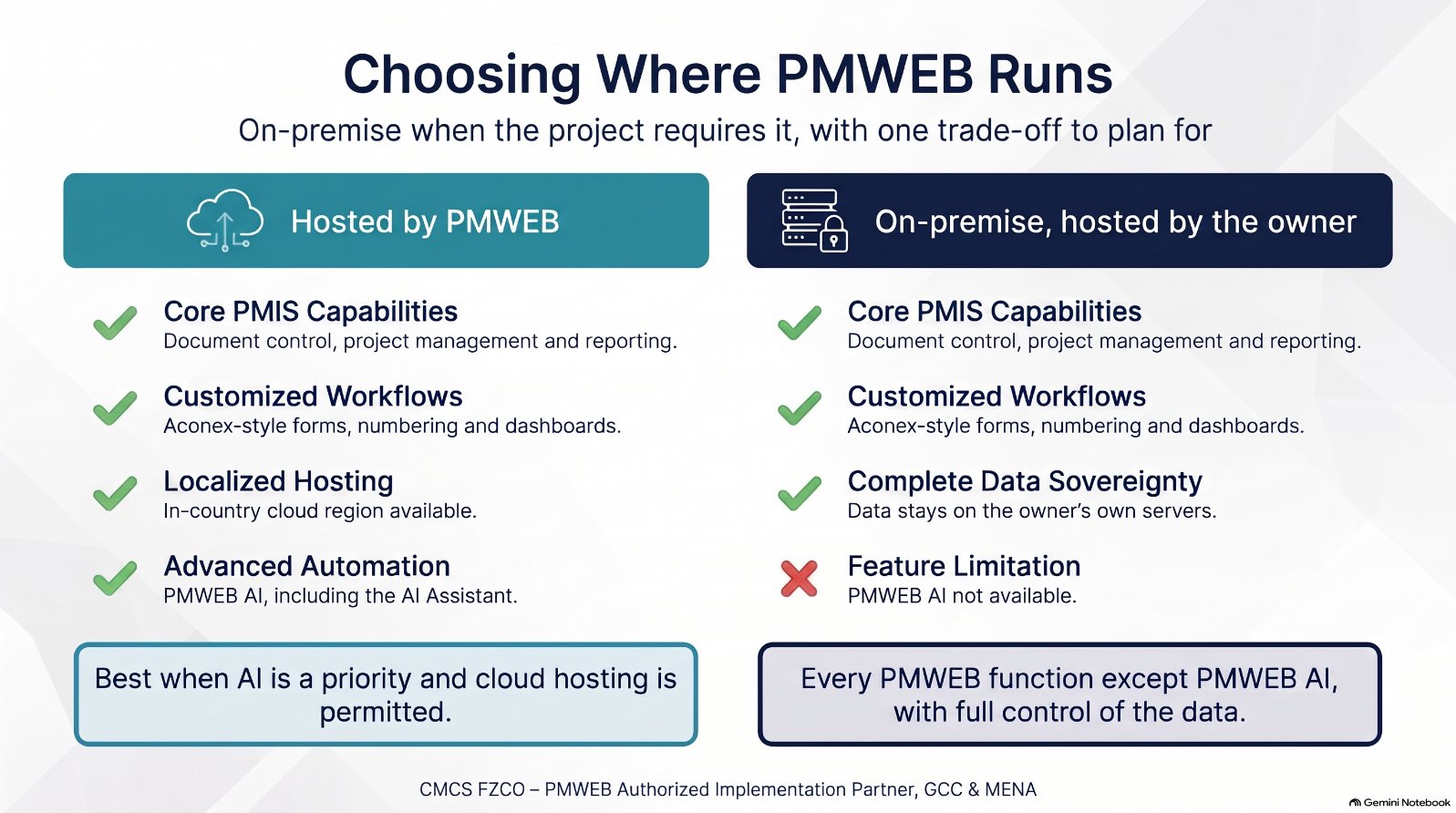
Many government entities, defence and security projects, critical infrastructure owners and some giga-projects require their document management system and PMIS to run on their own servers, inside their own network. Cloud-only document platforms cannot meet that requirement. PMWEB can: it is available as a cloud service hosted by PMWEB and as an on-premise installation on the owner's infrastructure, with the same modules, adaptive forms, workflows and reports.
That makes PMWEB one of the few ways to bring document control and project management into one platform on projects that cannot use the cloud. The developer featured in this series chose to run PMWEB on-premise for cybersecurity reasons, and everything described here, from the Aconex import to the dashboards, runs on its own servers.
Infographic 3 – Choosing where PMWEB runs
The trade-off to plan for
PMWEB AI functions, including the PMWEB AI Assistant, are only available when the instance is hosted by PMWEB. An on-premise instance hosted by the owner runs every document control, project management and reporting function described in this series, but without PMWEB AI.
Owners can choose per programme: a PMWEB-hosted instance, for example in an in-country cloud region, to use PMWEB AI, or an on-premise instance for maximum control of data.
Rolling It Out on a New PMWEB Instance
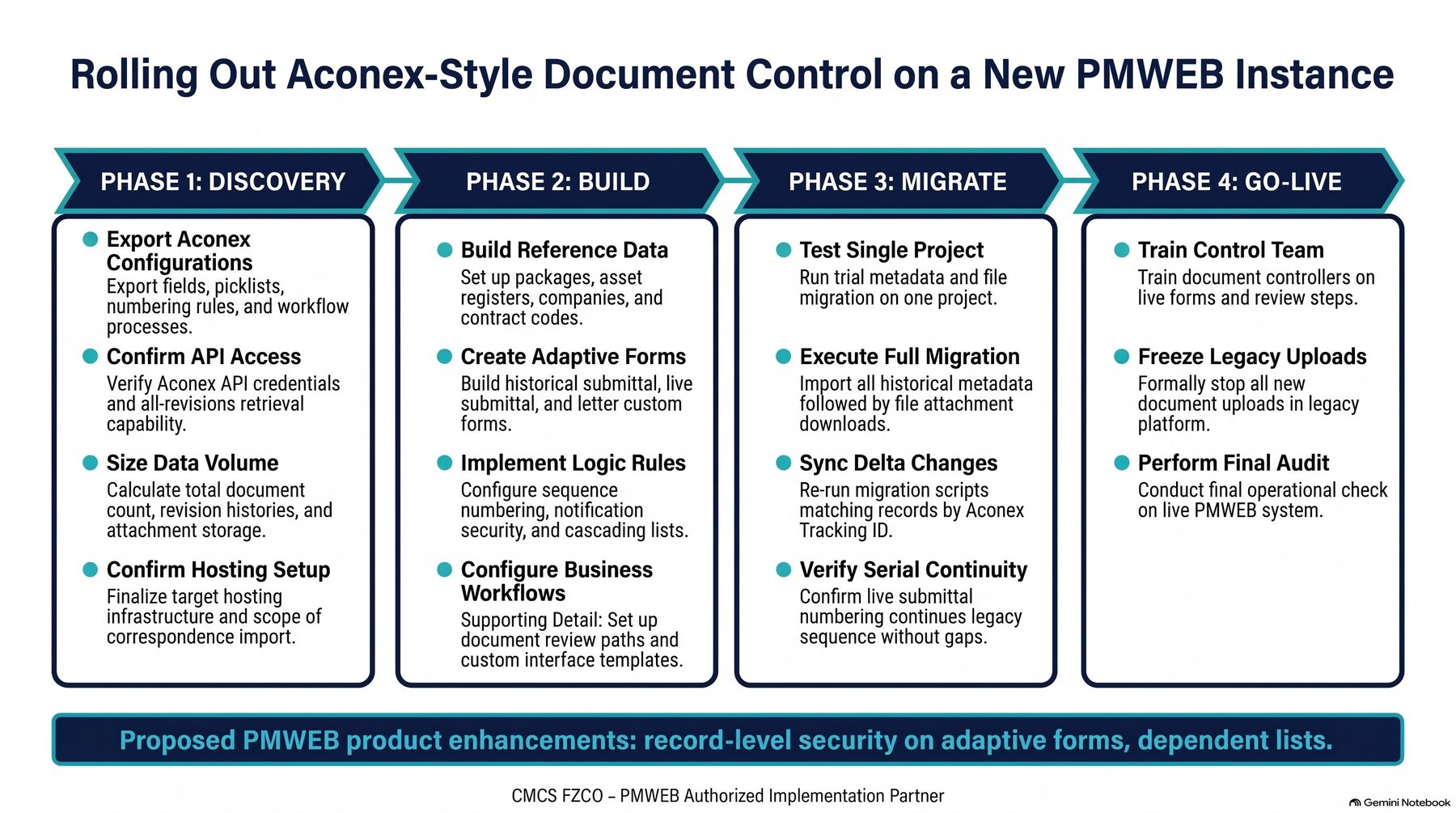
The approach is repeatable. On a new PMWEB instance the work runs in four phases. A project that starts in PMWEB skips the migration phase; one that has already started on Aconex runs all four.
Infographic 4 – Rollout roadmap for a new PMWEB instance
Discovery. Export the Aconex project settings: fields, picklists, numbering pattern, confidentiality rules and review workflows. Confirm API access and size the history.
Build. Set up packages with their assets, the lists, companies and contract codes, then the three adaptive forms, the numbering procedure, confidential security and cascading lists.
Migrate (projects already on Aconex). Test the import on one project, run the full import of metadata and then files, and re-run by Tracking ID until cut-over. Check that new numbers continue the legacy serials.
Go live. Train document controllers, stop Aconex uploads, publish the dashboards and switch on the weekly pending-actions report.
Checklist — before you replace your document platform
Questions to ask
Can your document controllers create, number and review a submittal in the PMIS the same way they do today?
If the project has already started on Aconex, will its full history, with every revision and file, be in the PMIS on the day you switch?
Is every document coded to a package, an asset and a contract?
Can you list every overdue review step, by person, without an export?
Recommendations
Mirror the document platform's fields, numbering and terms before asking anyone to change habits.
Key the migration on the source system's unique ID so it can be repeated safely.
Publish the dashboards in the first week, so the benefit is visible from day one.
Who Does What During the Move
A smooth move depends on every stakeholder knowing its part.
Stakeholder
Role in the move
Executives
Approve the decision to standardise on PMWEB, the hosting choice and the cut-over date.
Programme managers and PMO
Sequence projects, choosing which start directly in PMWEB and which migrate their Aconex history.
PMIS managers and IT
Run discovery, build the forms and logic, run the import, plan server capacity and own the hosting set-up.
Document control managers
Validate imported records, run the parallel period, confirm numbering continuity and train document controllers.
Project managers
Agree the cut-over with contractors and consultants so that no review in progress is lost.
Contractors and consultants
Stop uploading to Aconex at cut-over and submit in PMWEB from the agreed date.
Key takeaway
Projects already on Aconex can bring their full history with them, keyed on the Aconex Tracking ID; new projects simply start in PMWEB.
Where the project requires it, everything runs on-premise on the owner’s own servers; PMWEB AI is available only on PMWEB-hosted instances.
The rollout follows four repeatable phases: discovery, build, migrate and go live.
Next in the series: Part 4 shows the dashboards, the pending-actions report and how PMWEB AI benefits from the complete project picture.
Bassam Samman, PMP, PSP, EVP, GPM, is CEO and Chairman of CMCS FZCO, the PMWEB Authorized Implementation Partner for the GCC and MENA and PMWEB Global Partner of the Year 2025. He has more than 40 years of capital project experience, is a co-founder of the PMI Arabian Gulf Chapter and the author of four books on digitalising project delivery.