
Article 4 of 4 · PMWEB Replacing Aconex

Seeing Every Submittal — Dashboards, Reporting and PMWEB AI

By , PMP, PSP, EVP, GPM · CEO & Chairman, CMCS FZCO

Once submittals, reviews and letters live in the same database as cost, contracts and schedule, reporting stops being a monthly spreadsheet exercise. Every figure comes from one source, every day, and an AI assistant can finally see the complete picture.

Parts 1 to 3 covered why document control belongs in the PMIS, how the Aconex-style forms work and how to move across. This final part shows what owners gain once the data is in one place: dashboards for document controllers and executives, a weekly pending-actions report, and PMWEB AI working on the complete project picture.

Based on real implementations

This series is based on real PMWEB implementations, not a concept: CMCS has migrated two clients from Aconex to PMWEB, including a major real estate developer in the Gulf region. Client names and client data are withheld; the form illustrations and dashboards use sample data.

Is this article for you?

Yes, if you want to see where every submittal stands without exports and spreadsheets:

  • Document controllers: the daily workbench and the weekly pending-actions list.
  • Reviewers: your own open actions, due dates and response performance.
  • Project managers: overdue reviews, plan versus actual submissions and contractor quality on your project.
  • Programme managers and PMO: portfolio scorecards and review performance across projects.
  • PMIS managers: how the dashboards read PMWEB data and are displayed inside PMWEB.
  • Executives and other stakeholders: the seven numbers that tell you whether document review is healthy.

The delivery risk this part addresses

The most expensive document problems are the ones discovered late: an overdue review that has already delayed procurement, or a contractor whose submittals keep failing. Daily dashboards on the same database as cost, contracts and schedule make those problems visible while there is still time to act.

Dashboards and Reporting

Once submittals, reviews and letters live in PMWEB, reporting stops being a monthly spreadsheet exercise. A set of PMWEB Power BI dashboards reads the same PMWEB records every day and gives each audience the view it needs. Microsoft Power BI has a built-in integration with PMWEB: it reads the data directly from PMWEB and the dashboards are displayed within PMWEB itself, so users never leave the platform to see them.

DashboardForQuestion it answers
Executive overviewOwner executives, PMOIs document review healthy across the portfolio, and where is it at risk?
Submission plan vs actualExecutives, project controlsAre contractors submitting documents when the programme says they should?
Document controller workbenchDocument controllersWhat arrived, what is stuck, what is late and what needs cleaning up today?
Review turnaround & SLADocument control managerWhich review step loses time against its service level?
Quality & resubmissionsPMC lead, package managersWhich companies and document types are approved first time?
Reviewer workloadReviewers and their managersWho holds the open actions and how fast does each reviewer respond?
Correspondence responsesDocument controllersWhich letters needing a reply are still unanswered?
Pending workflow actionsEveryone, emailed weeklyEvery open review step, by the person who must act

The executive overview puts seven numbers on one page: submittals received, open in review, approval rate, first-time approval, average review cycle, share reviewed on time and overdue actions. A package scorecard flags each package as on track, watch or at risk.

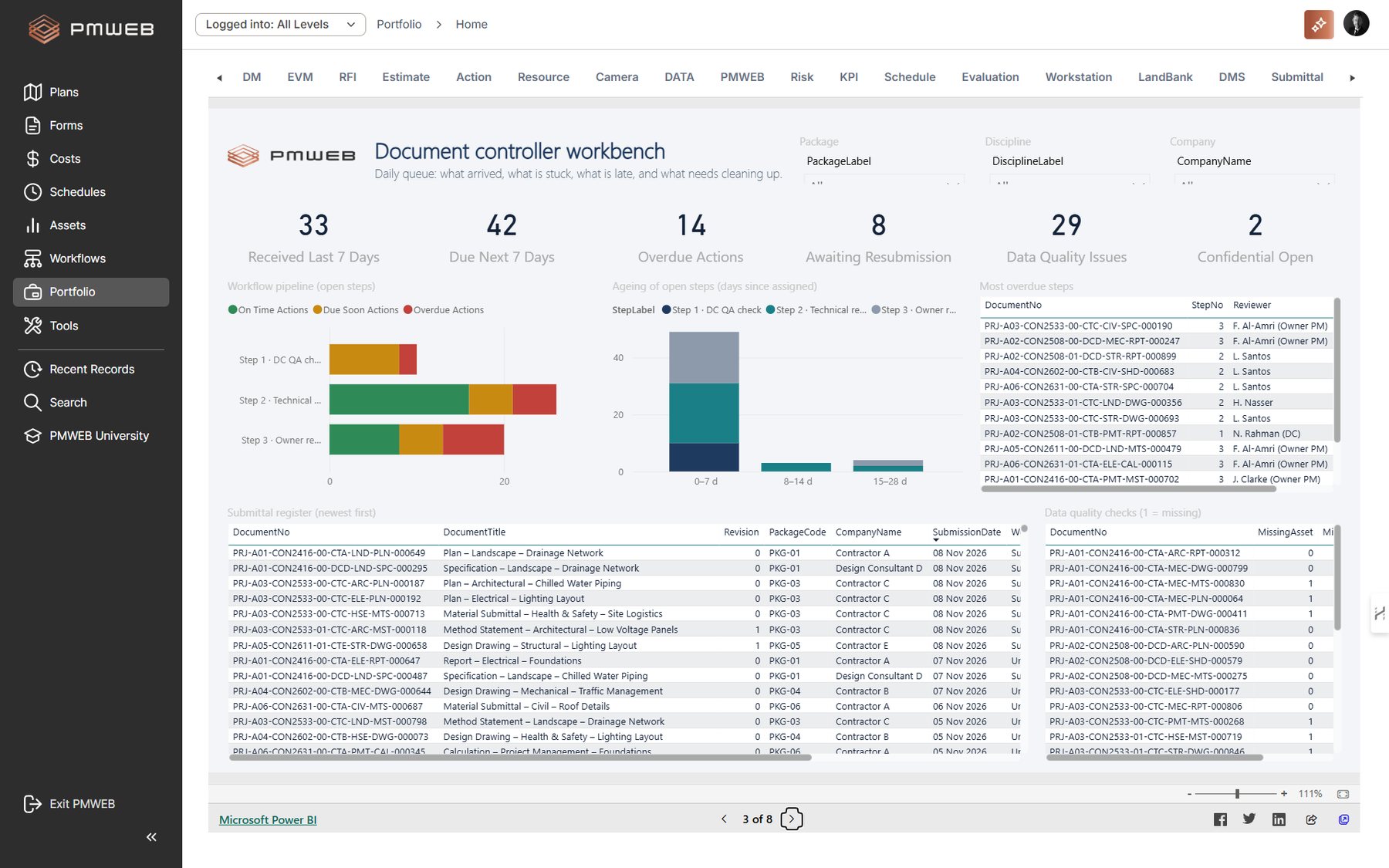
The document controller workbench is the daily queue. It shows what arrived in the last seven days, what falls due in the next seven, where open submittals sit in the workflow, how long they have waited, the most overdue steps, and records missing an asset or a scheduled date.
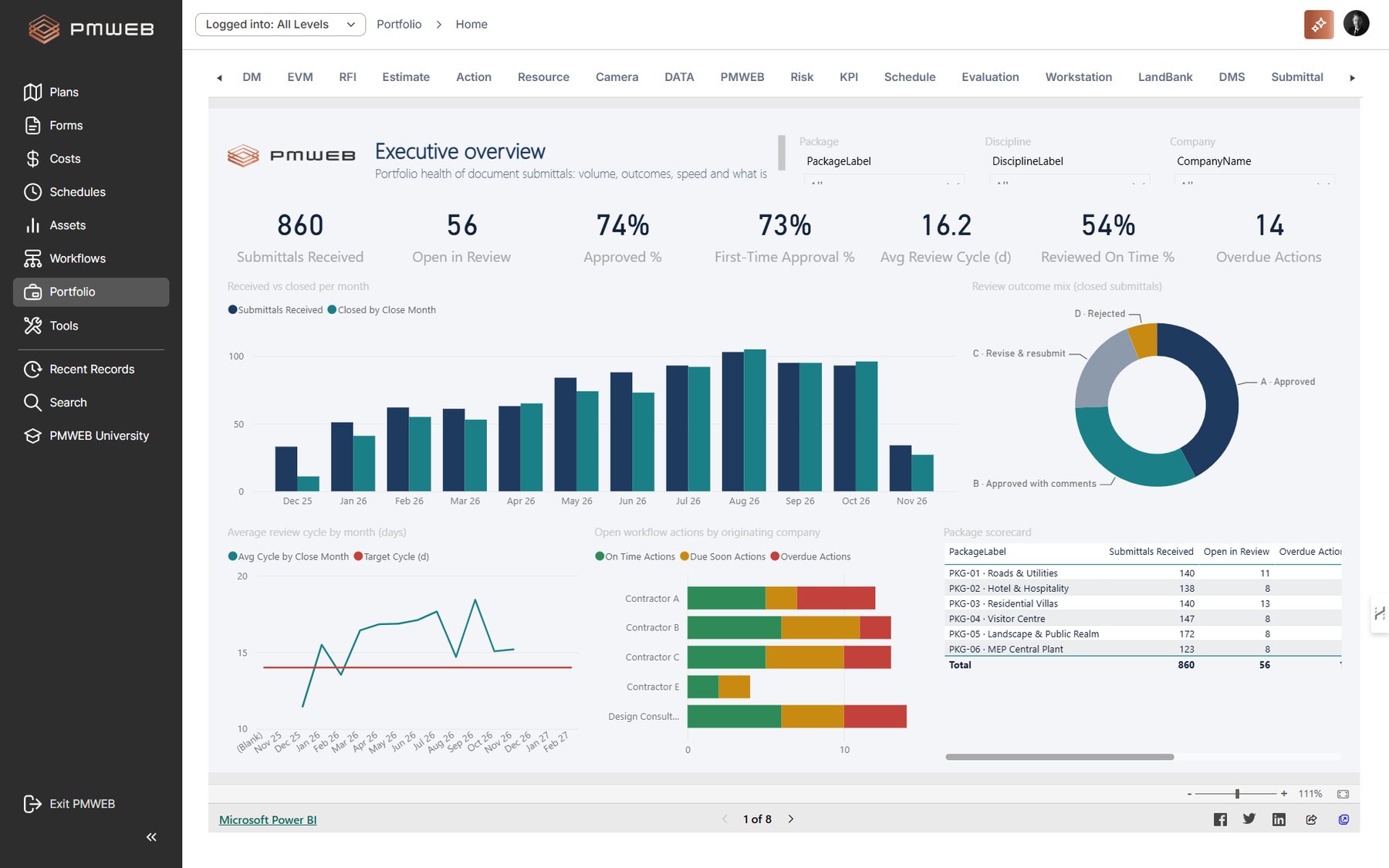
Executive overview dashboard (sample data)
Document controller workbench (sample data)

The pending workflow actions report lists every open review and approval step, grouped by the person who must act, with days pending, days overdue and a status flag. It is the weekly chase-up list for document controllers and each reviewer's personal to-do list. Reviewer performance figures are visible only to the reviewer and their direct manager.
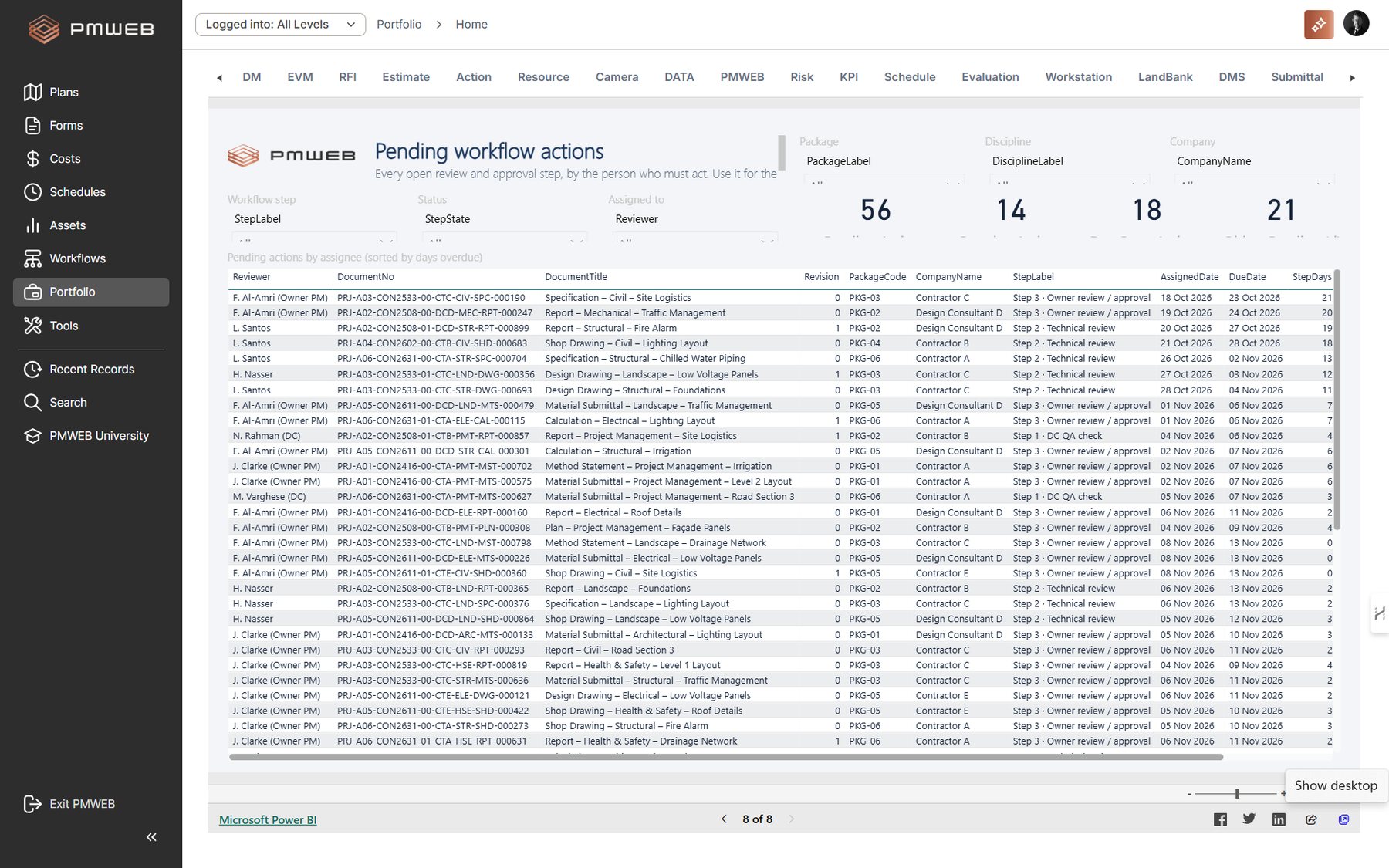
Pending workflow actions report (sample data)

Why this reporting was not possible before

When documents sit in one platform and contracts in another, a dashboard like the package scorecard needs an export from each system and a person to join them. With submittals, letters, packages, assets and contracts in the same PMWEB database, every figure comes from one source, refreshes daily, and can be traced back to the record behind it.

Your View, by Role

Each project stakeholder opens a different view of the same PMWEB data.

StakeholderDashboards and reports
Document controllersDocument controller workbench, correspondence responses and the pending workflow actions report.
Reviewers and technical leadsTheir own rows in the pending actions report and the reviewer workload page, visible only to them and their manager.
Project managersExecutive overview filtered to their project, submission plan versus actual, and quality and resubmissions.
Programme managers and PMOPackage scorecard, review turnaround against SLA and reviewer workload across the programme.
PMIS managersThe data model behind the dashboards, the refresh schedule and role-based security.
ExecutivesExecutive overview: received, open, approval rate, first-time approval, review cycle, on-time share and overdue actions.

Why the Complete Picture Matters Even More with PMWEB AI

Artificial intelligence raises the stakes. An AI assistant can only answer from the data it can see, and the questions owners want answered are never about one process. Which overdue submittals hold up a long-lead purchase order? Which rejected material submittals have already become change orders? Which contractor has the lowest first-time approval and the most extension of time requests? Which HSE method statements are still unapproved for work planned next week?
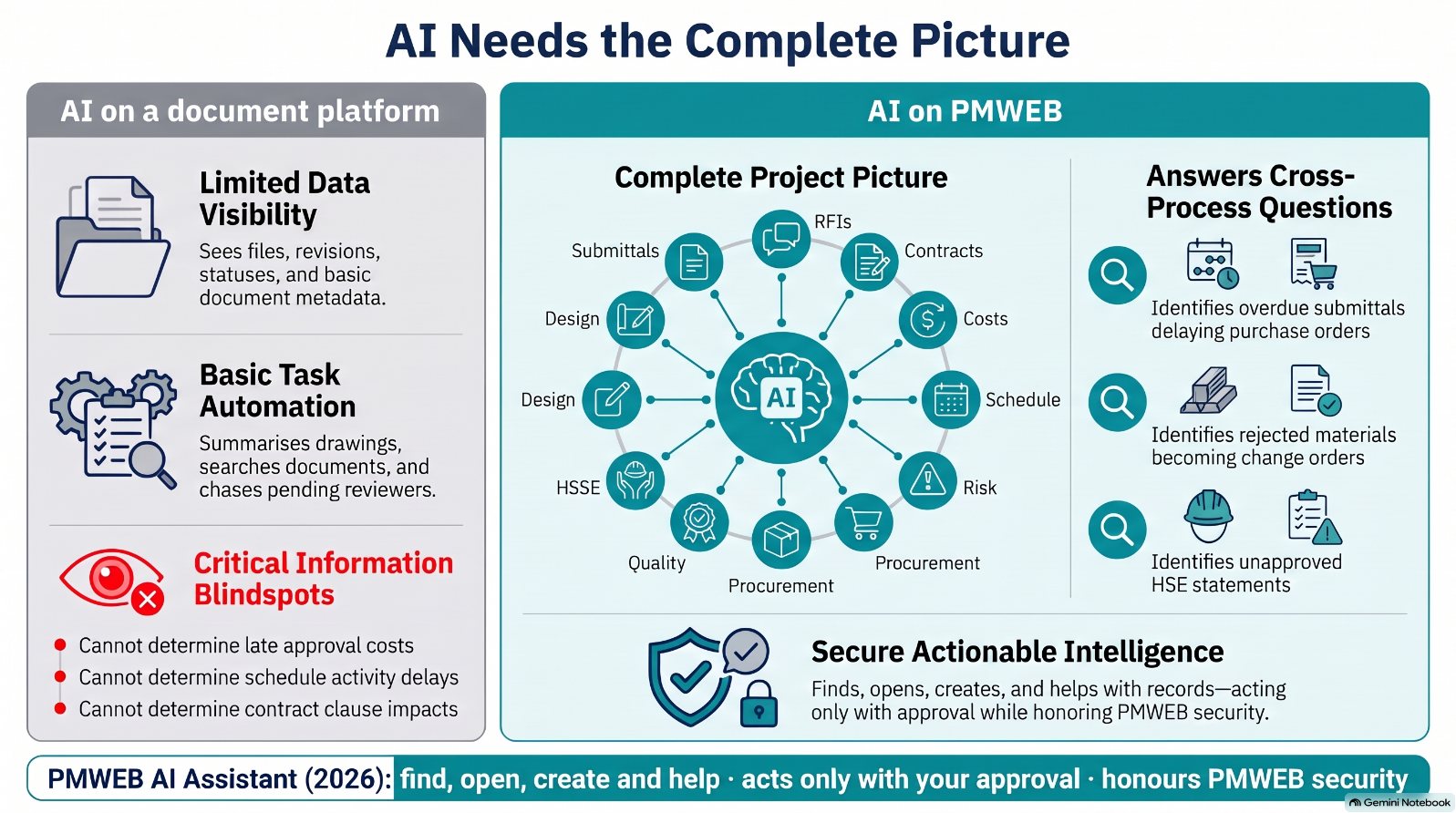
Infographic 1 – AI needs the complete picture

An AI connected only to a document platform sees files and statuses. It can summarise a drawing or chase a reviewer, but it cannot tell you what a late approval costs, which schedule activity it delays or which contract clause it triggers. An AI connected to PMWEB sees the submittal together with the RFIs, the contract, the cost, the schedule, the risks, the purchase orders, the inspections and the HSSE records, all coded to the same package, asset and contract.

  • The PMWEB AI Assistant: in the 2026 release helps users find, open and create records, including adaptive form records such as the submittals and letters described here, and answers how-to questions. It acts only with the user's approval and honours PMWEB security settings, so confidential submittals stay confidential. PMWEB AI functions require an instance hosted by PMWEB; an on-premise instance hosted by the owner does not include them.
  • Later capabilities, such as risk identification,: depend on exactly this: structured, validated data across all project processes in one database, rather than documents scattered across platforms.

Moving document submittals into PMWEB is therefore also preparation for AI. The more of the project lives in one structured platform, the more complete and trustworthy the AI's answers become.

Key takeaway

With submittals in the PMWEB database, every dashboard figure comes from one source, refreshes daily and is displayed within PMWEB.

The pending-actions report turns overdue reviews into a weekly, person-by-person action list.

An AI can only see the complete picture if every project process, document submittals included, lives in the same platform.

Series recap: Part 1 – one platform and one project history; Part 2 – Aconex-style document control in PMWEB; Part 3 – migration, hosting and rollout; Part 4 – dashboards, reporting and PMWEB AI.

Bassam Samman
Bassam Samman, PMP, PSP, EVP, GPM, is CEO and Chairman of CMCS FZCO, the PMWEB Authorized Implementation Partner for the GCC and MENA and PMWEB Global Partner of the Year 2025. He has more than 40 years of capital project experience, is a co-founder of the PMI Arabian Gulf Chapter and the author of four books on digitalising project delivery.

Next step

Bring this to your portfolio.

Tell us which processes matter most to you, and we will show them running in PMWEB.