
Article 2 of 7 · Project Fraud Prevention with PMWEB
Authority Enforced, Not Assumed: Workflows, the DoA Matrix and Delegation in PMWEB
Most project fraud passes through an approval. A wrong estimate, a favoured contractor, an inflated change order or an accelerated payment all need someone to say yes. When the owner cannot prove who said yes, under what authority and on what evidence, the approval itself becomes the fraud's best cover.
Part 1 of this series set out the governance model: a zero-tolerance policy, a procedures manual, an integrated PMIS and top management commitment. This article deals with the control that sits at the centre of all of them, approval authority. It rewrites and expands two of my earlier articles: one on whether individuals can be held to account for deceitful or unauthorised review and approval actions, and one on how well-designed output forms help prevent fraud on formally communicated transactions.
Is this article for you?
Read this if your approvals are routed as document reviews in Aconex, a DMS or a CDE, signed electronically on PDFs, or collected by email. The question is not whether approvals are digital, but whether the system can read the value being approved and enforce the DoA for it. If you advise clients on project governance, the adviser's checklist near the end turns this article into diagnostic questions and recommendations. Ministries of finance and sovereign funds will find a funder's lens on this topic near the end.
Where Approval Authority Breaks Down
On a capital project, the decisions most exposed to fraud are approvals: estimates, the selection of consultants, contractors and subcontractors, specified materials and their substitutes, change orders, interim payment certificates, acceptance of work in place and acceptance of material deliveries. A project team member becomes part of a deceitful act in one of two ways. Either the review or approval is made to obtain an unlawful gain, or the person takes a decision they were never authorised to take. The second is far more common, and it is the one a system can stop outright.
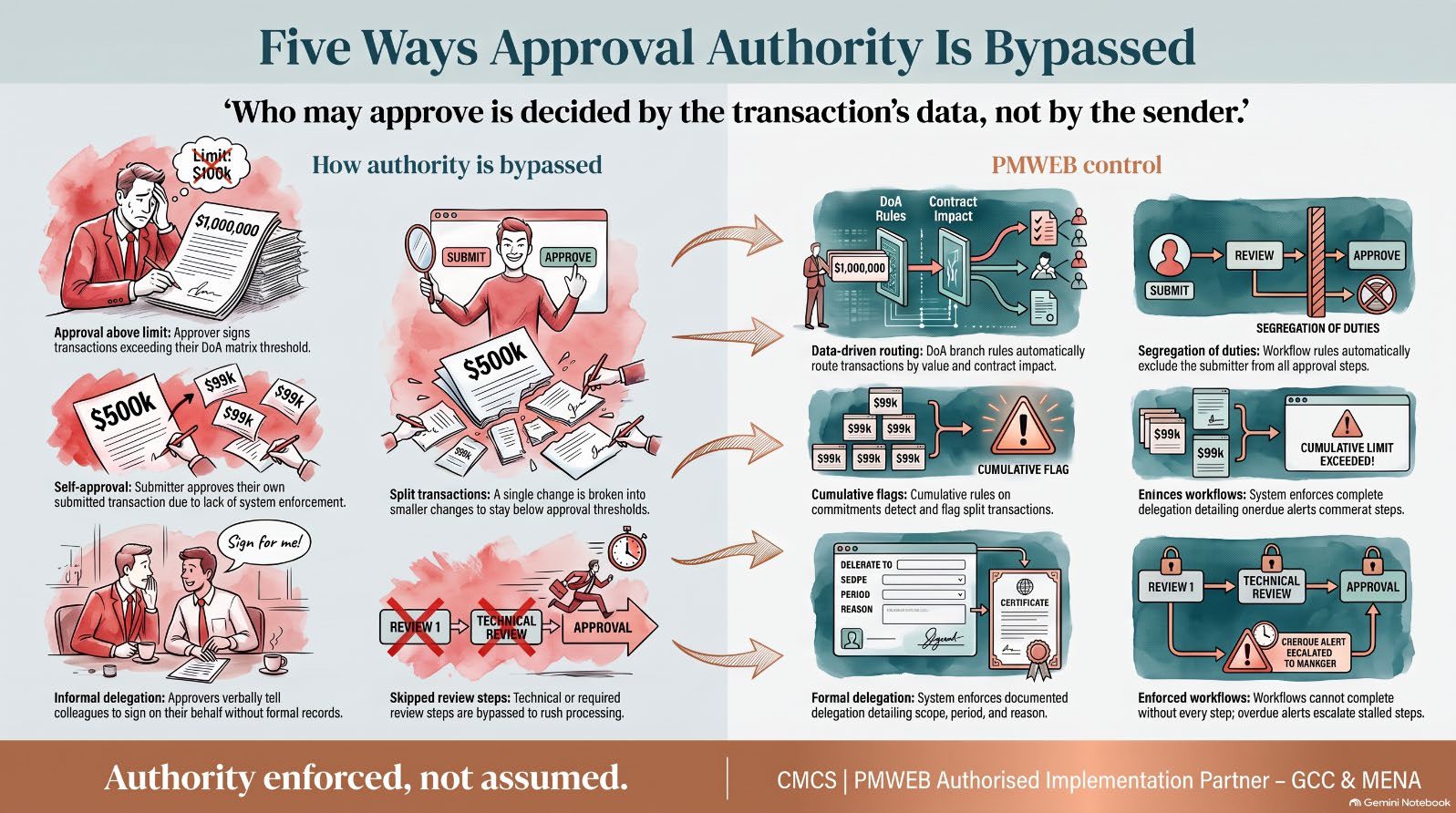
- Approvals above the approver's limit. A project director signs a change order that the DoA matrix reserves for the programme director.
- Submitter and approver are the same person. The segregation of duties exists in the manual but nothing enforces it.
- Split transactions. One change is broken into several smaller changes, each just below an approval threshold.
- Informal delegation. An approver on leave tells a colleague to "sign on my behalf", with no record of the scope or the period.
- Skipped steps. The technical review is bypassed because "the contractor needs payment this week".
- Back-dated or undocumented decisions. Approvals given in a meeting are recorded weeks later, if at all.
Four Requirements for Accountable Approvals
To reduce the risk of fraudulent or unauthorised review and approval, the project management plan needs four things. Each maps directly to PMWEB functionality.

Forms That Capture Only What Each Person Is Authorised to Provide
PMWEB comes with ready-to-use templates for the processes with the highest risk of fraudulent or unauthorised approval: requests for information, site inspections, technical and material submittals, contractor prequalification, bid comparison, contract awards, claim notices, change orders, interim payment certificates, miscellaneous invoices, budgets and budget adjustments. Processes that are not available out of the box, such as material substitution, value engineering proposals, work inspection requests and material inspection requests, are built with the custom form builder, in the language the project needs.
Permissions apply to the template as a whole and to each field within it. The contractor can enter the submitted amount on a progress invoice but cannot touch the approved amount. The cost engineer can enter the assessed value but cannot change the contract value. Each person provides exactly the information the project management plan says they are authorised to provide, and the record shows who entered each value.
Workflows That Embed the DoA Matrix
A workflow is assigned to each business process template. It maps the submit, review and approve steps, the role or user assigned to each step, the time allowed, the step type and the actions available, such as approve, return, reject or request team input. Branches route the transaction according to its attributes. A change order under SAR 1 million may end with the project manager. One between SAR 1 million and SAR 5 million adds the head of commercial. One that changes the contract sum by more than a set percentage, or extends the completion date, goes to the programme director or the board.
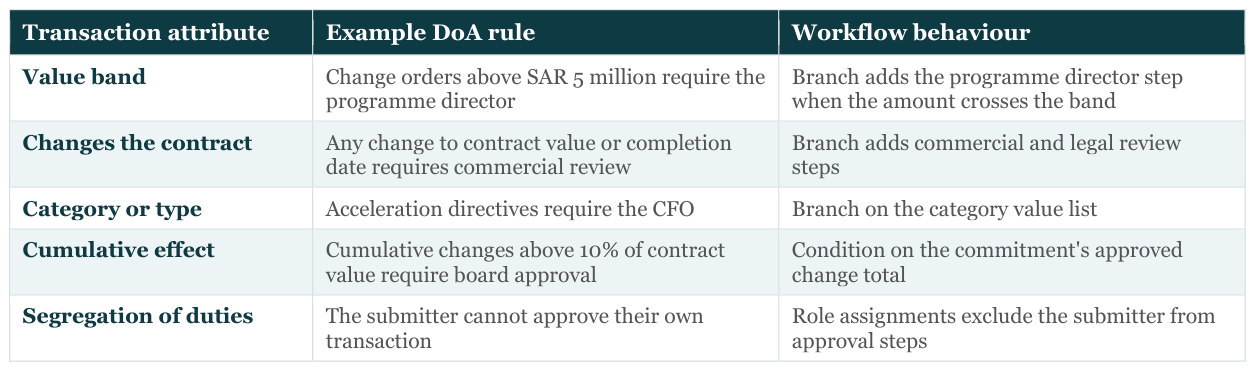
Because the routing is decided by the transaction's own data, nobody can choose a friendlier approver. And because overdue alerts escalate stalled steps, nobody can sit on a transaction indefinitely to pressure a contractor.
Delegation Without Loopholes
Approvers go on leave, travel and change roles. Without a formal delegation process, their approvals are made informally by whoever is available, and the authority trail breaks. PMWEB workflow delegation records each delegation as a controlled action:
- Select the person whose review and approval tasks are being delegated.
- Choose whether it applies to all projects or selected projects, and to all roles the person holds or specific roles.
- Choose a temporary delegation or a permanent replacement, and the person receiving the tasks.
- Decide whether it covers future tasks, tasks already in progress, or both.
- Set the end date for a temporary delegation and record the reason.
- Activate or deactivate the delegation. Every task completed under it shows both the original approver and the delegate.
Output Forms That Tell the Whole Story
Many transactions still leave the system as a formal communication: a change order issued to the contractor, a payment certificate sent to finance, an inspection result returned to site. Whether wet-signed or digitally signed, a well-designed output form has four components. Together they make the communication self-evidencing.

Checklists deserve emphasis. A predefined checklist, aligned with the contract's obligations and entitlements, can be added to any out-of-the-box PMWEB template; on custom forms, it is a table within the form design. Each checklist task is assigned to the person responsible and dated when completed. For a work inspection request, it lists every item to be inspected. For an RFI, it confirms the RFI is a genuine request for information and not a vehicle to create grounds for a variation.

Can Individuals Be Held to Account?
That record protects honest staff as much as it exposes dishonest ones. A project manager who followed the process can show it. Without the record, everyone is equally suspect.
When the Approval Lives in the Wrong System
Many owners believe their approvals are already controlled because they are routed electronically: through document- review workflows in Aconex, another document management system or a CDE, an e-signature service, or a generic workflow tool. These approvals look digital. For fraud control they are often weaker than a wet signature, because they carry the authority of a system without the logic of one.
- The value is invisible to the workflow. A change order uploaded as a PDF is routed by a document-review template. The amount sits inside the file, so no rule can send a SAR 18 million change to the programme director. The DoA is applied, if at all, by the people choosing the reviewers.
- The approved document and the paid figure can differ. The PDF is approved in one system and the amount is keyed into the ERP in another. Nothing proves the two are the same. Every re-keying step is a fraud opportunity.
- A signature proves identity, not authority. An e-signature confirms who signed. It does not confirm they were authorised to approve that value, for that contract, on that date.
- Delegation becomes account sharing. When the approver is away, the workflow is reassigned by an administrator or the approver's login is used by a colleague. The record then shows the wrong person.
- The audit trail records access, not decisions. Document platforms log who viewed, downloaded or stamped a file. That is not the same as who approved what amount under which authority.
The result is false assurance: management sees a digital approval trail and assumes the DoA is enforced. In PMWEB the approval is on the transaction itself, the values are data the workflow can read, and the same approved record posts to the cost ledger and, through integration, to the ERP.
No excuse to stay on the wrong platform
If approvals in your organisation are routed as document reviews in Aconex, a DMS or a CDE, or by email, the DoA cannot be enforced on transaction value. There is no excuse for leaving it there: migrate your approval- bearing processes to a PMIS like PMWEB, starting with change orders and payment certificates, while keeping the document platform for correspondence through PMWEB's integrations.
Monitoring Authority Across the Portfolio
The workflow history of every record is data. Reported across all projects, it shows whether the DoA matrix is working in practice.
Approval Authority Compliance Report — Power BI on the PMWEB database, embedded in PMWEB. Illustrative data.
In the illustrative report, 99.1% of approvals fall within the correct DoA band, which looks reassuring. The exceptions log shows what the average hides: four approvals made above the approver's limit, two transactions approved by the person who submitted them, and a budget transfer approved by a delegate outside the scope of the delegation. The delegate share chart shows one programme where nearly one approval in ten is made by a delegate, twice the tolerance. Each row opens to the record and its workflow log.

Where PMWEB 2026 AI Helps
The PMWEB 2026 AI Assistant gives auditors and PMO staff a faster way into this data. A reviewer can ask it to find all change orders approved by delegates on a programme last quarter, open the record with the largest value, and create an Integrity Red Flag record linked to it, which the assistant does only once the reviewer approves the action. The assistant honours PMWEB security, so it cannot reveal records the reviewer is not permitted to see. Its help mode also explains the workflow and DoA rules configured for a process, which is useful for new staff who need to understand why a transaction was routed the way it was.
Email, Document-Platform and PMWEB Approvals Compared


The funder's lens — ministries of finance and sovereign funds
- Approvals made outside authority are the first sign that a funded entity's governance is not working. Ask for DoA compliance and off-system approvals as standard reporting lines.
- Where the funder holds reserved matters, such as large commitments or changes, those thresholds can be built into the same PMWEB workflow branches, with the funder as an approval step or notified party.
Adviser's checklist — for consultants recommending project governance
Questions to ask in the diagnostic
- Can the client's system read the value of a transaction and route it under the DoA, or does a person choose the reviewers?
- How is delegation recorded during absences, and can it be audited?
- How many approvals in the last year were above the approver's limit or made by the submitter?
Recommendations to put in the governance report
- Embed the DoA matrix as workflow rules on the transaction, not as a reference document.
- Prohibit off-system approvals for any transaction that posts to cost.
- Require output forms to carry the checklist, evidence list and workflow record.
Evidence That Authority Controls Are Working
- DoA compliance. Approvals outside the authorised band, trending to zero.
- Segregation. No record approved by its submitter.
- Delegation discipline. Active delegations all within scope, with an end date and a reason.
- Off-system approvals. No transaction posted to the cost ledger without a completed workflow.
- Output form completeness. Every formal communication issued with checklist, evidence list and workflow record.
An approval is only a control if the system decides who may give it, records who did, and shows the evidence it rested on. PMWEB embeds the DoA matrix in workflow, formalises delegation and prints the full approval story on every output form.
An approval routed through a document platform looks controlled, but if the system cannot read the value it cannot enforce the authority.
Fraud then needs to beat the system as well as the people, and anyone who tries leaves a record.
Moving approval-bearing processes to PMWEB is what turns the DoA from a document into a control.
Next in the series: Part 3 moves to procurement: how PMWEB prequalification, bid comparison against the approved estimate and line-item analysis expose unqualified bidders, unbalanced bids and front-loading before the contract is signed.

Next step
Bring this to your portfolio.
Tell us which processes matter most to you, and we will show them running in PMWEB.