
Article 5 of 7 · Project Fraud Prevention with PMWEB
Payment Integrity: Detecting Abuse of Approval Power on Interim Payment Certificates
Late payment is usually treated as an administrative failure. Sometimes it is a lever. The person who can slow an invoice, cut it or hold the payment has power over a contractor's cash flow, and power that is not measured can be sold.
Delayed payment of interim progress invoices causes contractor cash-flow hardship, and hardship becomes claims and disputes. My earlier article on payment fraud made a further point: delay can also be deliberate. Those approving payments can use their "approval power" to pressure a contractor, to favour another, or to extract something in return. This article rewrites and expands that argument and shows how PMWEB turns every invoice into evidence of how each contractor was treated.
Is this article for you?
Read this if your payment certificates are approved as documents in Aconex, a DMS or a CDE and then keyed into the ERP, if your PMIS cannot integrate with the ERP, or if it has no progress invoice process at line-item level. If you advise clients on project governance, the adviser's checklist near the end turns this article into diagnostic questions and recommendations. Ministries of finance and sovereign funds will find a funder's lens on this topic near the end.
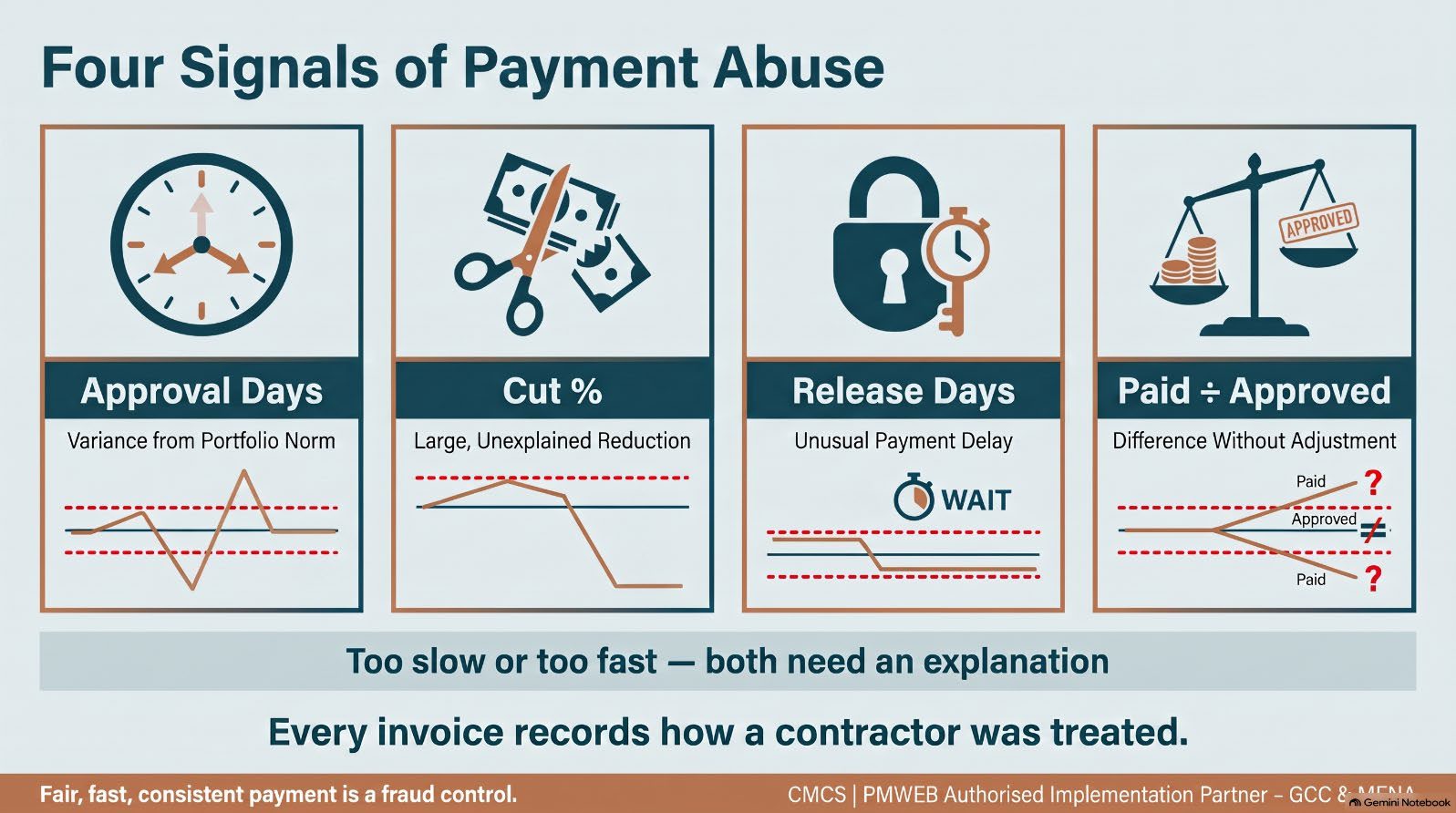
Four Ways Approval Power Is Abused

The opposite pattern matters just as much. Invoices that are approved unusually fast, with almost no cut, for one contractor may indicate favouritism, collusion or payment for work not done.
Capturing Every Invoice at the Granular Level
To find exceptions, the owner needs every interim progress invoice submitted, approved and paid against every contract and purchase order across the whole portfolio. In PMWEB, the progress invoice module captures this out of the box for each commitment:
- Submission. The amount submitted by the contractor or vendor and the submission date.
- Work in place and stored materials. Percent complete by line item, based on measured quantities, an estimate of completion or the linked schedule activity's percent complete.
- Retention. Calculated automatically on work in place and on stored materials.
- Approval. The approved amount for each line and the approval date, from the workflow history.
- Payment. The amount actually paid, the payment date and the transfer details.
Miscellaneous invoices and timesheets capture actual costs that are not tied to a specific contract, such as site storage rental, permits and authority fees. They follow the same pattern: attachments, links, workflow and posting to the cost ledger. All incurred project cost is therefore in one place, and nothing can be paid around the system.
A Checklist Before Submission, a Workflow After It
A predefined checklist sets out what the contractor must verify and provide before an invoice can be formally submitted, aligned with the contract's obligations and entitlements. Typical items include measured quantities signed by the supervision consultant, accepted work inspection requests for the invoiced work, material delivery notes and test certificates for stored materials, updated insurances and bonds, and the subcontractor payment declaration where the contract requires it. Each item is assigned and dated.
This removes one of the most common pretexts for delay: "the invoice was incomplete". If the checklist is complete at submission, the review clock is fair to both parties. If it is not, the record shows what was missing and who returned it.
Supporting documents are attached to the invoice record, and links are added to related records such as the work inspection requests behind the invoiced work. A rule can then compare percent complete claimed with inspections accepted, which catches progress invoiced ahead of the work.
The workflow maps submission, review and approval, the role for each step, its duration and the available actions. Conditions apply the DoA matrix, because every invoice has a financial consequence and the approval authority depends on its value and the roles involved. The workflow tab records the planned steps and the actual history: date and time, user, action, comments, delegate and whether team input was requested.
Finance teams often argue that payments are already controlled because every payment goes through the ERP. The ERP does control what it was designed for: three-way matching of purchase orders, receipts and invoices, payment runs and the general ledger. It was not designed to judge whether a construction progress invoice is right, or whether the people approving it used their power fairly.
- The ERP does not know what work was done. It has no measured quantities, percent complete by line item, accepted work inspection requests or stored materials. A progress claim can be over-stated and still pass a three-way match.
- The certificate is approved somewhere else. The interim payment certificate is reviewed and signed in a document platform or on paper, then keyed into the ERP. The ERP records when it received the approved amount, not how long the contractor waited or how much was cut.
- The cut is invisible. The ERP sees only the approved figure. The difference between what the contractor submitted and what was approved, the clearest signal of abuse of approval power, is never captured.
- Payment timeliness starts at the wrong date. ERP reports measure days from invoice entry to payment. The weeks a certificate spent waiting for approval before it reached the ERP do not exist in its data.
This is false assurance at its most expensive, because the ERP's audit reputation is strong. The answer is not to replace the ERP. It is to manage the progress invoice in PMWEB, where submission, line-level assessment, checklist, workflow and inspection links are captured, and to integrate the approved certificate and payment with the ERP so both systems hold the same, traceable figures.
The return on getting this right is measured twice: once in the payments that are not manipulated, and again in the claims for late or under-payment that are never filed.
The same gap opens when the PMIS itself cannot be integrated with the ERP. The certificate may be approved properly in the project system, but if finance re-keys it, the approved and paid figures can drift apart without anyone noticing, and a payment can be made that no approved certificate supports. And if the PMIS has no line-level progress invoice process at all, the owner is back to approving PDFs. PMWEB's progress invoices post to its cost ledger and pass to the ERP through its open APIs, so the approved certificate and the payment reconcile by design.
No excuse to stay on the wrong platform
If certificates are approved as documents and re-keyed into the ERP, or your PMIS cannot integrate with it, the most direct route to the owner's money is the least controlled. Migrating progress invoices to a PMIS like PMWEB, integrated with the ERP, is where many owners should start their move.
The Progress Invoice Abnormalities Report
With the data in place, a single report shows how each contractor has been treated over time. It plots, for every contract, the variance from the portfolio norm in approval duration, cut percentage, payment release duration and paid-to-approved percentage, against tolerance bands. It filters by contractor and contract, and its log lists every invoice with its submitted, approved and paid amounts and dates.
Progress Invoice Abnormalities Report — Power BI on the PMWEB database, embedded in PMWEB. Illustrative data.
Three contracts tell three stories in the illustrative data. Contract A1000-001 sits inside both tolerance bands: normal treatment. Contract A3000-003 drifts steadily outside them, with approvals now three weeks slower than the norm and a quarter of each invoice cut. Contract A2000-002 is approved two weeks faster than the norm with almost no cut. Neither pattern proves wrongdoing. Both demand an explanation, and the report tells the reviewer exactly which invoices, steps and approvers to ask about.

Because invoice data sits with all other PMWEB processes, it can be read alongside them. A contractor whose invoices are slowed may also be the one with a rejected claim or a refused change order. A contractor whose invoices are fast- tracked may also be the one whose change orders are approved in days. The correlation is often more revealing than either pattern alone.
Funding Release Against Verified Progress
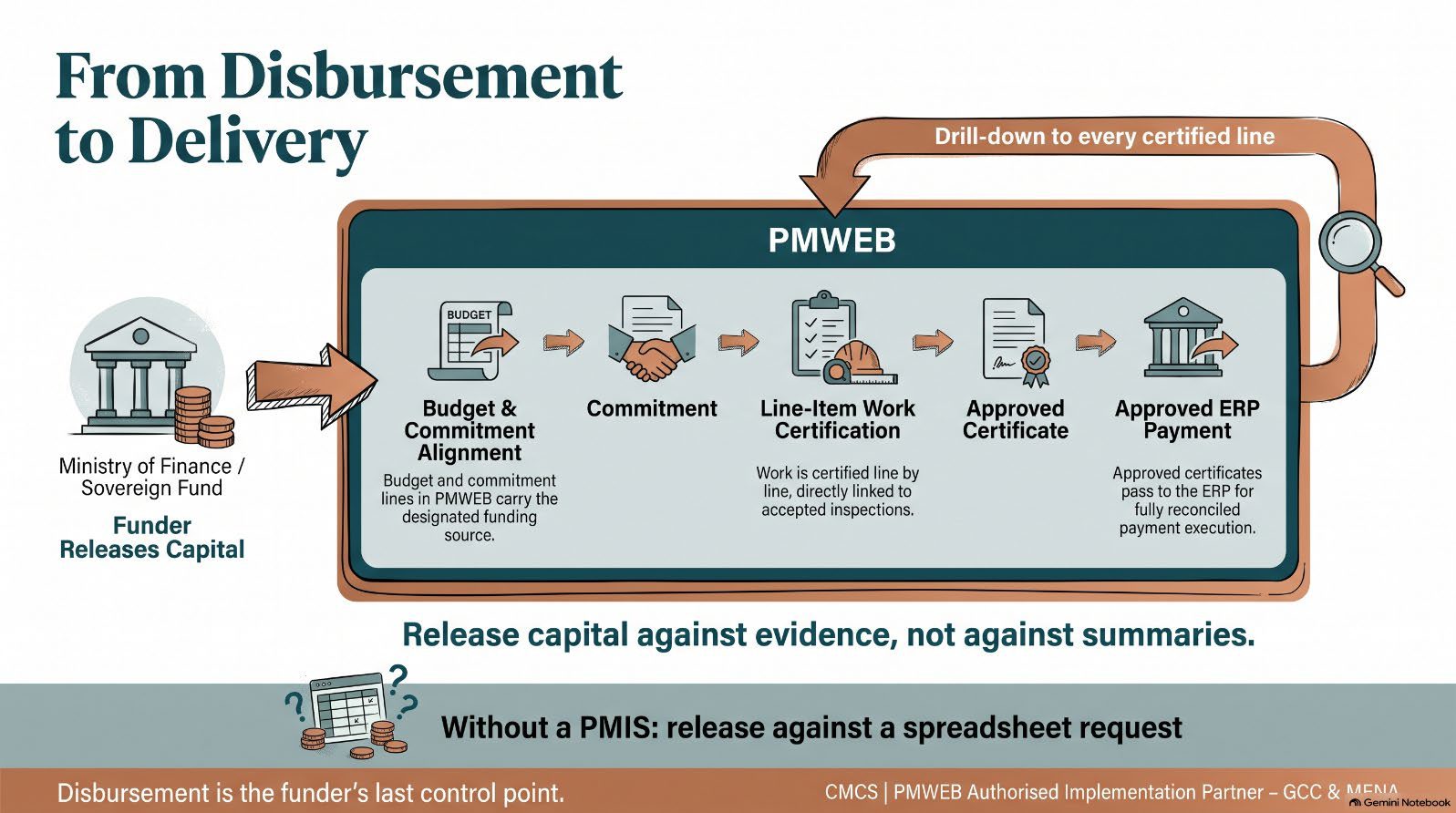
For a government entity, the progress invoice is not the end of the chain. The entity requests funds from the ministry of finance; a project company draws on its investors or lenders. If those requests are assembled outside the project system, the funder releases capital against a summary, and every weakness described above is passed upwards. In PMWEB, budgets and commitment lines carry their funding source, and approved progress invoices carry the certified value of work in place. A funding request can then be built from approved certificates and commitments, traceable line by line, and the funder can see exactly which certified work each release pays for.
Where PMWEB 2026 AI Helps
Payment reviews are a natural fit for the PMWEB 2026 AI Assistant's find and open modes. A commercial director can ask it to find all progress invoices on a contract where approved is less than 85% of submitted, open the most recent one and see its workflow log, or find every invoice approved by a given role in under two days this quarter. Where follow-up is needed, the assistant creates the red flag or a query to the approver once the reviewer approves. Spotting a
Email, ERP and PMWEB Invoice Control Compared

The funder's lens — ministries of finance and sovereign funds
- Disbursement is the funder's last control point. Release funds against certificates approved in a PMIS and reconciled to the ERP, not against payment requests assembled outside it.
- Payment-treatment indicators reveal whether contractors are paid fairly. Unfair payment becomes claims, and claims become cost the funder ultimately bears.
Adviser's checklist — for consultants recommending project governance
Questions to ask in the diagnostic
- Is the interim certificate assessed line by line in a project system, or approved as a PDF and keyed into the ERP?
- Can the client show approval days, cut percentage and release days for every contractor?
- Do approved and paid figures reconcile through integration?
Recommendations to put in the governance report
- Manage progress invoices in the PMIS with a submission checklist and DoA workflow.
- Integrate approved certificates and payments with the ERP to remove re-keying.
- Add payment-treatment indicators by contractor and approver to the PMO dashboard.
Evidence That Payment Controls Are Working
- Cycle time. Average and spread of invoice approval days within target, by programme and contractor.
- Consistency. Narrowing gap between the fastest and slowest treated contractors for similar invoices.
- Explained cuts. Every cut beyond the tolerance band has a recorded assessment reason.
- Payment discipline. Approved invoices paid within contract terms; paid equals approved unless explained.
- Fewer payment claims. Contractor claims citing late or under-payment falling over time.
Every invoice records how a contractor was treated: how long it waited, how much was cut and when it was paid. PMWEB captures those facts for every contract, so abuse of approval power shows up as a pattern rather than a rumour.
The ERP controls the payment run, not the certificate behind it; without the progress invoice in a PMIS, abuse of approval power never reaches the ledger.
Fair, fast and consistent payment is a fraud control, and it is also the cheapest way to avoid claims.
Progress invoices are often the right first process to migrate to PMWEB.
Next in the series: Part 6 looks backwards: how a forensic audit team can rebuild a project's financial record in PMWEB to identify the parties behind fraudulent activities and support recovery of lost funds.

Next step
Bring this to your portfolio.
Tell us which processes matter most to you, and we will show them running in PMWEB.