
Article 5 of 5 · PMWEB Replacing Aconex
PMWEB as Your EDMS — When the Project Does Not Need Aconex at All
Most capital projects that buy a separate EDMS do not need one. They need submittals reviewed on time, transmittals that prove what was issued, RFIs answered, and a register that shows who is holding what. PMWEB does all of this out of the box, in the same database as the rest of the project.
The first four articles in this series were written for owners moving from Aconex to PMWEB: why document submittals cannot live apart from the PMIS, Aconex-style adaptive forms, the optional history import and rollout, and the dashboards that one database makes possible. This article answers a different question that contractors, developers and consultants put to us: what if there is no Aconex to replace? Where the contract does not require a particular document control platform, PMWEB on its own fulfils the EDMS requirements of a capital project, using its out-of-the-box engineering forms and templates, its Document Manager and its workflow engine.
Based on real proposals and implementations
This article draws on CMCS proposals and implementations of PMWEB as the document control system for contractors and developers in the Gulf. The screens are from the PMWEB demonstration environment; client and project names have been removed.
Is this article for you?
Yes, if you are selecting a document control system for a project or a portfolio, or questioning whether you need a second platform next to your PMIS.
- Document controllers: the forms, registers, numbering and workflows that replace a separate EDMS.
- Project directors and managers: what you can see about reviews, delays and parties that a file repository cannot show.
- IT and PMIS managers: deployment, security, reporting and how the same system grows into a full PMIS.
What a Capital Project Expects From an EDMS
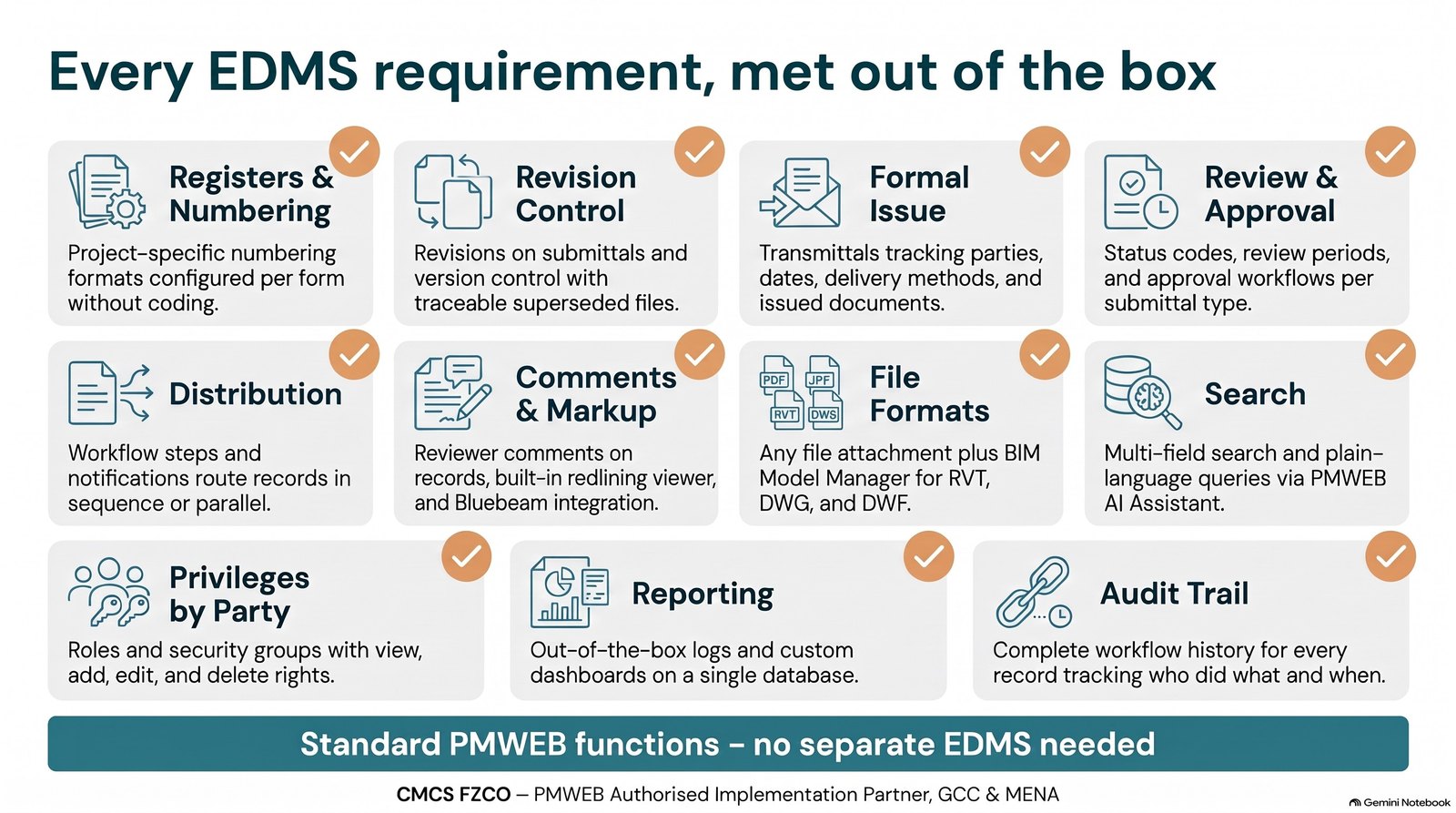
Remove the product names and the EDMS requirements in most tenders and contracts are consistent: controlled numbering and registers, revision control, formal issue, review and approval with status codes and review periods, distribution to the right parties, comments and markup, search, support for every file format, privileges by party, reporting on what is pending with whom, and a complete audit trail. Every one of these is a standard PMWEB function.
| EDMS requirement | How PMWEB fulfils it |
|---|---|
| Registers and numbering | Project-specific numbering formats, for example Project–Originator–Discipline–Type–Sequence, configured per form without coding |
| Revision control | Revisions on submittals and drawing lists, version control in the Document Manager, superseded revisions kept and traceable |
| Formal issue | Transmittals with from and to parties, date, due date, delivery method, tracking number and the list of documents issued |
| Review and approval | Submittal types with status codes (Approved, Approved as Noted, Revise & Resubmit, Rejected), review periods and an approval workflow per type; resubmissions tracked as revisions |
| Distribution | Workflow steps, roles and notifications route any record to the right people, in sequence or in parallel |
| Comments and markup | Reviewer comments on the record and on each attachment; annotation and redlining in the PMWEB viewer; built-in Bluebeam integration where licences are held |
| File formats | Any file format as an attachment; the BIM Model Manager for RVT, DWG, DWF and Navisworks |
| Search | By number, title, status, discipline, CSI code or any field, and in plain language through the PMWEB AI Assistant |
| Privileges by party | Companies, roles and security groups with view, add, edit and delete rights per module and record |
| Reporting | Out-of-the-box logs and forms, plus dashboards the organisation builds itself on the same database |
| Audit trail | The full workflow history of every record: who did what, and when |
The Engineering Forms Do the Work
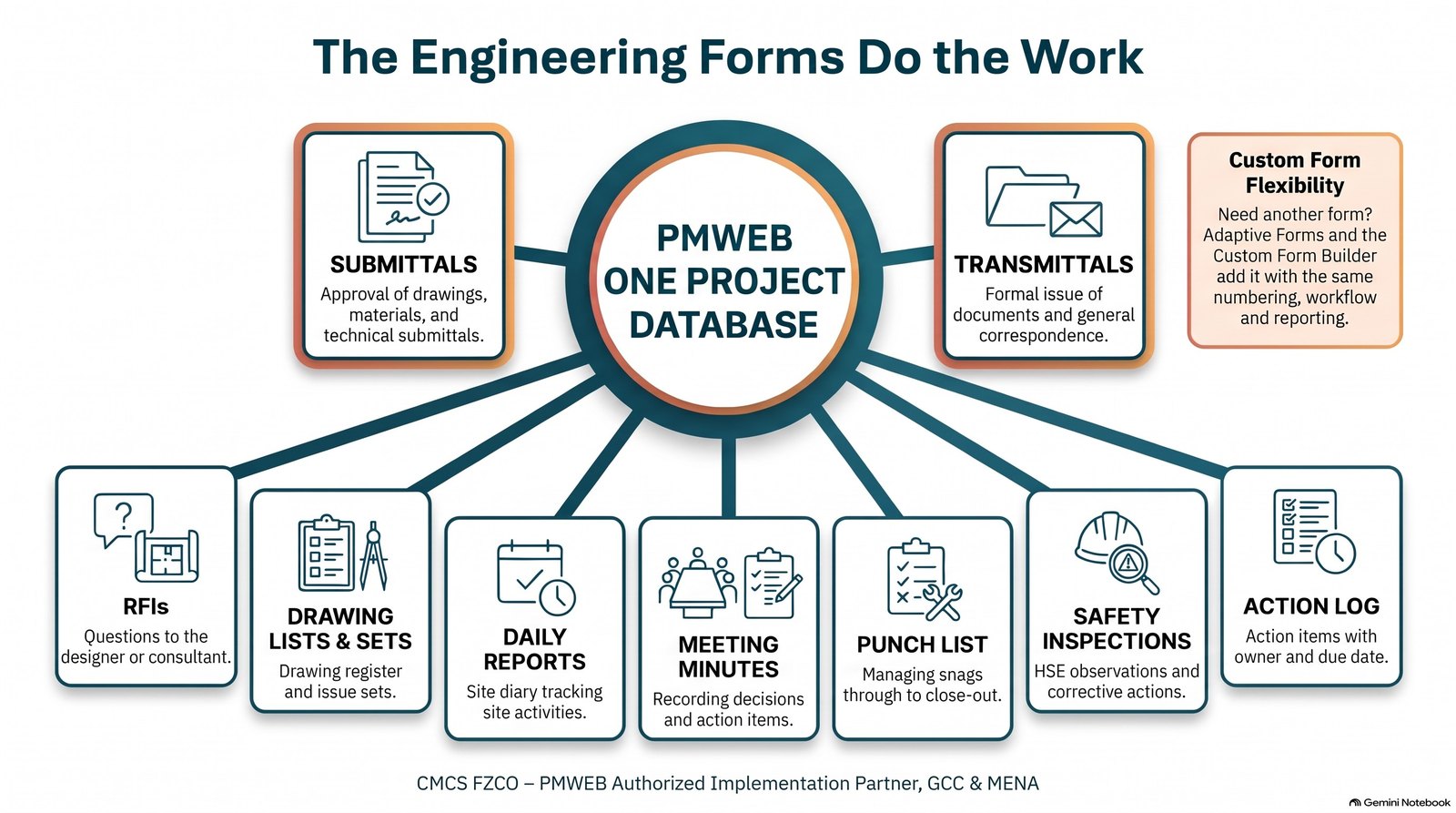
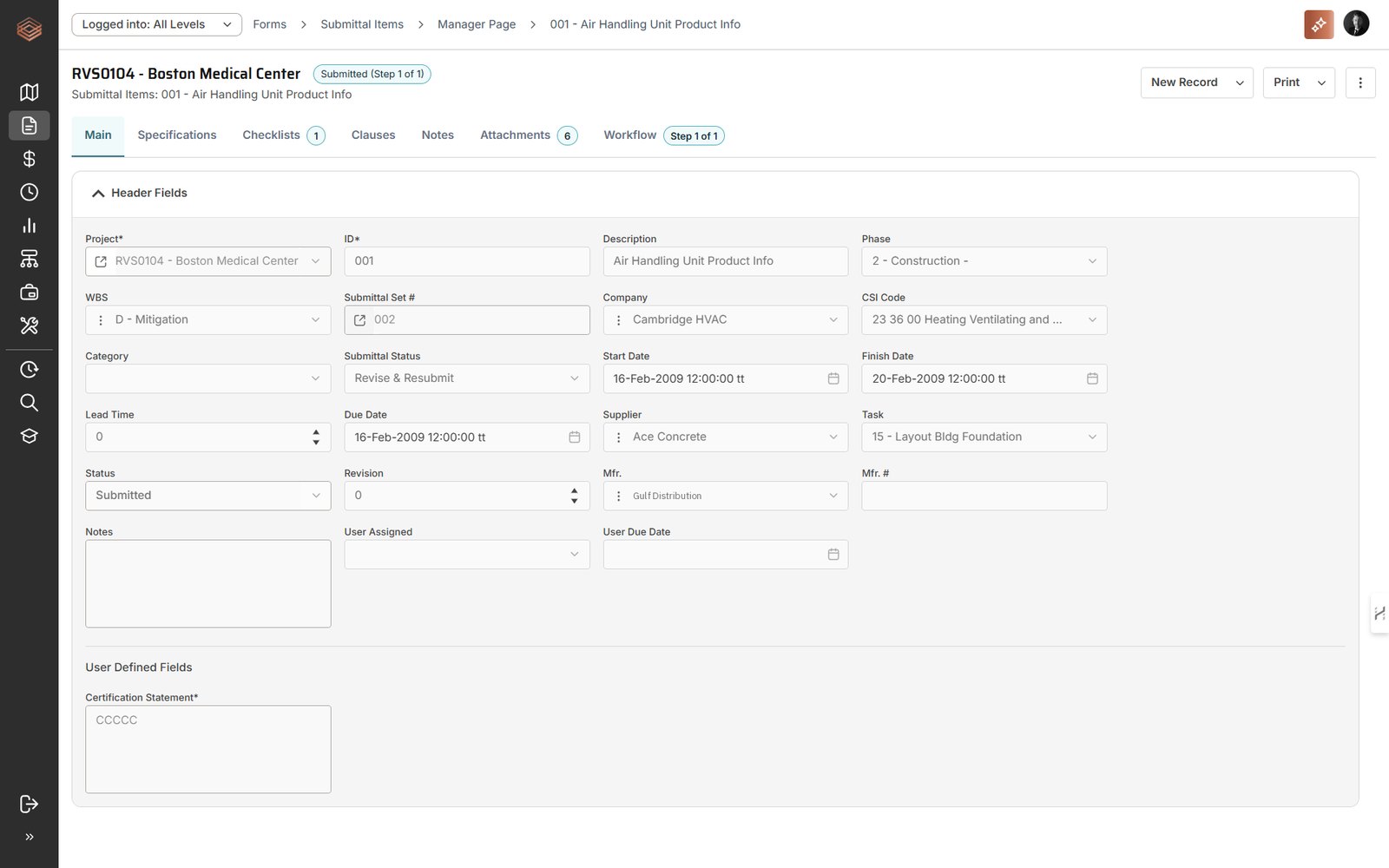
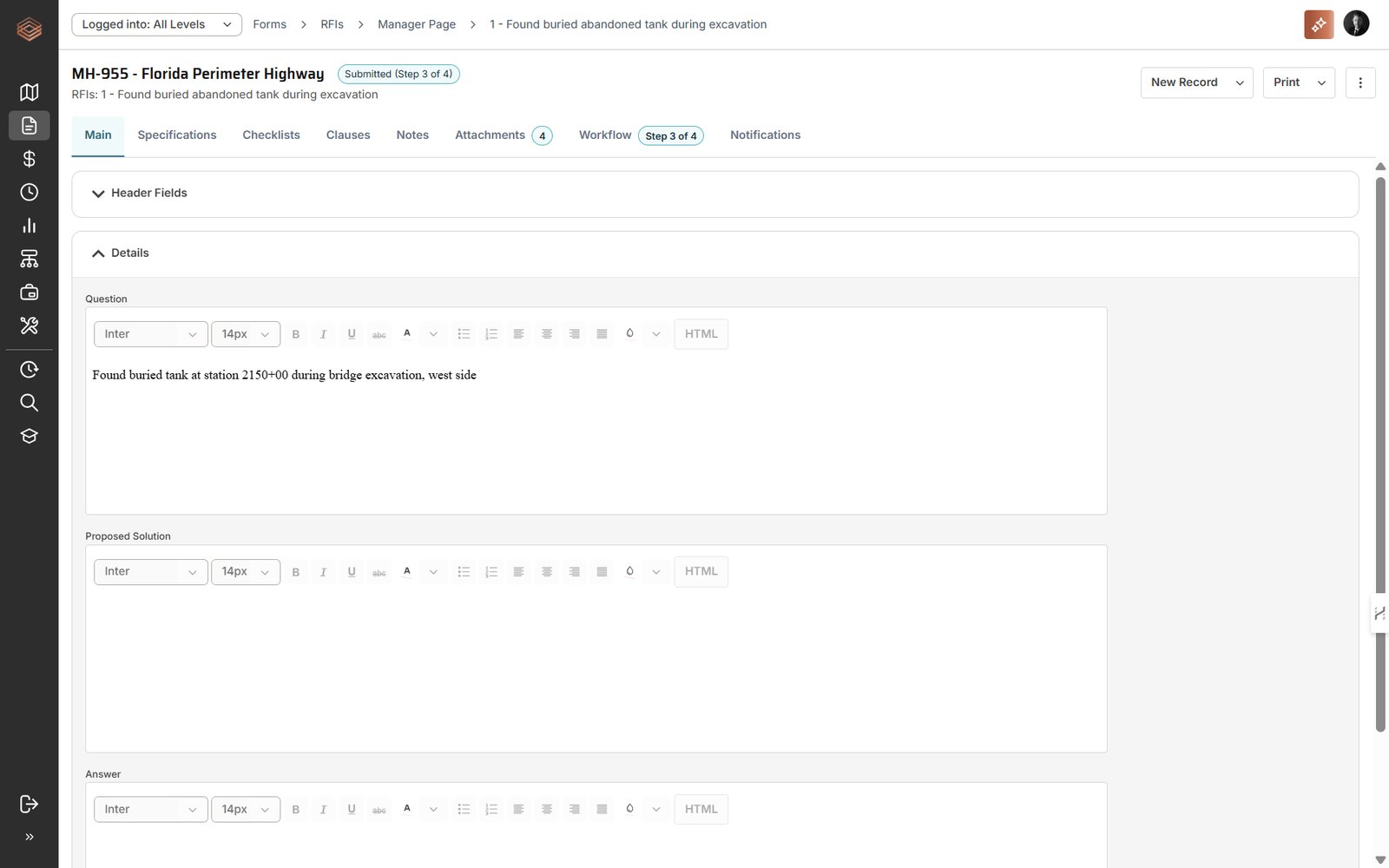
PMWEB manages formal project communication through its Forms module. Two forms carry most document control activity. Transmittals issue information to another party where no approval is sought: reports, drawings for information or general correspondence. Submittals are used where approval is required: the receiving party reviews the submission, records comments and returns a status code, and resubmissions are tracked as revisions. Around them sits a set of out-of-the-box engineering forms, each a structured record with its own numbering, fields, attachments and workflow.
| Form | What it controls | Examples of data captured |
|---|---|---|
| Submittals | Shop and as-built drawings, materials, subcontractor approvals, technical submittals, document reviews | Type, discipline, CSI code, specification, supplier, manufacturer, lead time, due date, revision, status code, linked schedule task |
| Transmittals | Formal issue of documents and correspondence | From and to parties, date, due date, delivery method, tracking number, documents transmitted |
| RFIs | Questions to the designer or consultant | Question, proposed solution, answer, required-by date, responsible party, linked drawings and activities |
| Drawing lists and sets | The drawing register and the sets issued to each party | Drawing number, revisions, sheets, dates, CSI codes, attachments |
| Daily reports | The site diary | Manpower, equipment, weather, work performed, delays |
| Meeting minutes | Decisions and actions | Attendees, items discussed, action owners, due dates |
| Punch list | Snags through to close-out | Location, trade, responsible company, status, close-out date |
| Safety inspections | HSE observations and corrective actions | Location, findings, severity, corrective action, close-out |
| Action log | Anything that needs an owner and a date | Owner, due date, status, linked records |
Where a project needs a form that PMWEB does not include, Adaptive Forms and the Custom Form Builder add it with the same numbering, workflow and reporting. Administrators can enable further standard forms and add, hide or rename fields as the project develops, without a change to the software.
Documents, Drawings and Models in One Repository
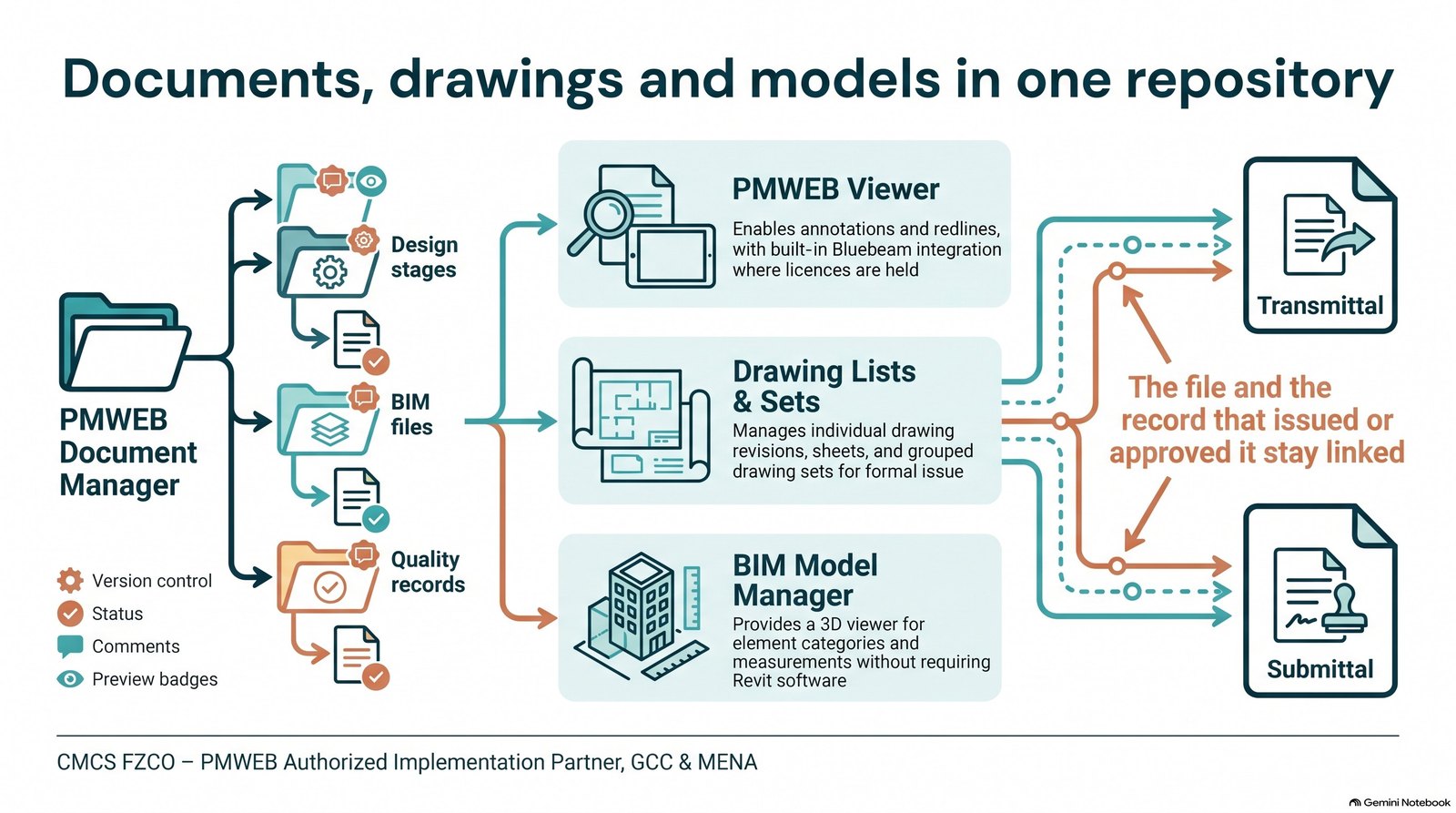
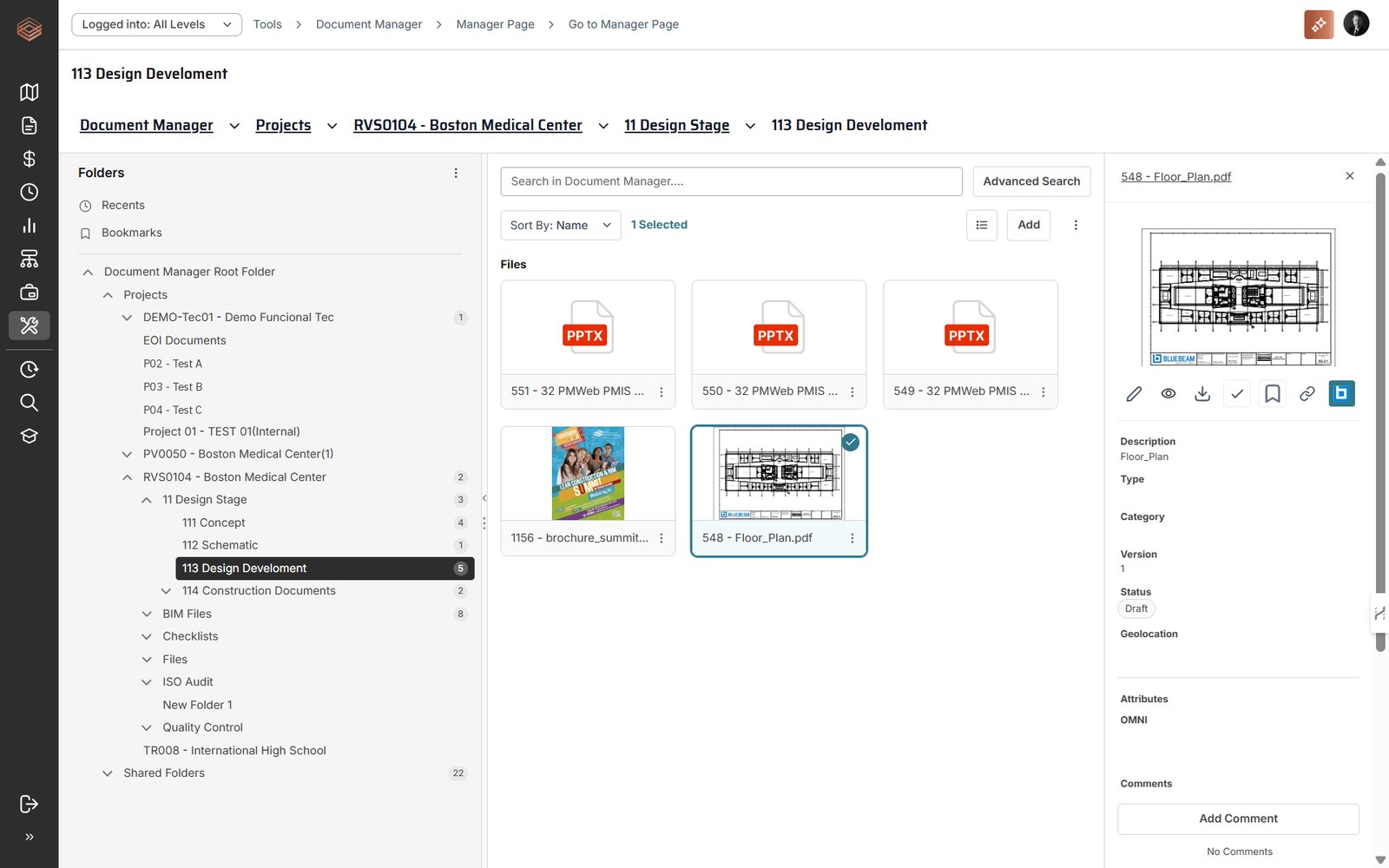
The Document Manager holds project files in a controlled folder structure, for example by design stage, BIM files and quality records, with naming rules and access permissions per folder. It accepts any file format and gives each file version control, status, attributes, comments, advanced search and preview. Files are attached to transmittals and submittals from the Document Manager, so the file and the record that issued or approved it stay linked.
PDF and image attachments open in the PMWEB viewer, where reviewers add annotations, notes and redlines; where Bluebeam licences are held, the built-in Bluebeam integration can be switched on for advanced markup. Drawing lists hold each drawing with its revisions and sheets, and drawing sets group drawings for issue. The BIM Model Manager stores each model as a record and displays it in a 3D viewer, where users browse by element category, take measurements and save views without Revit or other authoring software.
Workflow: Distribution for Every Document Type
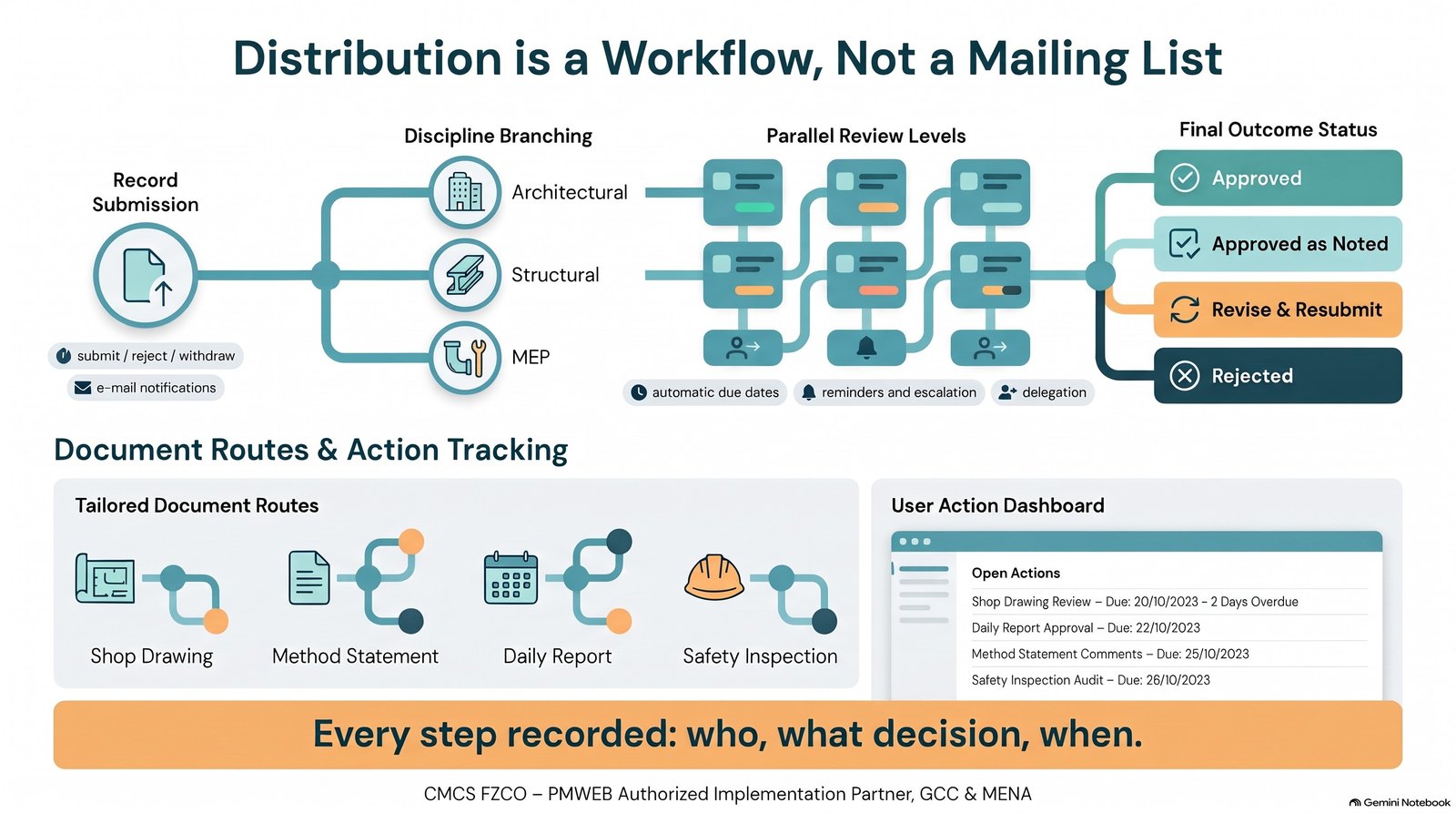
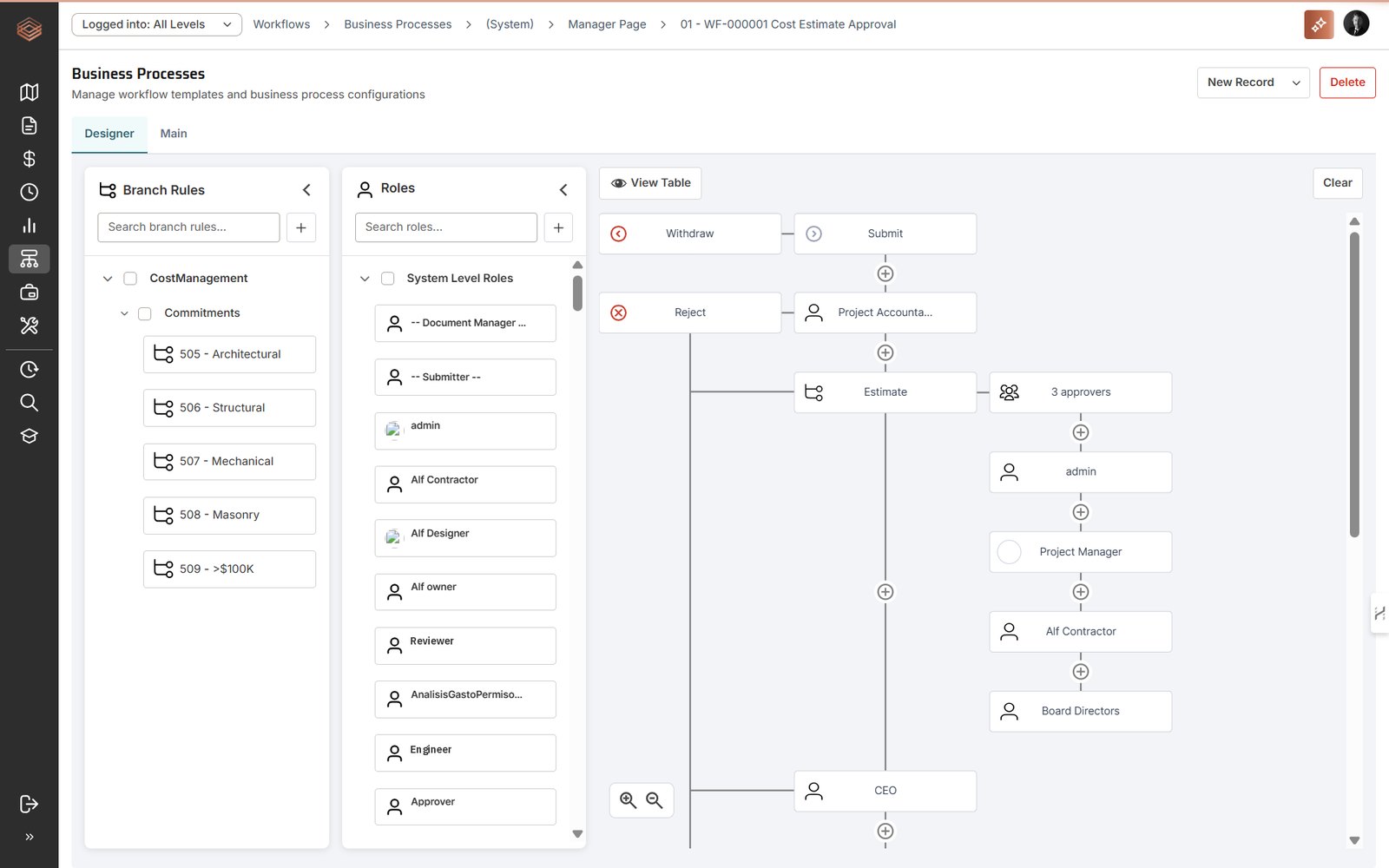
In many document systems, distribution means sending a document to a list of people. In PMWEB, distribution is a workflow. Business processes are built in the PMWEB designer without coding: branch rules route a record to different reviewers by discipline, value or any other field; steps run in sequence or in parallel, with one or several approvers; approval levels, delegation, automatic due dates, reminders, escalations and e-mail notifications are part of the configuration; and every record has submit, reject and withdraw paths.
The same engine applies to every form and to documents in the Document Manager. A shop drawing, a method statement, a daily report and a safety inspection can each have their own distribution and approval route, and every step is recorded with the user, the decision and the date. On log-in, each user's landing page lists their open actions with the workflow step, due date and overdue days, so nothing waits unseen in an inbox.
Data at Field Level: Dashboards You Build Yourself
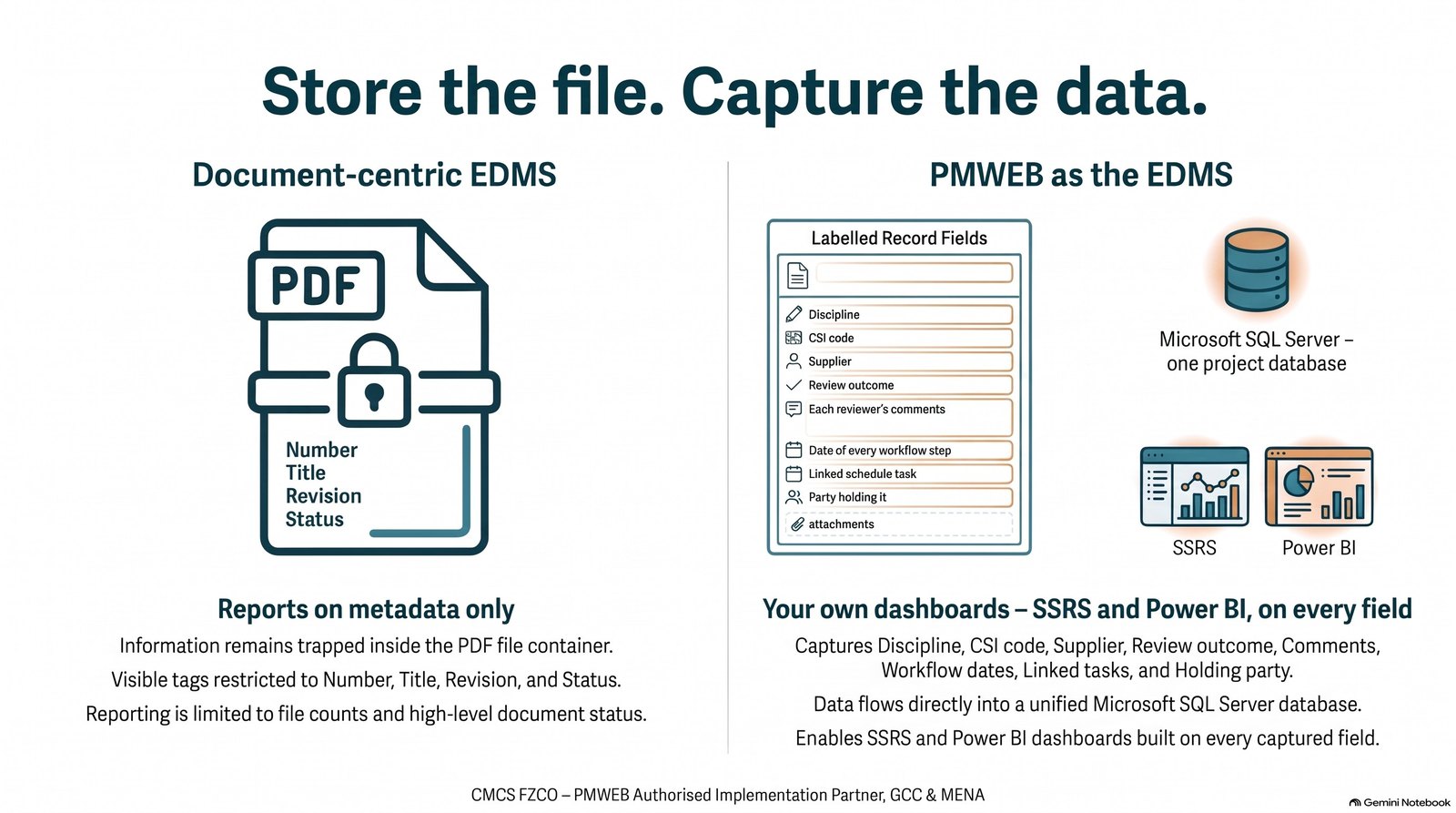
This is where PMWEB differs most from a document-centric EDMS. When a submittal is just a file, its content lives inside the attached PDF and the system knows only its metadata: number, title, revision and status. PMWEB captures the transaction itself, field by field, in a Microsoft SQL Server database: the discipline, CSI code, supplier and manufacturer, the review outcome, each reviewer's comments and the date of every workflow step.
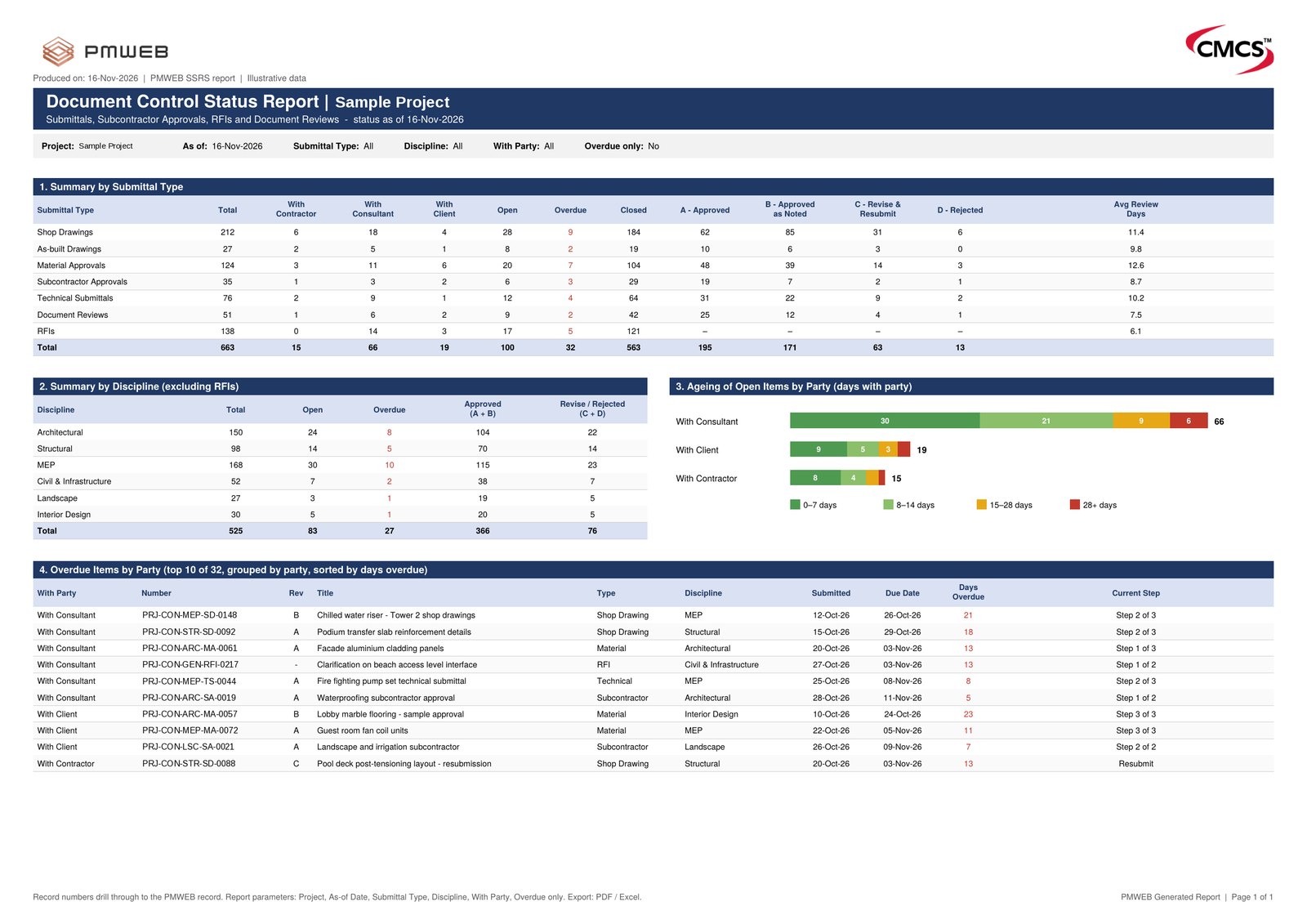
PMWEB reporting uses Microsoft SQL Server Reporting Services (SSRS). Out-of-the-box logs and forms, such as the Submittal Log, RFI Log, Transmittals Log and Drawing Lists Log, run with filters and export to Excel and PDF. Because the data sits in an open SQL Server database, the organisation can also build its own reports and dashboards, in SSRS or Power BI, that analyse the content of the transactions rather than counting documents. A one-page Document Control KPI dashboard, for example, can show:
- Summary by submittal type: total, open with the contractor, consultant and client, overdue, closed, review outcomes and average review days.
- Summary by discipline: architectural, structural, MEP, civil, landscape and interiors, with approved and revise or rejected counts.
- Ageing by party: open items by the party holding them, in bands of 0–7, 8–14, 15–28 and over 28 days.
- Overdue items by party: with the current workflow step and a forecast approval date calculated from the review period of each remaining step.
- Planned against actual submissions: by submittal type and discipline.
A Submittal Review Comment Sheet collates the comments of every reviewer, across workflow steps and attachments, into one sheet that the originator can respond to and download to Excel.
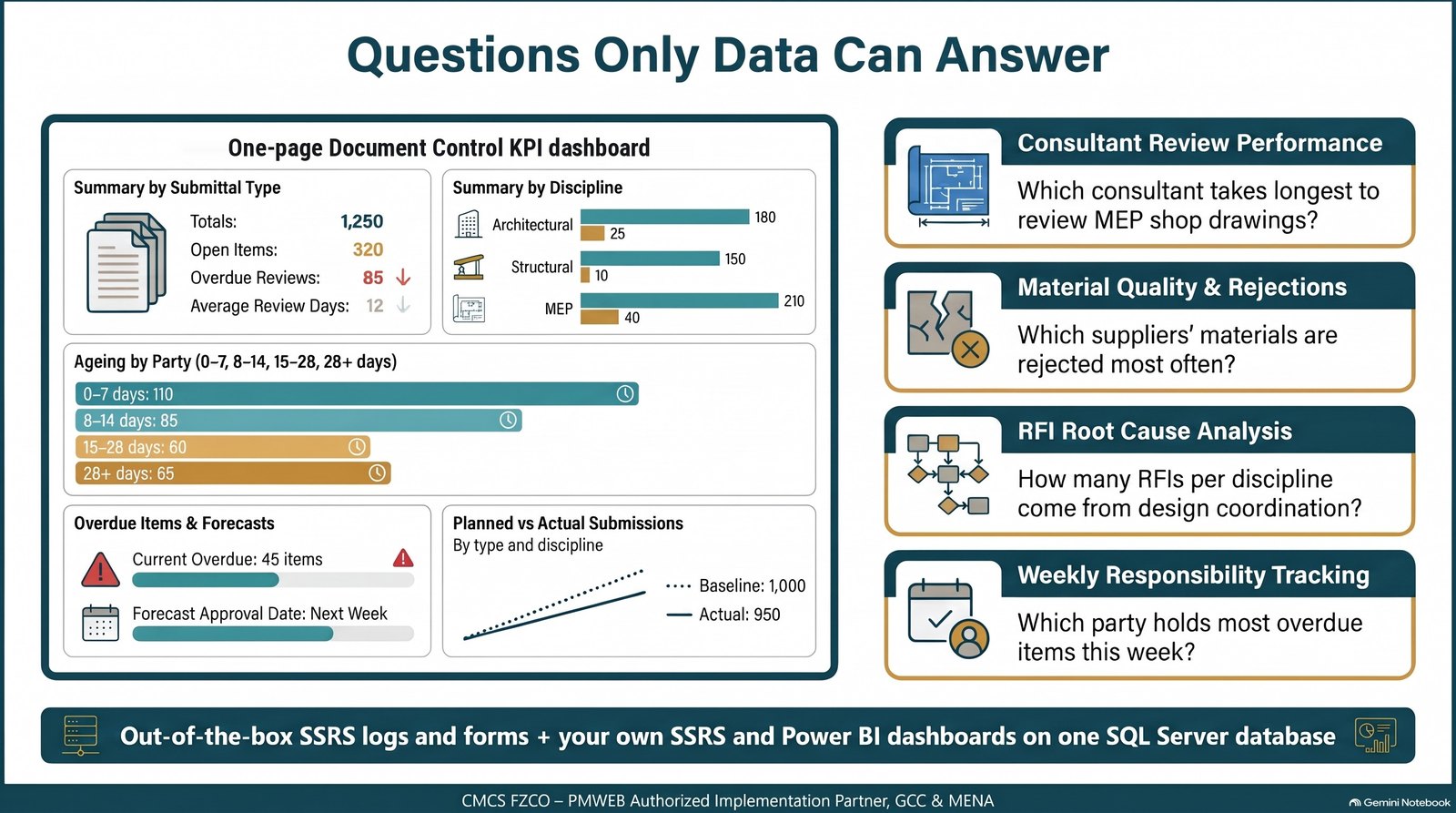
Questions only data can answer
Which consultant takes longest to review MEP shop drawings? Which suppliers' materials are rejected most often? How many RFIs per discipline come from design coordination? Which party is holding most overdue items this week? A file repository cannot answer these, because the answers are inside the files. PMWEB answers them because the content is captured as data.
Parties, Privileges and PMWEB AI
Companies, users and roles are set up for the client, project manager, consultant, contractor and subcontractors. Security groups define, for each module, whether a user can view, add, edit, delete or use a function, with conditional security and an activity monitor. Administration authority stays with the licence holder, who appoints its own PMWEB administrators. Reviewers, subcontractors and site staff who submit, review, approve and view can work as guest users, so every party works in the same system rather than by e-mail.
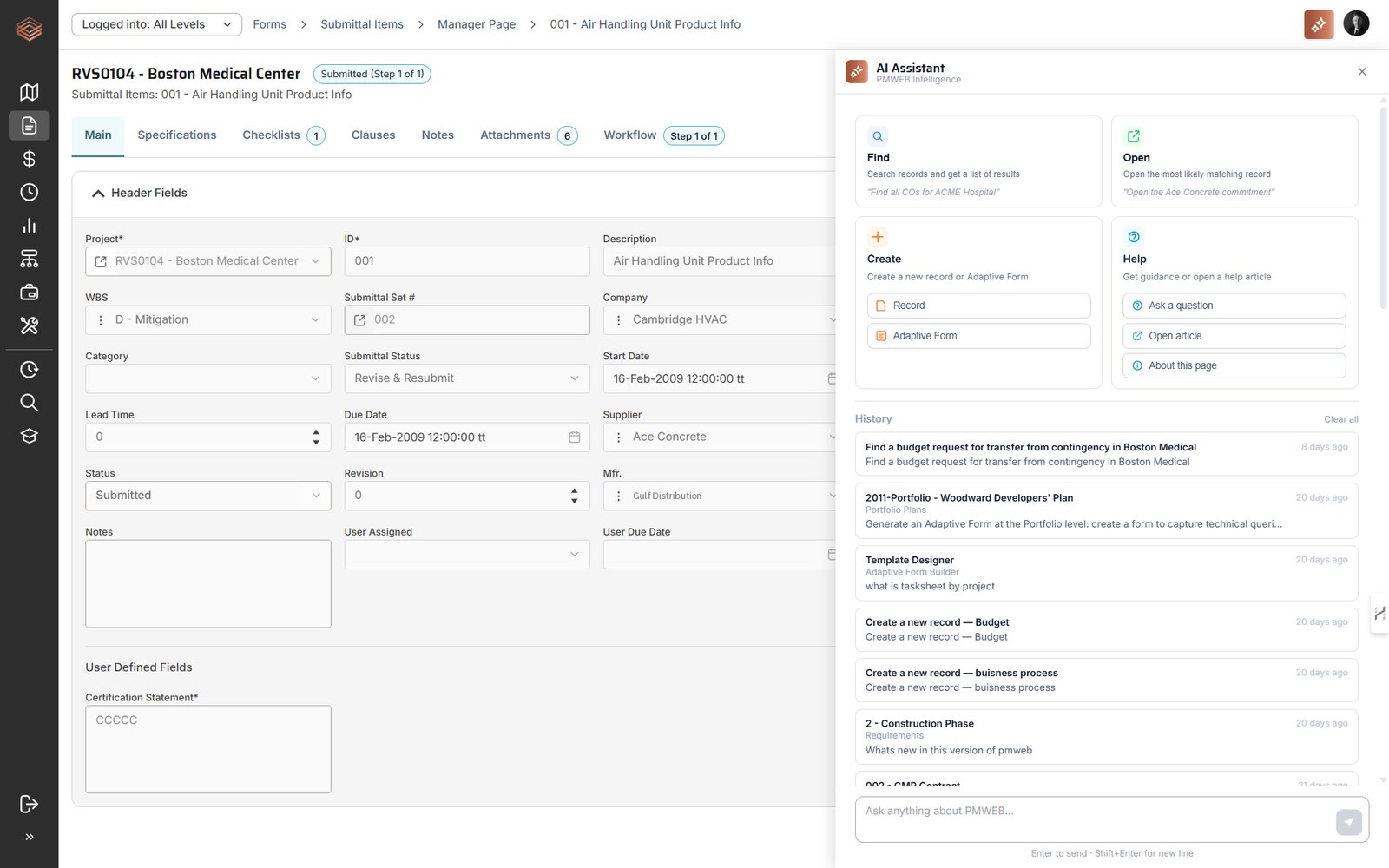
The PMWEB AI Assistant is built into PMWEB and included in the subscription. From any page, users ask in plain language to find records, for example all submittals pending with the consultant, to open a specific record, to create a new record or adaptive form, or to get help on the page they are using.
Deployment and Implementation
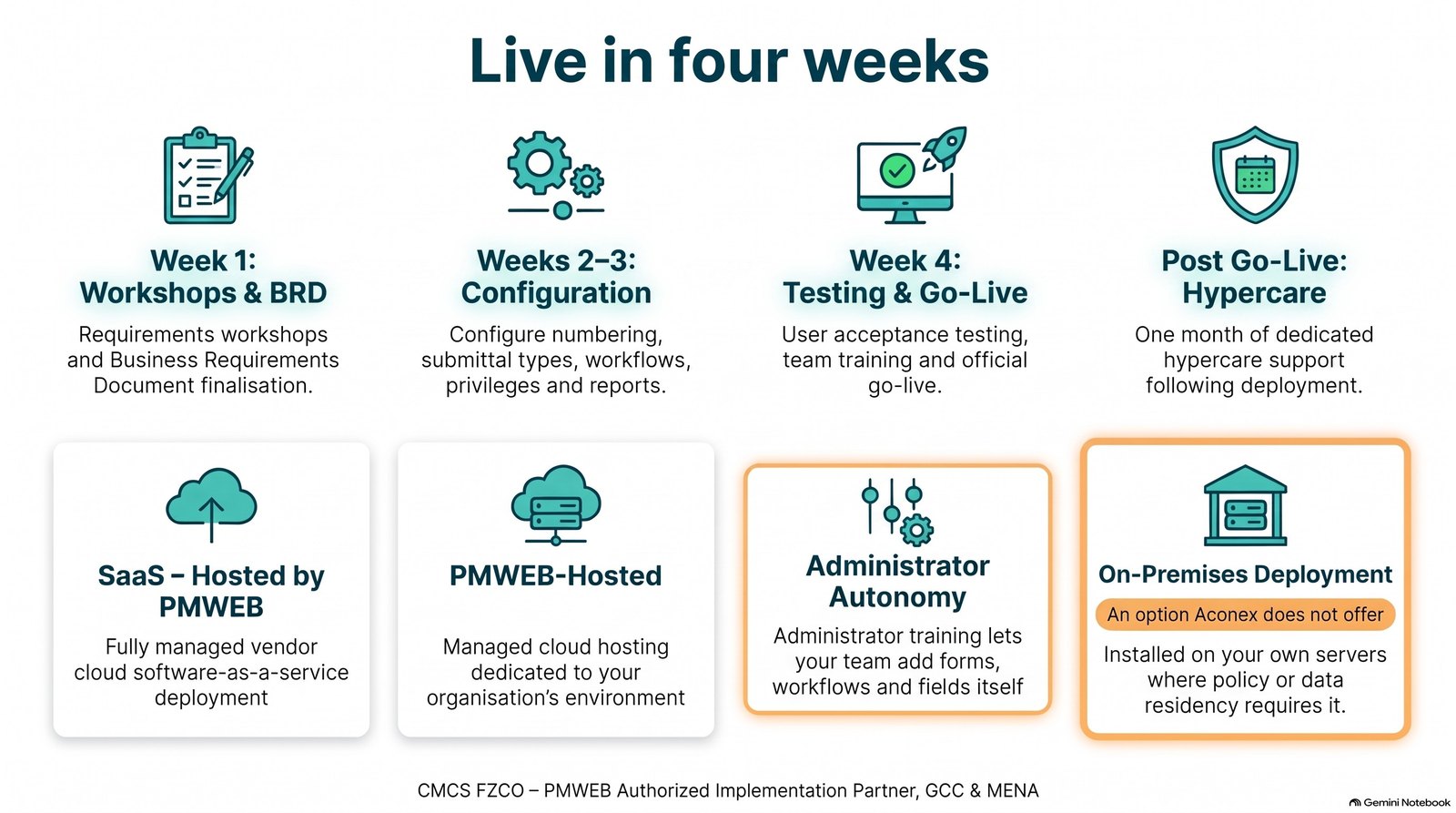
PMWEB is available as SaaS, hosted and managed by PMWEB, and can also be installed on-premises on the organisation's own servers where policy or data residency requires it, an option Aconex does not offer. Documents are held in the PMWEB repository or, through PMWEB's EDMS integration module, in a third-party document management system.
A document control implementation is quick because the forms, logs and workflows already exist. A typical CMCS implementation runs over four weeks: requirements workshops and a Business Requirements Document in week 1, configuration of numbering, submittal types, workflows, privileges and reports in weeks 2 and 3, and user acceptance testing, training and go-live in week 4, followed by a month of hypercare. Administrator training covers enabling further forms, setting up workflows and adjusting fields, so the organisation can extend the system itself.
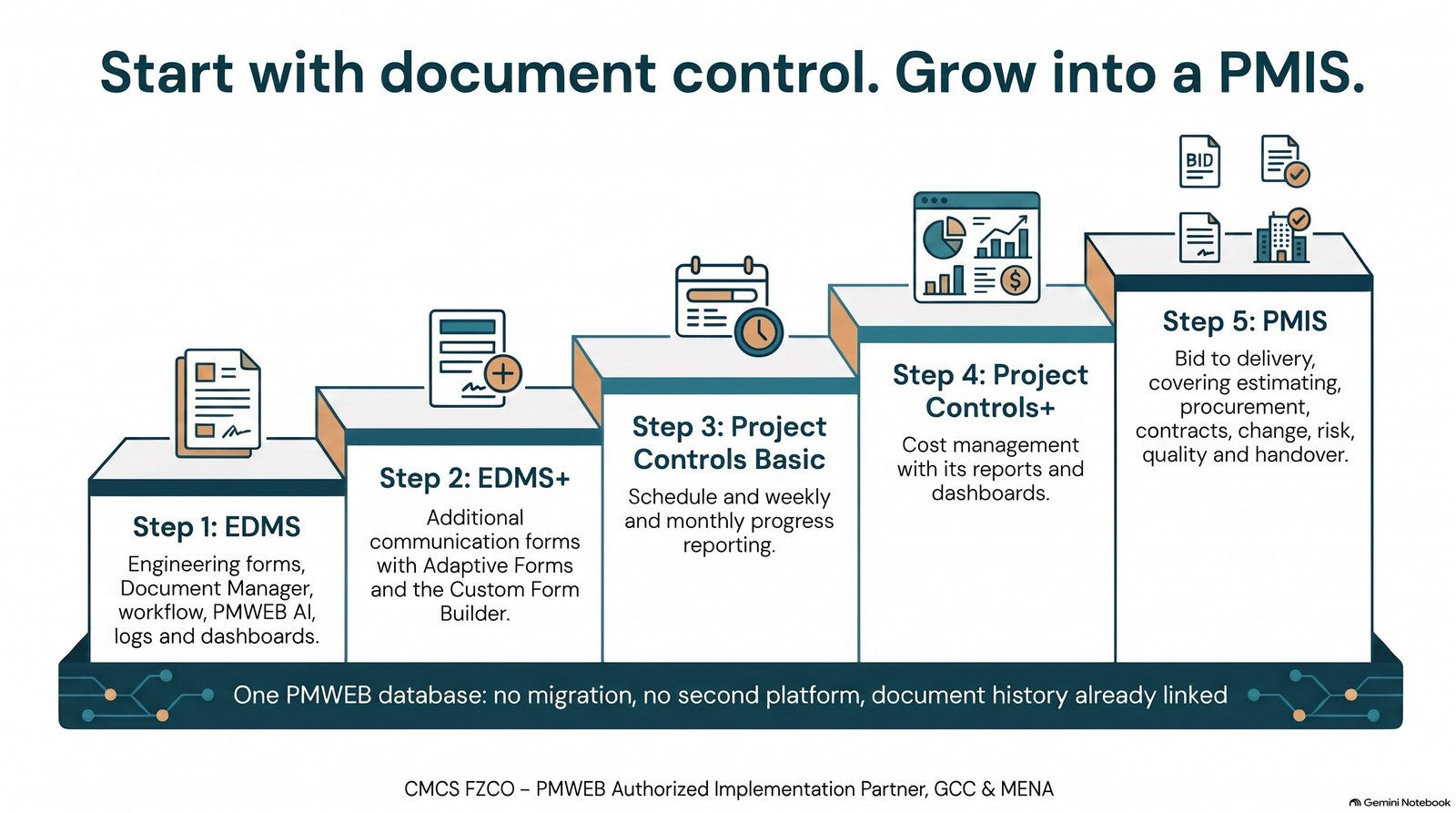
Start With Document Control, Grow Into a PMIS
Because the EDMS runs on PMWEB, it does not have to stay an EDMS. The same database extends, step by step, to project controls and a complete PMIS, with no migration and no second platform. When cost, contracts and the schedule are added, the document history is already linked to them.
| Stage | Adds |
|---|---|
| EDMS | Engineering forms, Document Manager, workflow, PMWEB AI, out-of-the-box logs and forms, document control dashboards and landing page |
| EDMS+ | Additional communication forms built with Adaptive Forms and the Custom Form Builder, with further reports and dashboards |
| Project Controls Basic | The schedule module and a progress form feeding the weekly and monthly progress reports |
| Project Controls+ | Cost management modules with their reports and dashboards |
| PMIS | Bid to delivery: estimating, procurement, contracts, change, risk, quality and handover |
A Separate EDMS or PMWEB?
| Question | Document-centric EDMS | PMWEB as the EDMS |
|---|---|---|
| What is stored | Files with metadata | Structured records with the files attached |
| What can be reported | Number, title, revision and status | Every field of every transaction, plus the metadata |
| Your own dashboards | Limited to the vendor's reports and exports | Built by the organisation in SSRS or Power BI on the database |
| Workflow | Review and distribution of documents | Any form or document, with branch rules, parallel steps, delegation and escalation |
| Cost, contracts and schedule | A separate system and an interface | The same database |
| Deployment | Vendor cloud (Aconex cannot be installed on-premises) | SaaS, PMWEB-hosted or on-premises |
| Growth path | A PMIS still has to be bought and integrated | Extends to project controls and a complete PMIS |
Key takeaway
Where a project does not require Aconex, it does not need a separate EDMS at all. PMWEB engineering forms, the Document Manager and workflow fulfil the EDMS requirements of a capital project out of the box, distribution is handled for every type of document, and because each transaction is captured field by field in SQL Server, the organisation builds its own dashboards on the content, not just on the documents. The same database then grows into a complete PMIS.
This article completes the series. Read the five articles as one PDF on cmcs.co, or ask us to show your document control procedure running in PMWEB.

Next step
Bring this to your portfolio.
Tell us which processes matter most to you, and we will show them running in PMWEB.