
Article 9 of 10 · PMWEB for RICS Contract Administration
Authority Written Once, Enforced Everywhere: PMWEB Workflow and Delegation of Authority Compliance
RICS asks that the contract administrator's authority over contingency, provisional sums and unforeseen work be confirmed at appointment, and that the CA seeks the employer's authority before instructing expenditure outside it. Owners add their own Delegation of Authority (DoA) for every financial decision. In PMWEB 2026 both are written once, as workflow configuration, and enforced on every record.
Every article in this series has ended with a workflow: who reviews, who approves, who is informed and at what value. This article explains the engine behind those workflows and how it gives owners and contract administrators something a policy document cannot: evidence that authority was respected every time, without anyone having to remember to check.
It covers RICS service 2.2 (agree with the client an appropriate level of authority to instruct works), the practical guidance on the CA's authority in the RICS 2011 guidance note Contract administration (GN 69/2011, archived in 2022: §3.1.5, §4.1.8, §4.2.1 and part (c) of the Appendix A pre-commencement checklist), and the governance controls owners typically add: approval thresholds, segregation of duties and audit trails.
Why this matters to you
- Commercial Directors and CFOs: no approval outside the Delegation of Authority, with proof available to auditors in one click.
- Contract Administrators: your authority enforced by the system, so instructions above it cannot be issued without the employer's approval.
- Internal audit and governance teams: segregation of duties, delegation and full audit trails on every transaction.
- Project Directors: visibility of where approvals wait, and for how long.
What RICS Requires
The CA's authority
GN 69/2011 makes several points about authority.
- Confirm it at appointment (§3.1.5). The terms of appointment will not normally allow the CA to issue instructions that alter the extent of the works without the employer's explicit prior agreement. The extent of the CA's authority over contingency monies, provisional sums and additional or unforeseen works "should be confirmed within the appointment agreement".
- Seek the employer's authority first (§4.1.8, §4.1.11). Where an instruction would incur expenditure outside the building contract provisions or the CA's appointment, the employer's approval must be sought before the instruction is given.
- Follow the employer's own rules (§4.2.1). Some employers have their own, more stringent requirements, which the CA should be aware of and follow. Where the CA has no authority for decisions with financial implications, it is useful to agree at the outset a method for dealing with unforeseen and additional works and for expending contingency.
- Agree who may instruct (Appendix A part c). Persons authorised to issue instructions, the system for issuing and confirming instructions, and the employer's approval procedure for instructions and changes are agreed and confirmed in writing before works start.
The CA's impartial decisions
Not every CA decision is an approval by the employer. Under most forms of contract, determinations of extensions of time, valuations and certificates are the CA's own decisions, made impartially. The employer must be kept informed, but the CA is not asking permission. A well-designed workflow distinguishes the two, which GN 69/2011 §2.2.2 describes as the agency function and the decision-making function.
The owner's governance
Owners add their own controls. The procedural manuals CMCS sees across the region typically require that approval workflows reflect the DoA; that approval thresholds apply to changes, payment certificates and claims; that duties are segregated so the person who prepares a transaction does not approve it; that large financial transactions need more than one level of approval; and that every transaction is logged with user, time and change.
Every PMWEB record type, native or built with the Custom Form Builder or Adaptive Forms, can carry a business process. A business process is a sequence of steps. Each step defines:
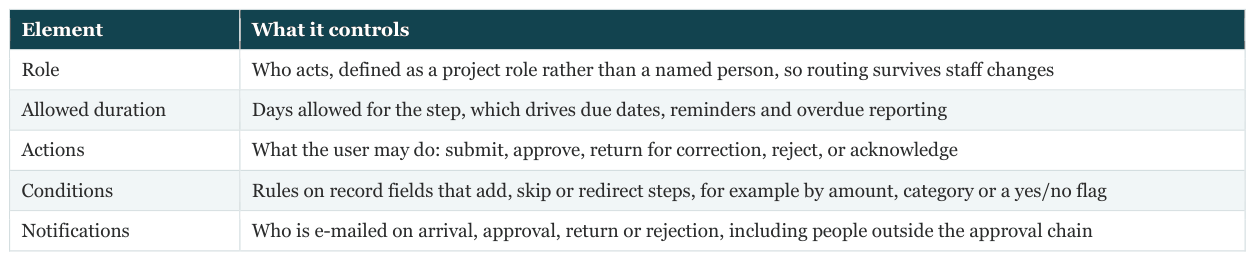
Every action is recorded on the record's Workflow tab with the user, date, time and comment. Users see their pending steps in the PMWEB workflow inbox and receive e-mail notifications that take them to the record.
Conditions turn the DoA into routing
Conditions are what make the DoA enforceable. A change order business process can contain a step for each authority level, each with a condition on the change order's net value. A change order within the Project Director's limit completes after the Project Director's step. One above it continues to the Commercial Director, and so on. The approver cannot be skipped, because the step is generated by the value, not chosen by the submitter.
Screenshot S1 shows the configuration for contract MC-001. Steps 4 to 7 carry the DoA thresholds for change orders: up to AED 250,000 the Project Director, up to AED 1 million the Commercial Director, up to AED 5 million the Chief Executive, and above that the tender and contracts committee, with a board minute reference required. Step 8 returns the record to the CA to issue the change order and post it to the ERP. The DoA matrix below shows the thresholds for the other processes that use the same engine: budget transfers, payment approvals, contract awards and notifications of extension of time determinations.

Measuring Compliance: The DoA and Workflow Dashboard
Configuration prevents approvals outside authority. Owners also want to see how the process performs: whether approvals are timely, where records wait, and how often submissions are returned. Because every step is recorded with its due and actual dates, PMWEB data supports a compliance dashboard, delivered in Power BI inside PMWEB.
and average days per step against the allowed days
Screenshot S2 shows the view for January to September 2026. There were 312 approvals across all processes and none outside the DoA, because the limits are enforced by workflow conditions rather than by review. Seven steps are overdue now, the oldest six days with the Commercial Director. Three delegations are active, all with end dates. The bar chart compares the average days each role takes with the days allowed, and highlights the Commercial Director's step as running over its allowance.
CMCS's generic workflow task and performance dashboard extends the same data to every PMWEB client: each team member's due and delayed tasks, tasks delayed by a preceding step, and planned against actual performance, with deliverable processes linked to their schedule activity for planned dates.
workflow paths
Designing Workflows That People Use
Article 4 quoted RICS's warning that a cumbersome change control system deters people from using it. The same is true of every workflow. CMCS applies a few design rules.
- Add a step only where the DoA or the contract requires a decision. Information can be shared by notification rather than an approval step.
- Route to roles, never names. Roles survive resignations, leave and reorganisations.
- Set realistic allowed durations. Base them on the contractual period, so overdue steps mean something.
- Use conditions rather than many separate processes. One change order process with value conditions is easier to govern than five processes chosen by hand.
- Allow return for correction as well as rejection. Most problems are incomplete submissions, not wrong decisions; the return rate on the dashboard shows where guidance is needed.
- Review the configuration when the DoA changes. The DoA document and the workflow conditions must change together, under the owner's change control.
ERP Touchpoint
Workflow approval is often the trigger for ERP posting. An approved commitment creates the purchase order; an approved change order updates it; an approved payment certificate creates the accounts payable invoice. Because the approval happens in PMWEB under the DoA, the ERP receives only transactions that have already been authorised, and the PMWEB workflow history is the approval evidence behind each ERP posting.
What Changes for Your Organisation


What the Owner and the CA Must Put in Place
- Write the CA's authority and the DoA as numbers per process. Per instruction, per change order, per budget transfer, per payment, per award.
- Configure conditions, not lists of approvers. Let the value choose the route.
- Separate the CA's decisions from the employer's approvals. Inform where RICS and the contract say inform; approve where they say approve.
- Design roles for segregation of duties. Preparer and approver are never the same person on the same record.
- Set up delegation with end dates. And review active delegations monthly.
- Monitor the workflow, not just the outcomes. Overdue steps and return rates show where the process needs attention.
RICS references for this article

RICS documents are UK-based; apply them in the GCC subject to the governing law and the form of contract.
If an auditor picked any change order from last year, could you show in one click that it was approved by the person whose authority covered its value, within the allowed time?

Next step
Bring this to your portfolio.
Tell us which processes matter most to you, and we will show them running in PMWEB.