
Article 2 of 10 · PMWEB for RICS Contract Administration
Commencement Done Right: Contract Set-Up, the CA's Authority, Insurances and Securities in PMWEB
Most contract administration disputes are seeded before the first excavator arrives on site: a spending authority nobody wrote down, a performance bond that quietly expired, a verbal understanding about who may instruct the contractor. RICS puts these items at the start of the contract administrator's services for that reason. PMWEB 2026 turns them into records that have to be complete before the contract is administered.
The first article in this series mapped the nine blocks of the RICS Contract Administration Services schedule to PMWEB 2026. This article takes the blocks that come first in time: block 2 (Commencement), block 3 (Statutory compliance) and service 1.4 in block 1, "set up and implement change control procedures". Together with the pre-commencement checklist in Appendix A of the RICS 2011 guidance note Contract administration (GN 69/2011, archived by RICS in 2022 but still a sound practical checklist), they define what must be true on the day the contract starts.
The theme is simple. Everything the CA will do for the next two or three years depends on decisions made in the first thirty days: what the contract says, who may instruct, how much they may spend without asking, and what security the employer holds if things go wrong. If those decisions live in a PMIS, every later process can test itself against them.
Why this matters to you
- Commercial Directors: no contract goes live without evidenced securities, insurances and a written spending authority, closing the gaps that most often expose the employer.
- Contract Administrators: the RICS Appendix A checklist as one approved record, and an authority you can point to every time an instruction is challenged.
- Cost Managers: a schedule of values coded to the cost structure from award, so nothing has to be re-coded later.
- Risk and insurance teams: expiry alerts at 90, 45 and 21 days on every bond and policy.
What RICS Requires at Commencement
The commencement services
The RICS services schedule lists six commencement services.

Block 1 adds service 1.4, "set up and implement change control procedures", and block 3 covers statutory compliance: whether the property is listed or in a conservation area, and what planning and building regulation obligations apply. In the GCC the equivalent obligations come from municipalities, master developers, civil defence and utility authorities, but the principle is identical: consents carry conditions, and conditions carry dates.
What GN 69/2011 adds
The guidance note turns the schedule into practice. Three passages are particularly relevant.
- Authority (§3.1.5). The extent of the CA's authority over contingency monies, provisional sums and additional or unforeseen works "should be confirmed within the appointment agreement".
- Insurance (§4.3.7). The CA should check that all appropriate insurances are in place when the building contract is signed, and should recommend that the employer takes specialist advice on cover.
- Letters of intent (§4.3.8). Letters of intent "give rise to a substantial number of construction contract disputes" and should be handled with great care, ideally by the employer's legal advisers.
The Appendix A pre-commencement checklist
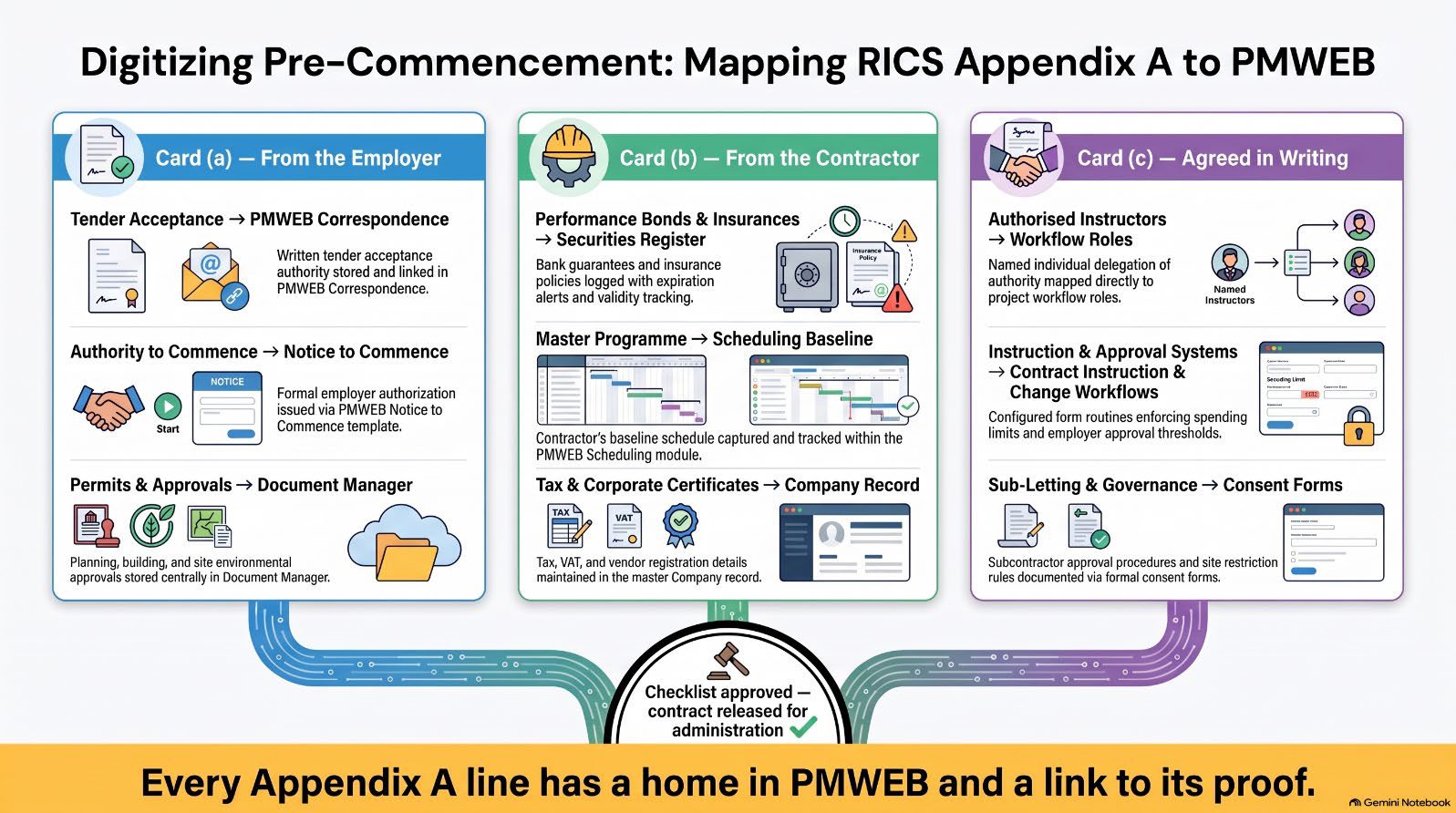
Appendix A of GN 69/2011 gives the CA a pre-commencement checklist in three parts.
- (a) Obtain from the employer and be satisfied that all is in order: written authority accepting the tender, written authority to commence, planning and building approvals, licences, notices about asbestos, live services and similar site matters.
- (b) Obtain from the contractor: tax and VAT certificates, bank details, insurance certificates approved by the employer's broker with their renewal dates, health and safety notifications, the performance bond, parent company guarantee, warranties and the master programme.
- (c) Agree and confirm in writing: the persons authorised to issue instructions, the system for issuing and confirming instructions, the employer's approval procedure for instructions and changes, key personnel, the drawing approval procedure, site boundaries and restrictions, the sub-letting approval procedure and the insurance claims procedure.
Part (c) is the most important and the most often neglected. It is effectively the contract administration manual for the project, agreed between the parties before the first instruction is given.
PMWEB Out of the Box: From Tender to a Live Commitment
Procurement keeps the award rationale
The contract is born in PMWEB's Procurement module. Bid packages hold the tender documents and invited bidders; pre- bid records hold clarifications and addenda; online bidding receives priced submissions; bid levelling compares them line by line. Award approval is routed through a workflow that follows the employer's DoA by contract value.
This matters for RICS service 2.6. The procurement route, the tender evaluation and the award rationale are documented in the same system that will administer the contract, so the CA who later interprets the contract can see how and why it was let.
The Commitment becomes the contract record
On award the package becomes a Commitment, the record from which every later contract administration process hangs. Its header holds: contractor (from the Companies register), contract number and title contract type and form of contract original contract sum, currency and tax treatment retention percentage and any retention limit advance payment amount and recovery rule key dates: award, commencement, completion and sectional completion dates
Its line items form the schedule of values. Each line carries a cost code from the cost breakdown structure, which Article 8 sets up to ICMS 3, the International Cost Management Standard, so that budget, commitment, change and payment all report against the same structure from day one. Provisional sums are held as separate lines so that their expenditure and omission can be tracked by instruction, as Article 4 explains.
Companies, contacts and roles
The contractor, consultants and the employer's team are held in PMWEB's Companies and contacts registers. In an ERP- integrated deployment the contractor record is synchronised with the ERP vendor master, so bank details and tax registration are maintained once. Each person is assigned roles per project, such as Contract Administrator, Employer's QS, Project Director or Contractor's Representative. Workflows route to roles, not names. When a person changes, the role is reassigned and every open workflow follows.
At this stage PMWEB's out-of-the-box SSRS library already provides the Contracts Log, Contract Details, the Subcontract forms in long and short versions, Purchase Order forms, and the Commitment Log grouped by vendor, by cost code or by project.
Letters of acceptance, notices to commence and, where unavoidable, letters of intent are generated from PMWEB Word templates that merge fields from the commitment record. Given RICS's warning about letters of intent, generating them only from templates approved by the employer's legal advisers is itself a control: no one drafts a letter of intent from a blank page.
Extend: The Pre-Commencement Checklist as a Custom Form
Appendix A is a checklist with evidence behind every line, and that evidence lives in different places: a bank guarantee in the securities register, a permit in the Document Manager, a baseline in Scheduling, a DoA matrix in the workflow configuration. A Custom Form is the right tool because one record can hold the contract header, a checklist grid, a status per line and a live link to the record or document that proves it.
Screenshot S1 shows the record for contract MC-001. The header names the CA as a firm rather than an individual, as GN 69/2011 §2.4.2 recommends, and records the CA's spending authority per instruction (AED 250,000). That figure is not decoration: Article 9 shows how it becomes a workflow condition that decides whether an instruction needs the employer's prior approval. Each checklist line names its evidence and where it is held, so a reviewer can click through to it.
Recommended design


Because the checklist is an Adaptive Form record, it also becomes a template. The next contract starts from the same item list, adjusted for its form of contract, and the owner gets the same commencement discipline on every project in the portfolio.
Extend: The Insurances and Securities Register
Appendix A part (b) asks for insurance certificates with their renewal dates, and part (e) of the construction phase checklist asks for "new insurance certificate at renewal date". GN 69/2011 §4.3.7 makes the CA responsible for checking that cover is in place. In practice, expiries are where owners are most exposed: a professional indemnity policy for the contractor's design portion lapses, or a performance security expires before the defects period ends, and nobody notices until a claim is made.
A second Adaptive Form holds one record per instrument: performance security, advance payment guarantee, parent company guarantee, contractor's all risks, third party liability, employer's liability and professional indemnity. Each carries the issuer, amount, effective date, expiry date, the required validity under the contract, and the document itself.
Three behaviours make the register useful rather than merely complete.
- Expiry alerts. Workflow notifications at 90, 45 and 21 days before expiry go to the CA, the employer's insurance broker and the contractor. In Screenshot S2 the professional indemnity policy for the design portion expires in 20 days and is flagged as urgent.
- Validity checks. Each instrument carries the date it must remain valid until, for example the issue of the performance certificate. If the expiry is earlier, the register flags an extension requirement.
- Reducing guarantees. The advance payment guarantee reduces as the advance is recovered through interim valuations (Article 5). The register shows the current required amount alongside the face value, so the employer neither releases too early nor holds more than the contract allows.
For block 3 the Custom Form Builder is sufficient: a permits and consents register with one header per consent (authority, reference, scope, date granted, expiry, responsible party) and one detail table of conditions to discharge, each with a due date and status. The register feeds the action items report, and conditions that must be discharged before occupation are linked to the practical completion checklist in Article 6.
Setting Up Change Control on Day One
RICS service 1.4 asks the CA to "set up and implement change control procedures", and RICS Final account procedures (1st edition, now practice information) adds that the project execution plan should include the change control mechanism and the procedure for contract instructions, because that "helps to provide a framework for auditability".
In PMWEB, that procedure is not a document in a binder. It is a set of configured business processes:
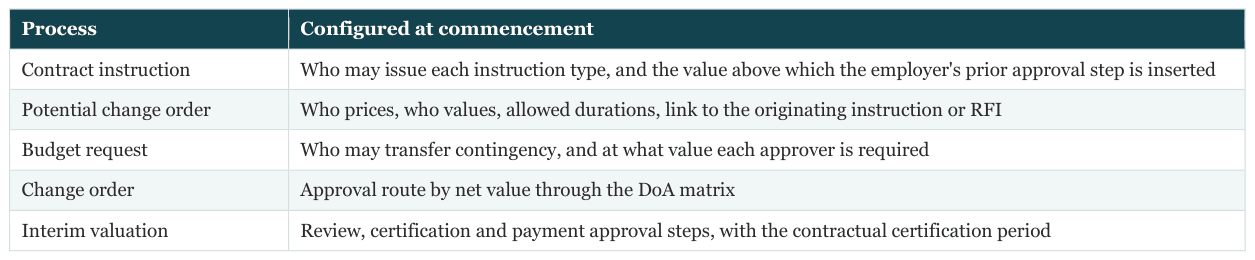
Part (c) of the Appendix A checklist, "employer's approval procedure for instructions/changes", is therefore evidenced by a link to the live workflow configuration rather than a description of it.
Workflow and DoA at Commencement
Three approvals are configured before day one, and each one follows the employer's DoA.
- Contract award. The procurement award routes by contract value: for example, a Project Director up to AED 1 million, a Commercial Director up to AED 5 million, the Chief Executive up to AED 25 million, and a tender committee above that.
- Change control processes. The configured business processes themselves are reviewed and approved as part of the project execution plan, so that the procedure the parties agreed is the procedure the system enforces.
ERP Touchpoint
An approved commitment creates or updates the purchase order in the owner's ERP, whether SAP, Oracle Fusion, Oracle E- Business Suite or Microsoft Dynamics 365. The vendor, cost codes, value, retention and advance payment terms travel with it. From that point both systems share one contract number, and Article 10 explains how later transactions keep them in step.
What Changes for Your Organisation
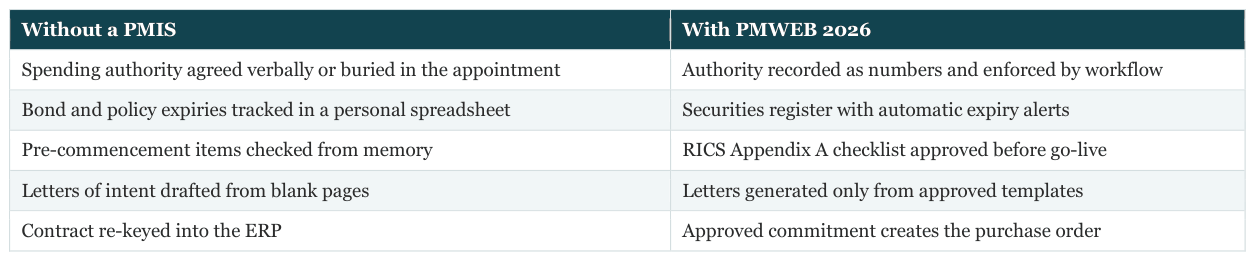
What the Owner and the CA Must Put in Place
- Name the CA as a firm, with individuals in the appointment. Record both in PMWEB so that roles survive staff changes.
- Write the spending authority as numbers. Per instruction, cumulative and per category, so that it can become a workflow condition.
- Adopt one pre-commencement Adaptive Form across the portfolio. Adjust items per form of contract, but keep the structure.
- Hold every bond and policy in the securities register with its required validity date. Expiry alerts are only as good as the dates entered.
- Approve the change control workflows before the first instruction. The procedure the parties agree should be the procedure PMWEB runs.
- Never issue a letter of intent outside an approved template. RICS is explicit about the dispute risk.
RICS references for this article

Could your contract administrator show you today, for every live contract, the CA's spending authority, the persons authorised to instruct, and the expiry date of every bond and insurance policy?

Next step
Bring this to your portfolio.
Tell us which processes matter most to you, and we will show them running in PMWEB.